

Webhooks are a simple and powerful solution that allow you to receive notifications every time a specific event occurs. They are particularly useful for asynchronous payment methods.
To take advantage of this feature, you can easily set up webhooks to receive notifications for events within your account. This will enable you to stay informed and take appropriate actions when necessary.
In the “Webhooks” menu, you can view a list of all your webhooks. You can quickly apply filters by credential, notifications, type, and webhook (email or URL).
In “SIBS Payment Gateway 2.0” > “Webhooks” you can view a list of all configured webhooks.

By clicking the action button, you can also see the details of a specific webhook and update it if needed. You can also run a test to ensure it is working properly.
Create webhooks
In order to create a new webhook, go to “SIBS Payment Gateway 2.0” > “Webhooks” and click on the “Add new webhook” button.
Once you are presented with the webhook creation page, pick if you want to configure an URL or e-mail webhook.
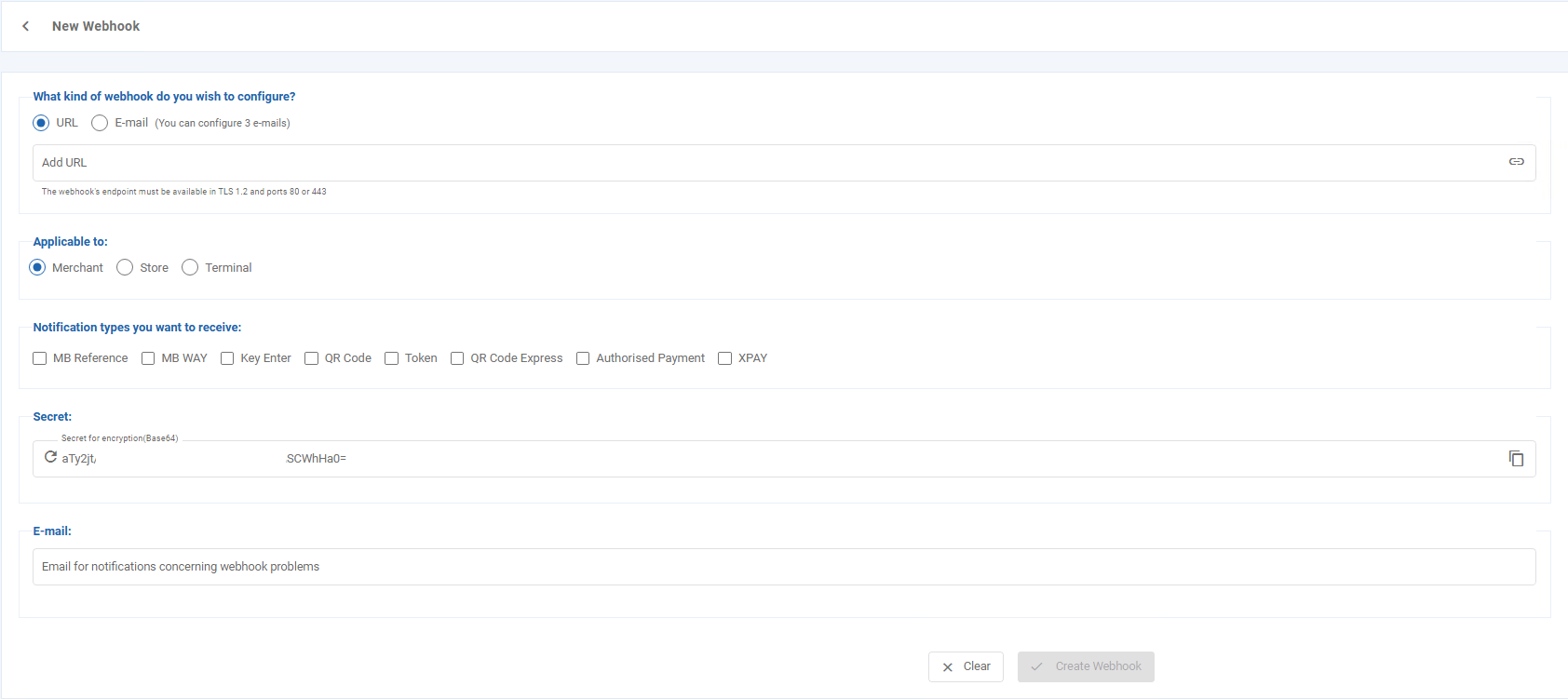
Depending on the type of webhook you will need to input the URL or e-mail that will be used to receive the notifications.
- MB Reference
- MB WAY
- Key Enter
- QR Code
- Token
- QR Code Express
- Authorized Payment
In URL type webhooks, a secret key is provided in order to keep your webhooks secure.

If you want to learn more about how to integrate URL notifications click here.