




SEPA Direct Debit (SEPA DD) is a payment method that enables merchants to collect euro-denominated payments directly from a customer’s bank account within the Single Euro Payments Area (SEPA)
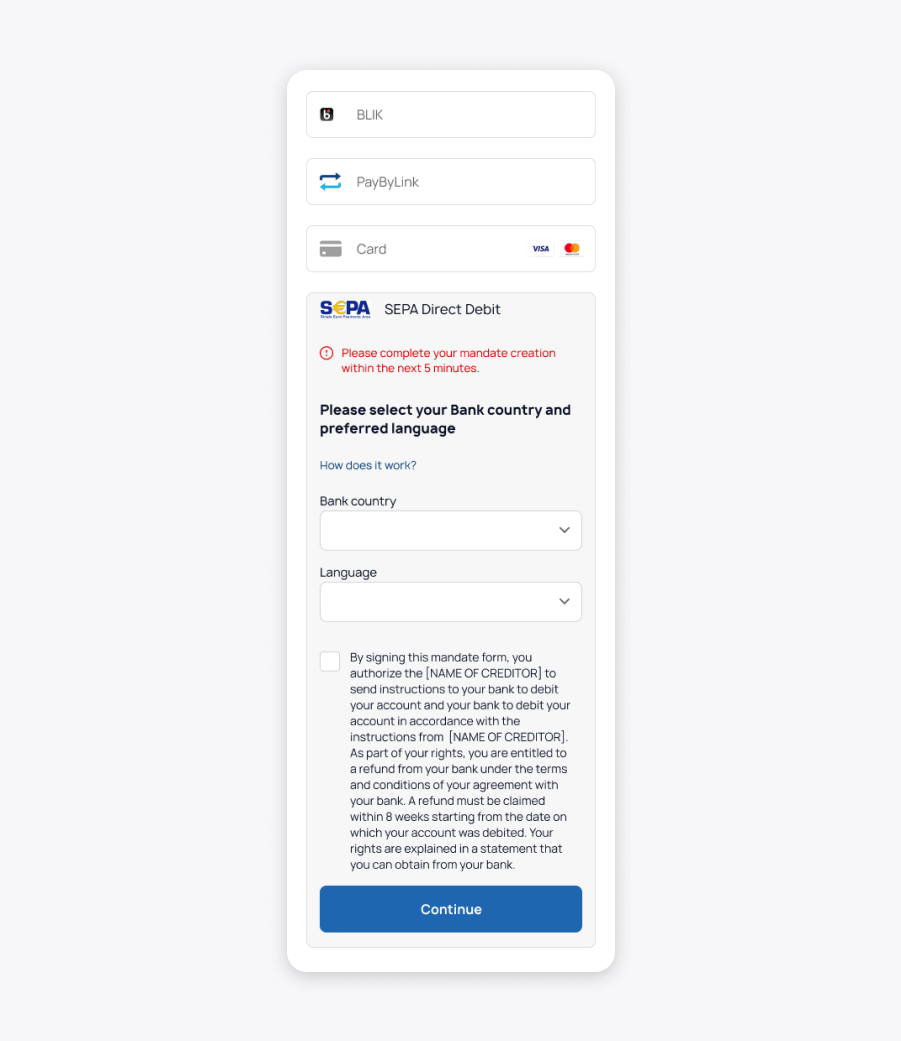
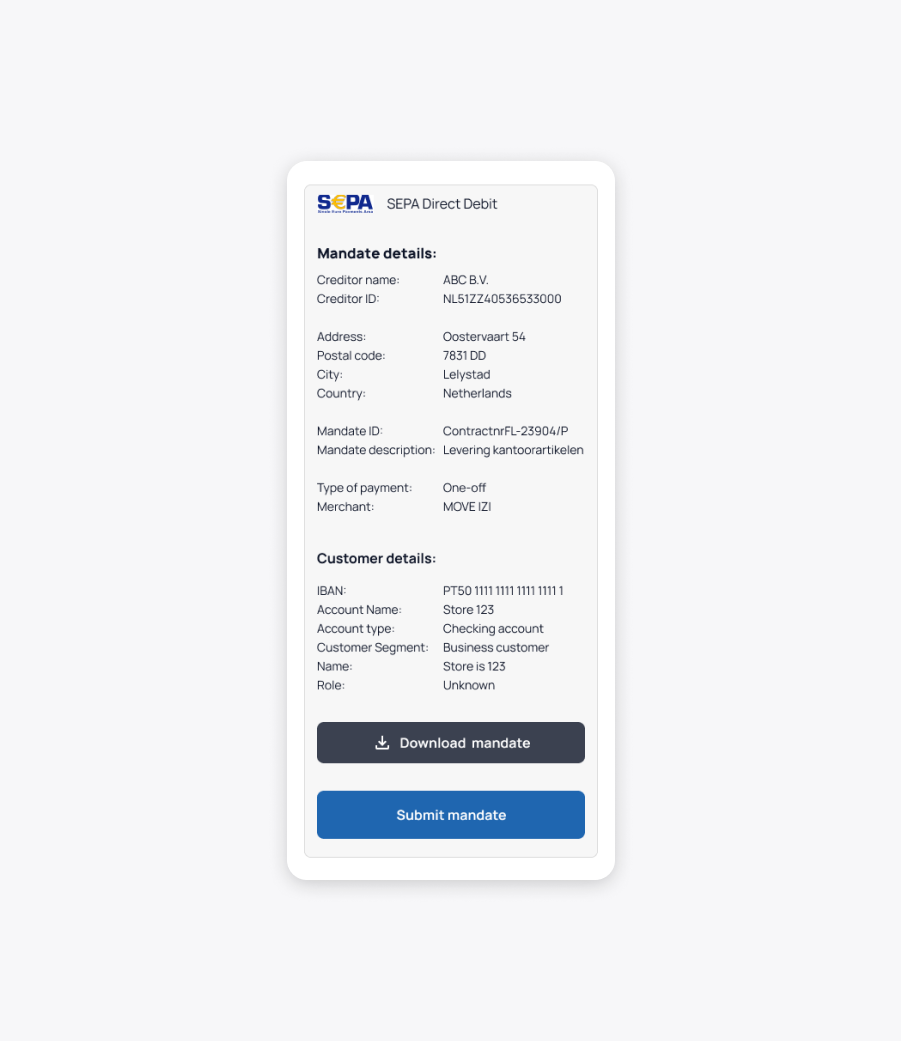
It is based on a mandate, where the customer (Debtor) authorizes the merchant (Creditor) to initiate collections. Both the Debtor and the Creditor must hold accounts within the SEPA zone.
SEPA Direct Debit supports two schemes:
- CORE – for consumers
- B2B – for business-to-business transactions
Payment Method Overview
| Payment Method | Category | Countries | Currencies | Features | Integrations |
|---|---|---|---|---|---|
| SEPA DD (via Tink) | Bank Debit | Europe (SEPA) | EUR | Tink – based Open Banking, Recurring payments | Payment Form |
| SEPA DD (via iDEAL) | Bank Debit | Netherlands | EUR | iDEAL – based authentication | Payment Form, API |

| Feature | SEPA DD via Tink | SEPA DD via iDEAL |
|---|---|---|
| Geographic scope | SEPA countries | Netherlands only |
| Mandate type | CORE / B2B | CORE only |
| Customer country | Flexible | Must be NL |
| Billing address | Recommended | Mandatory (Dutch context) |
| Integration type | Payment Form | Payment Form + API |
Choose Your Integration Mode
Before starting the integration, the merchant must first select the integration approach.
This selection is defined outside the SEPA DD specification and is covered in the dedicated integration documentation.
Please refer to:
| Integration Model | Description |
|---|---|
| Hosted Payment Form | SIBS manages UI and payment execution flow |
| Server-to-Server API | SIBS manages UI and payment execution flow |
This choice is not part of the API request. It defines how the Checkout response will be consumed.
How it Works
The integration is always initiated via the Checkout API, which creates a payment session and returns the data required to continue the flow.
From that point onward, the execution depends on the integration model selected during onboarding (Payment Form or API S2S).
Integration Flow
- Create Payment Session (Checkout API)
- Execute Payment
- Track Mandate Status (Status API)
- Monitor Collection Status
- Optional: Webhooks for asynchronous updates
Step 1 – Create Payment Session
This is the main entry point for SEPA DD transactions, regardless of provider (Tink or iDEAL).
This step creates a payment session and defines:
- merchant configuration
- customer identity
- transaction details
- mandate configuration
Endpoint
| Environment | URL | Method & Endpoint |
|---|---|---|
| PROD | api.sibsgateway.com | POST api/version-id/payments |
| TEST | stargate.qly.site[1|2].sibs.pt | POST api/version-id/payments |
Request Headers
| Field | Type | Description |
|---|---|---|
| Content-Type | String | application/json |
| Authorization | String | Bearer token |
| x-ibm-client-id | String | Client identifier (onboarding provided) |
Core Request Structure
The Checkout request is composed of 4 mandatory blocks:
- merchant
- customer
- transaction
- mandate
1.1 Merchant Object (Mandatory)
Defines the merchant context executing the transaction.
| Field | Type | Condition | Description | Example |
|---|---|---|---|---|
| merchant.terminalId | String (max 10 numeric) | Mandatory | Merchant terminal | 47215 |
| merchant.channel | string | Mandatory | Sales channel | WEB |
| merchant.transactionId | string (max 1000) | Mandatory | Unique reference | 987635435 |
| merchant.transactionDescription | String (max 4000) | Optional | Context | order #123 |
1.2 Transaction Object (Mandatory)
This is the critical block for payment execution configuration.
Key fields:
| Field | Type | Condition | Description | Example |
|---|---|---|---|---|
| transaction.transactionTimestamp | DateTime | Mandatory | Timestamp ISO8601 | 2026-04-24T13:40:08Z |
| transaction.description | String | Optional | Transaction short description. | purchase |
| transaction.moto | Boolean | Optional | Indicates if is a Mail Order Telephone Order. | false |
| transaction.paymentType | String | Optional | Type of payment used by the client. Possible values are: “PURS” – Purchase, “AUTH” – Authorisation, “CAPT” – Capture, “CAUT” – Authorisation Cancellation, “RFND” – Refund, “RVSL” – Reversal, “STIQ” – Status Inquiry. | AUTH |
| transaction.amount.value | Number | Mandatory | Transaction amount. For standard SEPA Direct Debit flows, this value must be set to 0. Exception: When using [“SPDD”, “iDEAL”], the amount must be greater than 0, as iDEAL does not support zero-value transactions. | 0 |
| transaction.amount.currency | String | Mandatory | Currency used in the transaction. | EUR |
| transaction.paymentMethod | Array | Mandatory | Determines how the SEPA Direct Debit flow is executed. [“SPDD”] triggers a SEPA DD flow using Tink for bank authentication. [“SPDD”,”IDEL”] adds iDEAL to the authentication journey, enforcing a CORE mandate and NL-based customer data. | [“SPDD”] |
Payment Method Behavior (CRITICAL DECISION POINT)
Tink Flow
If:
</> JSON
"paymentMethod": ["SPDD"]
This configuration enables a SEPA Direct Debit flow where bank authentication is performed through Tink (Open Banking).
From an integration perspective:
- The customer authenticates with their bank during checkout.
- Bank account data is collected via provider flow.
- Mandate creation is supported by authentication result.
Integrator responsibilities:
- Provide complete customer data.
- Ensure mandate object is correctly defined.
- Continue flow using Checkout response data.
iDEAL Flow
If:
</> JSON
"paymentMethod": ["SPDD", "IDEL"]
This configuration introduces iDEAL as the authentication rail within the SEPA DD flow.
From an integration perspective:
- The customer proceeds through the provider authentication journey.
- Identity validation occurs within provider journey.
- Mandate is still created as part of SEPA DD lifecycle.
Integrator responsibilities:
- Ensure mandate.serviceType = CORE
- Provide customer data aligned with NL context.
- Enforce NL address constraints.
This configuration is intended for Netherlands-based payment flows where iDEAL is part of the checkout experience.
1.3 Customer Object (Mandatory)
Defines the customer identity and addresses required for risk validation and payment execution.
Key fields:
| Field | Type | Condition | Description | Example |
|---|---|---|---|---|
| customer.customerInfo.customerName | String | Mandatory | Customer name. | Test Name |
| customer.customerInfo.customerEmail | String | Mandatory | Customer E-mail | email@provider.com |
| customer.customerInfo.customerLanguage | String | Conditional | Customer language. ISO 639-1 Format. Must be fulfilled if intended Payment Method (Request Body.transaction.paymentMethod) to proceed payment is one of: “IDEL” – “iDEAL”; | NL |
| customer.customerInfo.customerPhone | String | Conditional | Phone number of the customer formatted in the International E.164 standard, starting with plus (+) symbol. E. 164 numbers can have a maximum of fifteen digits and are usually written as follows: [+][country code][subscriber number including area code] Must be fulfilled if intended Payment Method (Request Body.transaction.paymentMethod) to proceed payment is “BNPL” or “MBWAY”. | +351919191919 |

Billing Address (Mandatory)
| Field | Type | Condition | Description | Example |
|---|---|---|---|---|
| customer.customerInfo.billingAddress.street1 | String (Max70Text) | Mandatory | First line of the billing address (street name and number) | “Damrak 1” |
| customer.customerInfo.billingAddress.street2 | String (Max70Text) | Mandatory | Additional address information (e.g., apartment, floor) | “Floor 2” |
| customer.customerInfo.billingAddress.city | String (Max35Text) | Mandatory (iDEAL) | City of the billing address | “Amsterdam” |
| customer.customerInfo.billingAddress.postcode | String (Max16Text) | Optional (Mandatory if available) | Postal code | “1012LG” |
| customer.customerInfo.billingAddress.country | String (ISO 3166-1 alpha-2) | Mandatory | Country code | “NL” |
Shipping Address (Optional)
Used only for in-person deliveries.
| Fields | Type | Condition | Description | Example |
|---|---|---|---|---|
| customer.customerInfo.shippingAddress.street1 | String (Max70Text) | Mandatory | First line of the shipping address | “Herengracht 10” |
| customer.customerInfo.shippingAddress.street2 | String (Max70Text) | Mandatory | Additional shipping address information | “Unit 5A” |
| customer.customerInfo.shippingAddress.city | String (Max35Text) | Mandatory (iDEAL) | City of the shipping address | “Amsterdam” |
| customer.customerInfo.shippingAddress.postcode | String (Max16Text) | Optional (Mandatory if available) | Postal code | “1015BK” |
| customer.customerInfo.shippingAddress.country | String (ISO 3166-1 alpha-2) | Mandatory | Country code | “NL” |
1.4 mandate – Object (Mandatory)
| mandate | mandate | Conditional | Mandate details information Remark: only to be filled when Merchant wants to offer SEPA DD as payment method | – |
| mandate.mandateId | String (Max35Text) | Mandatory | Identification of the Direct Debit mandate resource. It refers to Debit Authorisation Number. | mandateID |
| mandate.mandateDescription | String (Max256Text) | Mandatory | Description of the Direct Debit mandate resource’s context. | mandateDescription |
| mandate.frequency | String (Exact4Text) | Mandatory | Regularity with which instructions are to be created and processed. “OOFF” – “One-Off” (Direct debit instruction where the debtor’s authorisation is used to initiate one single direct debit transaction) “RCUR” – “Recurring” (Direct debit instruction where the debtor’s authorisation is used for regular direct debit transactions initiated by the creditor) | ‘OOFF’ |
| mandate.serviceType | String (Exact4Text) | Mandatory | Identification of the SEPA Direct Debits service related to the specific Direct Debit Mandate. It can be fulfilled with the following values: “CORE” when it refers to SEPA DD CORE service; “BTOB” when it refers to SEPA DD B2B service. | ‘CORE’ |
Request Example – Tink-based SEPA DD
</>JSON
{
  "merchant": {
    "terminalId": "1000536",
    "channel": "web",
    "merchantTransactionId": "trx123",
    "transactionDescription": "order 123"
  },
  "transaction": {
    "transactionTimestamp": "2026-04-24T13:41:08Z",
    "paymentType": "AUTH",
    "amount": {
      "value": 0,
      "currency": "EUR"
    },
    "paymentMethod": ["SPDD"]
  },
  "customer": {
    "customerInfo": {
      "customerName": "Test Name",
      "customerEmail": "email@provider.com"
    }
  },
"mandate": {
        "mandateId": "mandateID",
        "mandateDescription": "mandateDescription",
        "frequency": "OOFF",
        "serviceType": "CORE"  }
}
Request Example – iDEAL-based SEPA DD
</>JSON
{
  "transaction": {
    "amount": {
      "value": 0.01,
      "currency": "EUR"
    },
    "paymentMethod": ["SPDD","IDEL"]
  }
}
Response – Checkout API
Once the Checkout request is successfully processed, the API returns a response that represents the payment session created.
This response is essential to:
- identify the transaction
- proceed with payment execution
- track the payment lifecycle
| Field | Type | Condition | Description | Example |
|---|---|---|---|---|
| transactionID | String (Max36Text) | Always | Unique identifier of the transaction. Must be stored for tracking and status queries | TECByGFuB7yaFta19hua |
| transactionSignature | String | Always | Security signature associated with the transaction | eyJ0eElkIjoiVEVD… |
| amount.value | Number (double) | Always | Transaction amount. ⚠️ Represents the transaction amount. For SEPA Direct Debit, this value corresponds to the actual transaction amount. | 0.01 |
| amount.currency | String (Currency Code – ISO 4217 Alpha-3 Code). | Always | Currency of the transaction | EUR |
| paymentMethodList | Array | Always | List of payment methods available for execution | [“IDEL”,”SPDD”] |
| formContext | String | Conditional (Payment Form) | Encoded data required to initialise the hosted payment execution experience | eyJQYXltZW50TWV0aG9kIj… |
| mandate.mandateId | String (Max35Text) | Conditional (SEPA DD) | Unique identifier of the generated SEPA mandate | v8t58W2RpGDaDbESMrnMhYGZdixsHUDZUkC |
| mandate.mandateDescription | String (Max254Text) | Mandatory | Description of the Direct Debit mandate resource’s context. | “short information” |
| mandate.frequency | String (Exact4Text) | Conditional (SEPA DD) | Mandate frequency (OOFF or RCUR) | OOFF |
| mandate.serviceType | String (Exact4Text) | Conditional (SEPA DD) | SEPA scheme used (CORE or B2B) | CORE |
| returnStatus.statusCode | String | Always | Operation status code (“000” means success) | 000 |
| returnStatus.statusMsg | String | Always | Short status message | Success |
| serviceType | String | Always | Detailed status description | Success |
Example Response
</> JSON
{
  "transactionID": "TECByGFuB7yaFta19hua",
  "transactionSignature": "eyJ0eElkIjoiVEVD...",
  "amount": {
    "value": 0.01,
    "currency": "EUR"
  },
  "paymentMethodList": ["IDEL", "SPDD"],
  "returnStatus": {
    "statusCode": "000",
    "statusMsg": "Success",
    "statusDescription": "Success"
  }
}
How to Use the Response
After receiving a successful response:
- Store the transactionID as your main reference
- Use the returned data to proceed with payment execution
- Prepare your system to handle asynchronous updates (status or webhooks)
If you are using a hosted integration model, the response includes the necessary data to initialize the payment execution step
Step 2 – Payment Execution
What happens in practice
- The previously created payment session is used to continue the checkout flow
- The customer proceeds through the provider authentication journey (Tink or iDEAL)
- Mandate authorisation and required banking data collection occur within the provider journey.
Integration perspective
From an integration standpoint:
- No additional API call is required at this stage
- No manual intervention or processing is expected from the integrator
- The entire execution flow is handled by the payment session context returned in Step 1.
Step 3 – Payment Status
After the payment execution flow (Step 2), the SEPA Direct Debit mandate continues asynchronously until the mandate reaches its final lifecycle state.
The merchant can monitor the mandate lifecycle using the Checkout Status API.
How to retrieve the status
Endpoint
| Environment | URL | Method & Endpoint |
|---|---|---|
| PROD | api.sibsgateway.com | GET /version-id/payments/{transactionId}/status |
| TEST | stargate.qly.site[1|2].sibs.pt | GET version-id/payments/status |
Request Parameters
| Type | Field | Format | Condition | Description |
|---|---|---|---|---|
| PATH | transactionId | String | Conditional | Unique identifier of the transaction |
| QUERY | merchantTransactionId | String (Max1000) | Conditional | Merchant reference used to retrieve status |
What you should monitor
| Field | Type | Condition | Description |
|---|---|---|---|
| Content-Type | String | Mandatory | application/json |
| Authorization | String | Mandatory | Bearer token |
| x-ibm-client-id | String | Mandatory | Client identifier provided during onboarding |
What you should monitor
Field: mandate.mandateStatus
This field represents the lifecycle of the SEPA Direct Debit mandate.
Status values
| Status | Meaning |
|---|---|
| INTT | Initiated |
| PDNG | Pending |
| ACTV* | Active |
| RJCT | Rejected |
| RFSD | Refused |
| CNCL | Cancelled |
*ACTV represents a successfully activated mandate.
Integration recommendation
You should:
- Store the transactionId returned in Step 1
- Periodically call the Checkout Status API
- Optionally implement webhooks for asynchronous notifications
Step 4 – Additional Information: Collection Status
Collection status monitoring is only applicable when debit collections are initiated against an existing SEPA mandate.
Once a SEPA Direct Debit mandate becomes active, debit collections may be initiated according to the merchant business model.
Collection execution is asynchronous and may expose additional status information through the Checkout Status API.
Collection lifecycle monitoring
The Checkout Status response provides two complementary status fields for SEPA Direct Debit collections.
| Field | Purpose |
|---|---|
| paymentStatus | Final transaction outcome |
| mandate.mandateCollection.status | Detailed SEPA Direct Debit collection lifecycle |
4.1. paymentStatus
Field: paymentStatus
This field represents the consolidated transaction result from the merchant perspective.
Possible values include:
| Status | Meaning |
|---|---|
| PENDING | Transaction still being processed |
| INPROCESSING | Collection execution in progress |
| SUCCESS | Collection successfully processed |
| DECLINED | Collection failed or rejected |
| ERROR | Technical error |
This is the primary field that should be used to determine the final transaction outcome.
4.2. mandate.mandateCollction.status
Field: mandate.mandateCollction.status
This field provides additional operational detail regarding the SEPA Direct Debit collection lifecycle.
Collection Status Values
| Status | Meaning |
|---|---|
| CRTD | Collection created |
| PDNG | Pending processing |
| ACSP* | Accepted Settlement In Process(FINAL STATUS) |
| RJCT | Rejected |
| RVSL | Reversed |
*ACSP represents the successful completion of the SEPA Direct Debit collection process and should be treated as the final successful status.

Integration recommendation
From an integration perspective:
- Store the transactionId returned during Checkout creation
- Monitor transaction updates through the Checkout Status API
- Treat SEPA Direct Debit flows as asynchronous
- Optionally implement webhooks for automated status notifications
Step 5 – Webhooks
SEPA Direct Debit transactions are asynchronous by nature.
Instead of periodically calling the Checkout Status API, merchants may optionally implement webhooks to receive automatic transaction updates.
Webhook notifications can be used to:
- monitor transaction lifecycle changes
- receive payment status updates
- track SEPA Direct Debit collection evolution
For webhook integration details, payload structure and event configuration, please refer to the Webhooks Integration.