

Overview
This section describes configuration steps shared across all SIBS plugins, regardless of the platform.
These settings ensure secure communication with SIBS SPG and proper order lifecycle handling.
This section should be read in conjunction with B.3 Plugin Integration, which defines the overall integration model, responsibilities, and architectural considerations.
1. Enter SPG Credentials
All plugins require authentication parameters provided during onboarding.
Required fields
- Terminal ID : Identifies the merchant terminal within SPG.
- Client ID : Used for API authentication and request validation.
- Authentication Token: Bearer token used for secure communication with SPG APIs

2. Select Environment
Plugins support two environments:
Sandbox
- Used for development and testing
- No real transactions
Production
- Used for live payments
- Requires full onboarding approval
Always validate the integration in Sandbox before switching to Production.
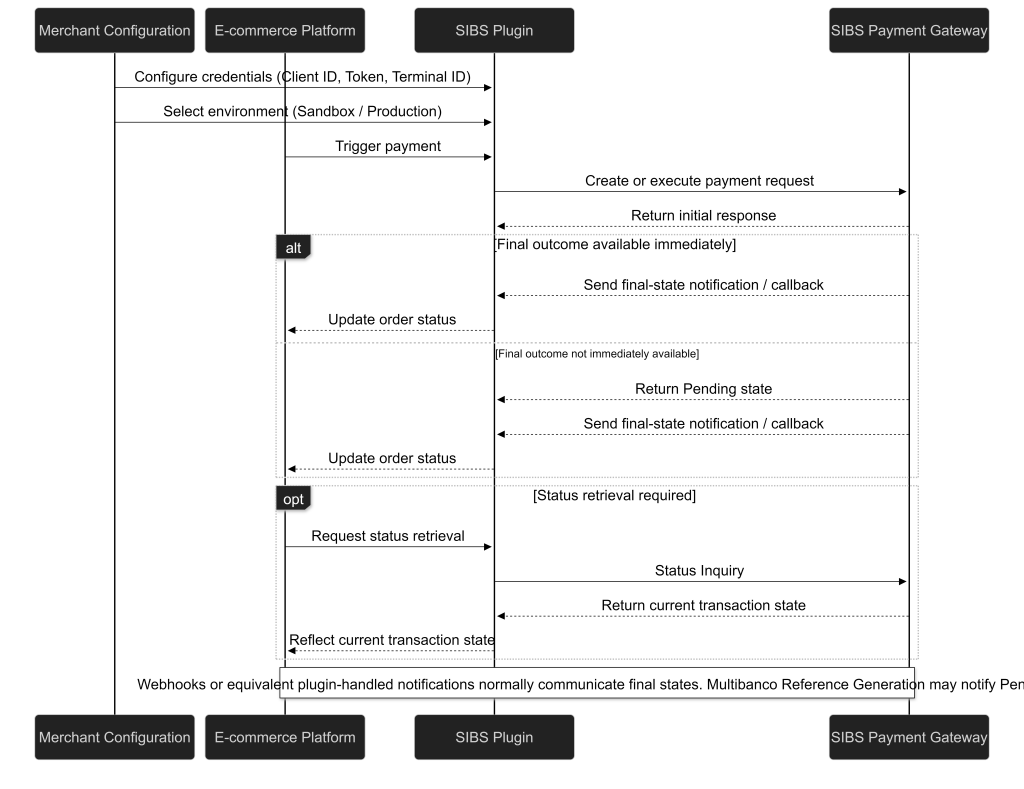
This sequence diagram illustrates the common configuration and execution flow for plugin-based integrations.
It shows how the merchant configures the plugin, how the platform delegates payment execution to the plugin, and how transaction-status notifications are handled through plugin and platform mechanisms.
It also highlights how final transaction states are reflected in the platform and how status retrieval or reconciliation may be handled when required.
3. Notifications and Order Synchronization
SIBS plugins rely on transaction-status notifications to update order states.
These notifications reflect payment events such as:
- MB WAY confirmations
- Multibanco settlement updates
- Fraud or cancellation signals
The plugin processes these notifications internally and automatically updates the order lifecycle in the platform.
Merchants are not required to implement webhooks or call SPG APIs directly. However, they must ensure that the order status in the platform correctly reflects the actual payment outcome, including for payment methods whose final outcome is not immediately available.
Final transaction status must be reliably reflected through the platform and plugin mechanisms. Status retrieval or reconciliation should be performed when required by the platform, plugin capabilities, or operational process.
4. Order Lifecycle Behaviour
Order lifecycle transitions depend on the payment method and its execution model.
Typical synchronous flow: Pending → Processing → Completed
Typical asynchronous flow (e.g., MB WAY, Multibanco Reference): Pending → Awaiting Payment → Paid / Expired
Plugins handle these transitions automatically, but merchants must ensure that order states remain consistent with actual transaction status.
5. Logging and Troubleshooting
Troubleshooting capabilities depend on the platform-specific plugin implementation.
If you encounter issues during integration:
- Verify SIBS SPG credentials and environment settings
- Confirm onboarding completion
- Check platform logs (e.g., WooCommerce logs or Magento system logs)
- Contact SIBS support if issues persist
Some platforms may provide additional diagnostic tooling depending on the plugin version.
For effective troubleshooting, merchants should correlate platform order identifiers with SPG transaction identifiers to ensure traceability across systems.
Refer to F.5 Logging and Monitoring Best Practices for guidance on correlation and observability.
6. Transaction Visibility
Transactions created via plugins are processed through the SIBS Payment Gateway infrastructure.
As a result, transaction lifecycle management (status tracking, reporting, reconciliation) is handled through standard SPG channels, such as:
- SIBS Backoffice
- Notifications / callbacks handled by the plugin or platform
- Platform-level order management (depending on plugin capabilities)
The exact visibility of transactions inside the e-commerce platform depends on the plugin implementation.
Merchants should rely on SIBS Backoffice and platform-level reporting to ensure proper reconciliation and to verify transaction outcomes when required.
Regardless of the plugin abstraction, transaction status must be reliably reflected through the platform and plugin mechanisms, including for payment methods whose final outcome is not immediately available.
Related Topics
- B.3 – Plugin Integration for integration model overview and responsibilities
- E.1 – Webhooks (Notifications) for transaction-status notification handling
- E.2 – Status Inquiry / Get Status for transaction status retrieval and reconciliation
- F.5 – Logging and Monitoring Best Practices for troubleshooting and observability