

Overview
This example illustrates a complete end-to-end flow for recurring payments using Credit Card, based on:
- Customer Initiated Transactions (CIT) → initial authorization and consent
- Merchant Initiated Transactions (MIT) → subsequent recurring charges
It demonstrates how the merchant system:
- Performs an initial transaction to establish customer consent and tokenization
- Stores the required identifiers for future use
- Executes recurring payments without customer interaction
- Processes asynchronous updates via Webhooks
- Confirms final transaction states using final webhook
paymentStatusvalues or Status Inquiry when required
This scenario represents a multi-phase lifecycle, where the initial transaction enables a sequence of future automated payments.
Goal
Enable recurring payments using a credit card, ensuring:
- Proper initial authorization and consent (CIT)
- Secure storage of tokenized payment credentials
- Correct execution of subsequent recurring payments (MIT)
- Reliable transaction validation and reconciliation
Preconditions
Before executing this flow, the following must be in place:
- Valid SPG credentials:
terminalIdX-IBM-Client-IdBearertoken
- Configured Webhook endpoint
- Backend capable of storing:
transactionIDoriginalTransactionIdoriginalTransactionDateTimetoken(if applicable)
- Recurring business rules defined (frequency, amount, duration)

(See collection root variables in SIBS PAYMENT GATEWAY POSTMAN Collection)
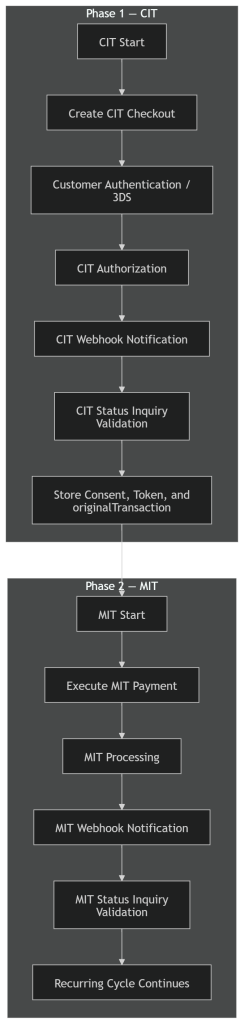
Phase 1 – Initial Transaction (CIT / Authorization & Tokenization)
Step 1 – Create Checkout (CIT)
The merchant creates a checkout for the initial customer-initiated transaction.
Endpoint
POST <ROOT_URL>/paymentsHeaders
Authorization: Bearer <AuthToken>
X-IBM-Client-Id: <clientId>
Content-Type: application/json
Accept: application/json
Example Request
{
    "merchant": {
        "terminalId": 11111,
        "channel": "web",
        "merchantTransactionId": "ORDER-CIT-0001"
    },
    "transaction": {
        "transactionTimestamp": "2026-04-15T14:00:00.000Z",
        "description": "Initial recurring setup",
        "paymentType": "AUTH",
        "amount": {
            "value": 0.00,
            "currency": "EUR"
        },
        "paymentMethod": [
            "CARD"
        ]
    }
}
Key Outputs
transactionIDformContexttransactionSignature
The transactionID must be used as the primary correlation identifier across all subsequent steps, including webhook processing and status validation.
Step 2 – Customer Interaction (Consent & Authentication)
The customer is redirected to the hosted payment form.
<script src="<ROOT_URL>/assets/js/widget.js?id={transactionID}"></script>

<form
  spg-context="{formContext}"
  spg-config='{"redirectUrl":"https://merchant.example.com/return"}'>
</form>
At this stage:
- The customer enters card details
- 3DS authentication may occur
- Consent for recurring usage is established
Sensitive cardholder data is collected and processed directly by the hosted SPG payment form, helping reduce PCI DSS scope for the merchant environment.
Step 3 – Handle Customer Redirection
After authorization, the customer is redirected to the merchant.

Recommended behavior:
- Display a “processing authorization” state
- Trigger backend validation
The backend must use the transactionID obtained during checkout when Status Inquiry API validation is required.
Step 4 – Receive and Process Webhook (CIT)
SPG sends a notification with the authorization result.
Example Payload
{
    "returnStatus": {
        "statusCode": "000",
        "statusMsg": "Success"
    },
    "paymentStatus": "Success",
    "paymentMethod": "CARD",
    "paymentType": "AUTH",
    "transactionID": "s2ExampleTxCIT123",
    "notificationID": "notif-cit-001",
    "token": {
        "tokenType": "Card",
        "value": "TKN123456789"
    }
}
Processing Requirements
- Receive and validate webhook
- Store and process using
notificationID - Persist token and transaction identifiers
- Ensure idempotent processing
- Acknowledge correctly
Response to SPG
{
    "statusCode": "000",
    "statusMsg": "Success",
    "notificationID": "notif-cit-001"
}
The notificationID must match the value received in the webhook payload.
The reconciliation and validation mechanisms described in E. Notifications and Transaction Status should be followed where applicable.
Step 5 – Confirm CIT (Status Inquiry APIs)
The merchant may confirm that the initial CIT authorization was successful using Status Inquiry when no final CIT webhook is available or when additional confirmation, recovery, or reconciliation is required.
Endpoint
GET <ROOT_URL>/payments/{transactionID}/statusHeaders
Authorization: Bearer <AuthToken>
X-IBM-Client-Id: <clientId>
Content-Type: application/json
Accept: application/json
Example Response
{
    "returnStatus": {
        "statusCode": "000",
        "statusMsg": "Success"
    },
    "paymentStatus": "Success",
    "paymentType": "AUTH",
    "transactionID": "s2ExampleTxCIT123"
}
The identifiers obtained from the CIT transaction (including transactionID, originalTransaction.id, and originalTransaction.datetime) must be stored and reused for subsequent MIT operations.
Rule
The initial transaction must be confirmed as successful before enabling recurring payments.
Phase 2 – Recurring Transactions (MIT)
Step 6 – Execute MIT Payment
The merchant initiates a recurring charge without customer interaction.
Endpoint
POST <ROOT_URL>/payments/{transactionID}/card/purchaseHeaders
Authorization: Digest <transactionSignature>
X-IBM-Client-Id: <clientId>
Content-Type: application/json
Accept: application/json
Example Request
{
    "amount": {
        "value": 19.99,
        "currency": "EUR"
    },
    "merchantInitiatedTransaction": {
        "type": "UCOF",
        "originalTransaction": {
            "id": "s2ExampleTxCIT123",
            "datetime": "2026-04-15T14:00:00.000Z"
        }
    }
}The MIT request must reference the original CIT transaction to ensure proper linkage and compliance with recurring payment rules.
The MIT transaction must comply with the conditions established during the original CIT transaction, including consent scope, transaction type, and applicable regulatory requirements.
Step 7 – Receive Webhook (MIT)
SPG sends a notification with the authorization result.
Example Payload
{
    "returnStatus": {
        "statusCode": "000",
        "statusMsg": "Success"
    },
    "paymentStatus": "Success",
    "paymentType": "MITR",
    "transactionID": "s2ExampleTxMIT123",
    "notificationID": "notif-mit-001"
}
Processing Requirements
- Receive the notification
- Validate authenticity and integrity according to the configured webhook security model (e.g., payload decryption and header validation)
- Store and process the notification using
notificationIDas a unique identifier - Ensure idempotent processing
- Acknowledge correctly
Response to SPG
{
    "statusCode": "000",
    "statusMsg": "Success",
    "notificationID": "notif-mit-001"
}
The notificationID must match the value received in the webhook payload.
The reconciliation and validation mechanisms described in E. Notifications and Transaction Status should be followed where applicable.
Step 8 – Confirm MIT (Status Inquiry APIs)
At this point, the transaction may still temporarily remain in intermediate transaction states such as Pending before reaching a final outcome.
The merchant may confirm that the recurring transaction has been successfully completed using Status Inquiry when no final MIT webhook is available or when additional confirmation, recovery, or reconciliation is required.
Endpoint
GET <ROOT_URL>/payments/{transactionID}/statusHeaders
Authorization: Bearer <AuthToken>
X-IBM-Client-Id: <clientId>
Content-Type: application/json
Accept: application/json
Example Response
{
    "returnStatus": {
        "statusCode": "000",
        "statusMsg": "Success"
    },
    "paymentStatus": "Success",
    "paymentType": "MITR",
    "transactionID": "s2ExampleTxMIT123"
}
Final State Rule
Final transaction state may be determined from a final webhook paymentStatus or via Status Inquiry when no final webhook is available or when additional confirmation, recovery, or reconciliation is required.
For scenarios requiring extended operational or financial information, integrations may additionally use the Inquiry Details endpoint documented in E.2 Status Inquiry / Get Status.
Inquiry Details complements operational analysis and troubleshooting workflows, but it must not be used as the source for determining the current or final transaction state.
This ensures consistency between:
- Merchant-initiated transaction execution (no customer interaction)
- Webhook notifications
- Backend reconciliation and processing
This ensures consistency between event execution, webhook notifications, and backend reconciliation and processing, particularly in scenarios involving delays, retries, or asynchronous flows.
Expected Final Outcome
- CIT →
Success - MIT →
Success
Recurring cycle continues according to business rules.
Implementation Notes
- CIT establishes customer consent and tokenization
- MIT executes without customer interaction
originalTransaction.idanddatetimeare mandatory- Tokenization may be implicit or explicit
- Webhooks may arrive before or after status checks
- Status validation should be used when no final webhook is available or when additional confirmation, recovery, or reconciliation is required
- Failures in MIT must be handled according to retry policies
Operational logs and monitoring systems should correlate transactionID, originalTransaction.id, merchantTransactionId, and notificationID across CIT, MIT, webhook processing, and reconciliation stages.
Retry mechanisms for MIT operations must ensure idempotent processing and avoid duplicate recurring charges.
MIT operations must remain within the consent scope established during the original CIT transaction, including recurrence model, transaction type, and applicable business rules.
Merchant systems must be resilient to out-of-order event delivery and temporary inconsistencies between webhook notifications and status responses.
Temporary issuer-side delays, retry windows, or asynchronous authorization processing may delay the final completion state of recurring transactions.
Use of Postman Collection
The Postman Collections should be used as the execution layer for this example.
Relevant Requests
- Checkout
SIBS PAYMENT GATEWAY → Card → Checkout Card- Status
SIBS PAYMENT GATEWAY → Card → getStatus- MIT Purchase
SIBS PAYMENT GATEWAY → Card → MIT PurchaseUse the previously referenced requests to execute each step, validate responses, and simulate different transaction outcomes in sandbox environments.
Recommended Usage
- Execute initial CIT transaction
- Validate CIT status and store identifiers
- Execute MIT transaction
- Validate MIT status
- Simulate success and failure scenarios
Final Notes
This example demonstrates the full lifecycle of recurring payments using SPG.
For production-grade implementations:
- Use API responses for immediate execution flow control
- Use Webhooks for event-driven updates
- Use Status Inquiry APIs when no final webhook is available or when additional confirmation, recovery, or reconciliation is required
This ensures secure, compliant, and reliable recurring payment processing across all transaction cycles.