

Overview
The Status Inquiry response must be interpreted using a dual-layer model, combining:
- Technical execution result (
returnStatus) - Business transaction state (
paymentStatus)
These two dimensions represent different aspects of the transaction lifecycle and must always be evaluated together to determine the correct operational outcome.
Dual-Layer Status Model
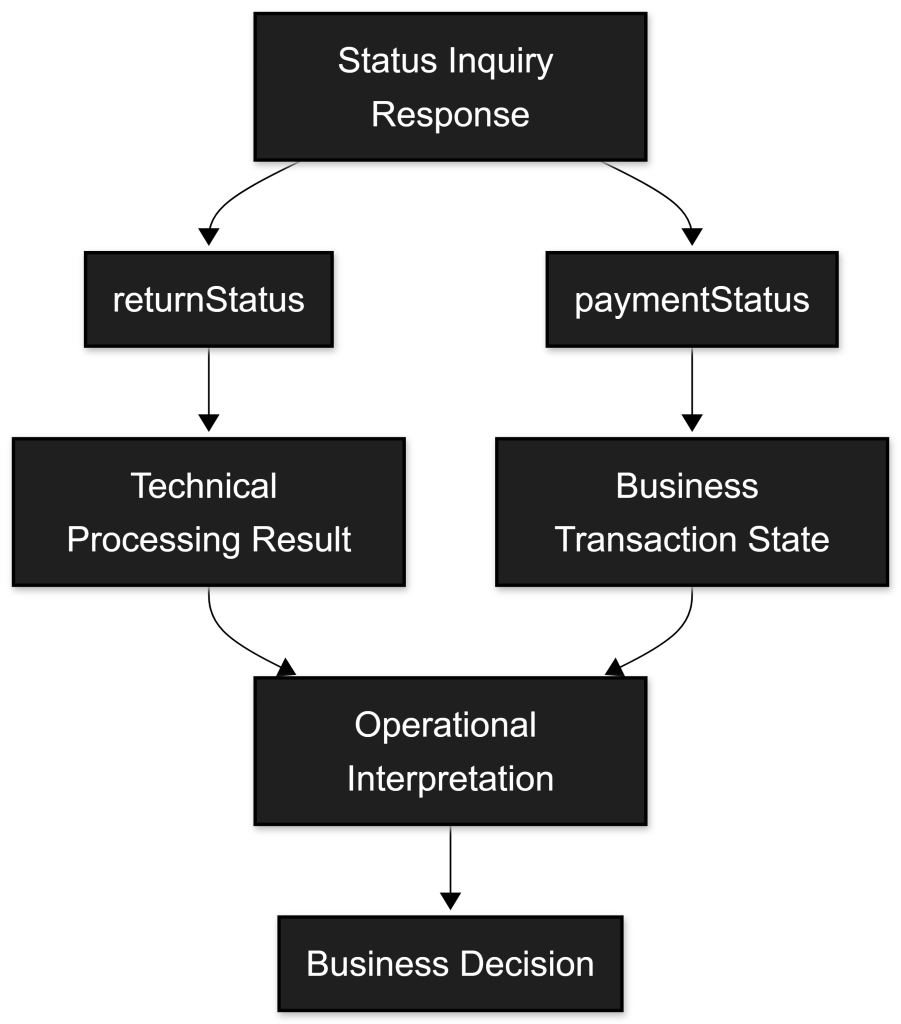
Technical Layer – returnStatus
The returnStatus object represents the technical outcome of the API operation.
It indicates whether the request was:
- Successfully processed
- Rejected due to validation errors
- Affected by system-level issues
Key characteristics:
statusCode = "000"indicates successful request processing- Non-zero codes indicate technical or business-level issues
- Codes follow the structure defined in C.5 – Status Codes and Error Codes Catalogue
Business Layer – paymentStatus
The paymentStatus field represents the actual business state of the transaction.
It reflects:
- The progression of the payment lifecycle
- User interaction outcomes
- Final settlement or failure states
This is the primary field for business decision-making.
Core Principle
Both layers must be evaluated together.

Business-critical decisions must always be based on the evaluated combination of both fields, and never on a single dimension in isolation.
paymentStatus Values and Semantics
Success
The transaction has been successfully completed.
Typical meaning:
- Funds have been authorized or captured (depending on payment type)
- No further user action is required
Operational guidance:
- Safe to proceed with business actions (e.g., order fulfillment), subject to merchant-specific validation rules
Pending
The transaction is awaiting completion.
Typical scenarios:
- Waiting for user authorization (e.g., MB WAY push notification)
- Waiting for payment completion (e.g., Multibanco Reference)
Operational guidance:
- Do not treat as final
- Continue polling or wait for webhook notifications
Declined
The transaction has been refused.
Typical scenarios:
- Payment rejected by issuer or user
- Authorization failed
Operational guidance:
- Treat as final
- Do not retry automatically without user intervention
Error
A technical failure occurred during processing.
Typical scenarios:
- System error
- Integration issue
- Temporary platform failure
Operational guidance:
- May be retryable depending on context and
returnStatus.statusCodeclassification (temporary vs permanent) - Investigate
returnStatus.statusCodefor root cause
Timeout
The transaction was not completed within the expected time window.
Typical scenarios:
- User did not respond (e.g., MB WAY notification expired)
- External system timeout
Operational guidance:
- Treat as non-successful outcome
- Retry may be possible depending on payment method
For a complete definition of transaction states and transitions, refer to C.3 – Transaction States and Operational Meaning.
Combined Interpretation Matrix
returnStatus.statusCode | paymentStatus | Interpretation | Recommended Action |
|---|---|---|---|
000 | Success | Operation successful and payment completed | Proceed with business flow |
000 | Pending | Operation successful but awaiting completion | Continue polling / wait for webhook |
10.x.xxxx | Declined | Payment refused | Treat as final failure |
12.x.xxxx | Error | Technical failure | Investigate and consider retry |
000 | Timeout | Operation processed but not completed in time | Treat as failed or retry depending on context |
State Finality
Not all paymentStatus values represent final states.
Typical Final States
SuccessDeclined
Potentially Final Depending on Context
ErrorTimeout
Non-Final (Transient) States
Pending
Important:
- Only final states should trigger irreversible business actions
- Transient states require continued monitoring
Payment-Type Considerations
The interpretation of Success depends on the transaction type:
One-Off Payments
Successtypically means payment is completed
However, operational settlement and downstream financial reconciliation may still occur asynchronously depending on the payment method and processing model.
Two-Step Payments (AUTH → CAPTURE)
Successafter AUTH → authorization completed, funds not yet capturedSuccessafter CAPTURE → funds successfully captured
Authorized funds may still be subject to authorization validity windows, reversal, or expiration if capture is not performed within the required timeframe.
Recurring Payments
Successindicates successful execution of a scheduled or initiated charge- Must be correlated with mandate or token context
Relationship with Webhooks
- Webhooks provide event-based updates
- Status Inquiry APIs provide the current state snapshot
This implies:
- Webhook events may not reflect the latest state
- The Status Inquiry APIs should be used to confirm final outcomes when no final webhook is available or when additional confirmation is required
Error Interpretation Strategy
When handling errors:
- Always inspect:
paymentStatusreturnStatus.statusCode
- Use
statusCodeto:- Identify root cause
- Determine retry eligibility
- Classify error type (business vs technical)
Key Integration Principles
- Always evaluate both
returnStatusandpaymentStatus - Never assume
statusCode = "000"implies payment success - Only act on final states
- Implement retry logic for transient states
- Use the Status Inquiry APIs to confirm webhook-based flows
Summary
The Status Semantics model defines how transaction states must be interpreted within the SIBS Payment Gateway.
By combining:
- Technical execution status (
returnStatus) - Business transaction state (
paymentStatus)
Integrators can:
- Accurately determine transaction outcomes
- Handle asynchronous flows correctly
- Implement reliable and fault-tolerant payment logic
This model is essential for ensuring correct, consistent, and auditable transaction processing.