

Overview
The Transaction Management area provides the primary workspace for consulting, reviewing, and managing payment transactions processed through the SIBS Payment Gateway.
Depending on the user’s permissions and the transaction type, this area allows users to search for transactions, review detailed transaction information, analyse associated transactions, and perform operational actions such as payment capture, authorisation cancellation, refund processing, receipt generation, and transaction commenting.
Transaction Management enables users to monitor transaction activity throughout the payment lifecycle and, where permitted, perform the operational actions available for each transaction.
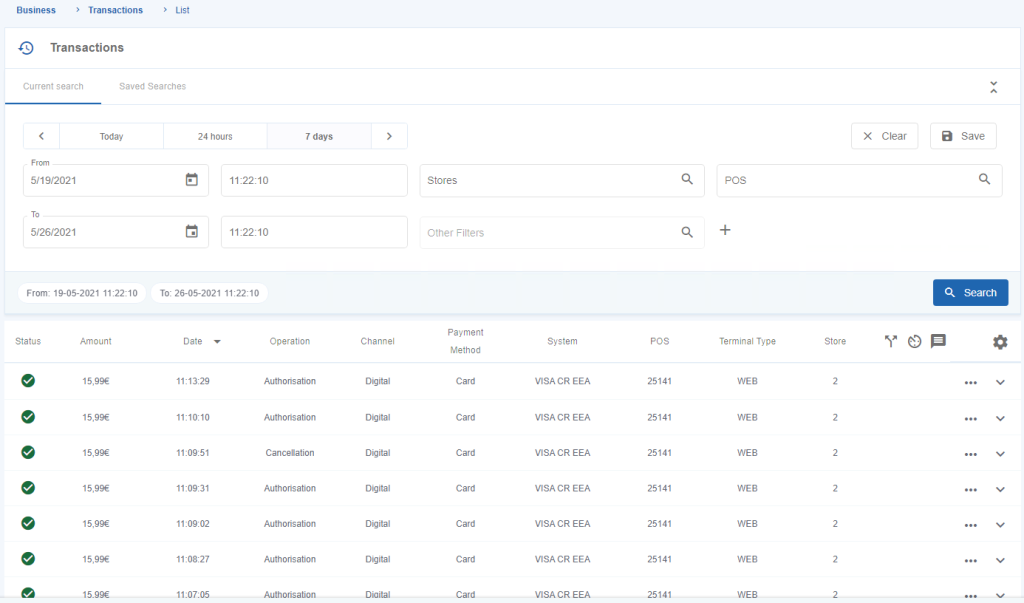
Figure 1 – Transactions list of the User’s Stores
Available Features
The Transaction Management area provides the following capabilities:
- Search and filter transactions.
- View transaction lists.
- Access detailed transaction information.
- Review associated transactions.
- Execute transaction operations, when permitted.
The availability of operational actions depends on the transaction status, the services enabled for the merchant, and the permissions assigned to the authenticated user.
Transaction Lifecycle
During their lifecycle, transactions may progress through different operational states depending on the payment method and the transaction type.
For example, an authorisation may later be captured or cancelled, while a completed payment may subsequently be refunded.
The Transaction Management area allows users to consult these related operations and, where permitted, perform the appropriate operational actions directly from the corresponding transaction.
Detailed information about associated transactions and the available operational actions is provided in the following sections of this chapter.
Transaction Operations
Depending on the transaction type and user permissions, Transaction Management may provide access to operational actions including:
- Collect Payment (Capture).
- Cancel an Authorisation.
- Refund a Transaction.
- Request an Operation.
- Obtain a Transaction Receipt.
- Add Comments to a Transaction.
These operations are available only when supported by the selected transaction and the user’s assigned permissions.
Detailed procedures for each operation are provided in G.1.4.4 – Transaction Operations.