

Overview
The Events and Audits area provides a centralized audit trail of the actions performed by users within the SIBS Backoffice.
Every significant operational and administrative action executed through the Backoffice is recorded in the audit log, allowing authorized users to review historical activity, verify operational changes, and support troubleshooting, operational control, and compliance requirements.
The audit log provides visibility into user activity according to the permissions assigned to each Backoffice profile, ensuring that users can access only the audit information permitted by their role.
The Events and Audits area enables authorized users to:
- Review actions executed within the SIBS Backoffice.
- Identify the user responsible for each action.
- Review when operations were performed.
- Verify the type and description of recorded events.
- Support operational traceability and accountability.
Accessing Events and Audits
The Events and Audits area is available from the SIBS Backoffice navigation menu.
Selecting Events and Audits displays the audit log associated with the currently selected merchant and the authenticated user’s permissions.
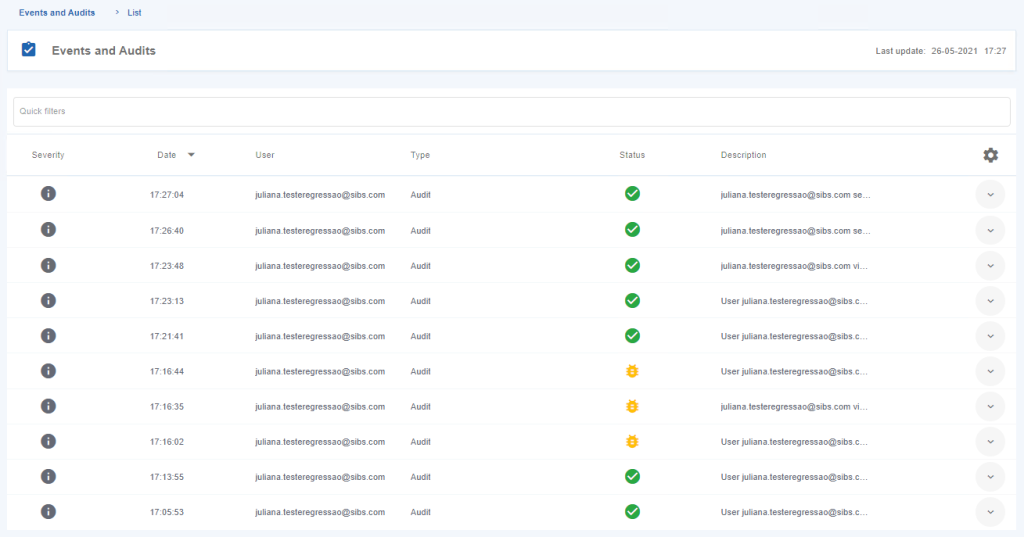
Figure 1 – List of Events and Audits
Audit Visibility
The information available in the audit log depends on the permissions assigned to the authenticated user’s profile.
The following visibility rules apply:
| User Profile | Audit Visibility |
|---|---|
| Owner | Can view all audit records associated with the merchant. |
| Administrator | Can view audit records generated by users belonging to hierarchically lower profiles. |
| Supervisor | Can view audit records generated by the supervisor account and by Operator users. |
| Operator | Can view only the audit records generated by the authenticated user. |
These visibility rules ensure that audit information remains accessible only to users with the appropriate authorization level.
Audit Information
Each audit entry records information describing the action performed within the Backoffice.
The following table describes the information available for each audit record.
| Field | Description |
|---|---|
| Severity | Indicates the severity level associated with the recorded action. |
| Date | Date and time at which the action was executed. For actions performed on the current day, only the time is displayed. |
| User | E-mail address of the user who executed the action. |
| Type | Type of operation recorded in the audit log. |
| Description | Description of the action performed by the user. |
The audit information enables authorized users to reconstruct operational activity and identify when, by whom, and how an action was performed.
Viewing Audit Entries
The Events and Audits page displays the recorded events in chronological order, allowing authorized users to review the operational history associated with the selected merchant.
Each entry provides sufficient information to identify:
- The user who executed the action.
- The type of operation performed.
- The execution timestamp.
- The severity of the recorded event.
- A description of the executed operation.
The audit log is intended to provide operational traceability rather than transaction management. For detailed transaction information, refer to the corresponding transaction management sections of this documentation.
Example: Refund Operation Audit
Operational actions performed within the Backoffice are automatically recorded in the audit log.
For example, when a Refund operation is executed, the corresponding audit entry records information such as:
- The user who performed the refund
- The merchant associated with the operation
- The transaction identifier
- The operation details
This information allows authorized users to verify that the operation was executed and identify the user responsible for the action.

Figure 2 – Refund Detail in the List of Events and Audits
Important
The Events and Audits area records operational activity performed through the SIBS Backoffice.
The audit log is intended to provide operational traceability and accountability. It should not be considered a substitute for transaction reporting or reconciliation, which are covered by the corresponding reporting and transaction management features.
The information visible in the audit log depends on the authenticated user’s permissions and the active merchant context.
Permissions
Access to the Events and Audits area is controlled through the SIBS Backoffice permission model.
The audit information available to each user depends on:
- The authenticated user’s profile.
- The permissions assigned to that profile.
- The currently selected merchant.
- The operational scope defined for the user within the merchant hierarchy.
As a result, different users may view different audit records while accessing the same Backoffice environment.