

Prerequisites (once per merchant/environment)
You need the following credentials and configuration elements before calling the SIBS SPG APIs:
- AuthToken : used as
Authorization: Bearer <AuthToken>for REST calls - TerminalId : the terminal ID assigned to the merchant, by the SIBS OnBoarding team
- X-IBM-Client-Id : merchant application identifier assigned by the SIBS OnBoarding team
Choose the appropriate environment URLs. The API base URL (<ROOT_URL>) and hosted widget URL (<WIDGET_URL>) must correspond to the same environment.
Please refer to A.3 – API Requests for the complete list of environment-specific URLs.
API Request Flow
The following diagram summarizes the complete Credit Card Two-Step Form Integration flow, including checkout creation, cardholder authentication, authorization validation, capture execution, and final settlement validation.
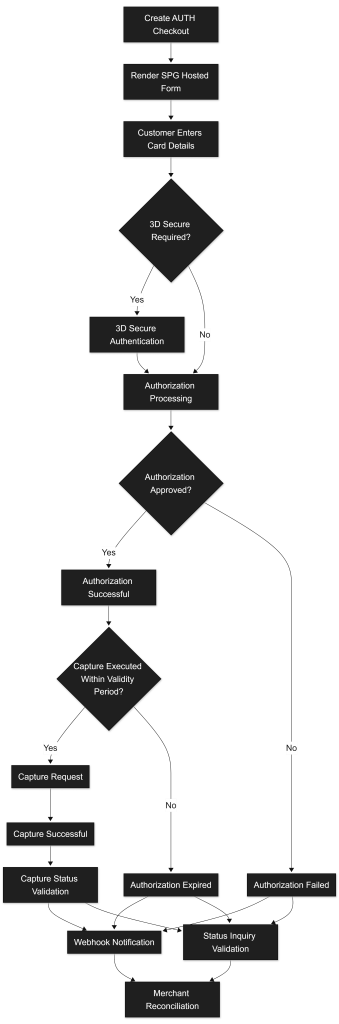
In a Two-step Credit Card (AUTH → CAPTURE) Form Integration, the process is divided into:
- Checkout creation (server-to-server)
- Payment form rendering (frontend – SPG widget)
- Authorization result handling (redirect + backend validation)
- Capture the authorized transaction (server-to-server)
- Check capture status (backend)
1) Prepare the checkout (server-to-server)
Goal: Create a checkout session configured for Authorization only (paymentType = AUTH) and obtain the parameters required to render the SPG form.
1) Create the Checkout Session (server-to-server)
1.1 POST Checkout Payment to:
curl -v -X POST '<ROOT_URL>/payments' \
--header "X-IBM-Client-Id: dd43****" \
--header "Authorization: Bearer 0276****" \
--header "Accept: application/json" \
--header "Content-Type: application/json" \
--data '
{
    "merchant": {
        "terminalId": "58019",
        "channel": "web",
        "merchantTransactionId": "unique-order-id"
    },
    "transaction": {
        "transactionTimestamp": "2028-12-31T00:00:00.000Z",
        "description": "Transaction short description",
        "moto": false,
        "paymentType": "AUTH",
        "amount": {
            "value": 5.10,
            "currency": "EUR"
        },
        "paymentMethod": ["CARD"]
    },
    "customer": {
      "customerInfo": {
        "customerName": "Onboarding",
        "customerEmail": "Onboarding@teste.com",
        "shippingAddress": {
          "street1": "Rua 123",
          "street2": "Porta 456",
          "city": "Lisboa",
          "postcode": "1200-999",
          "country": "PT"
        },
        "billingAddress": {
          "street1": "First street",
          "street2": "Menef Square",
          "city": "Lisbon",
          "postcode": "1700-123",
          "country": "PT"
        }
      }
    }
  }'
Important
paymentTypemust be set to “AUTH“- paymentMethod must include
"CARD"(i.e.,["CARD"]) merchantTransactionIdmust be unique per transaction
Headers
Authorization: Bearer <AuthToken>X-IBM-Client-Id: <ClientId>Content-Type: application/jsonAccept: application/json
What you do in this step
- Create a new payment session.
- Define the payment type (
AUTHfor the first step for the two-step payment). - Restrict the payment method to
"CARD". - Provide customer information as required by the merchant configuration defined during onboarding.
- Send the total amount and currency.
This call registers the payment and prepares the transaction for the hosted form.
1.2. Store from the successful response:
From the Checkout response, you must store:
transactionID: (you’ll inject it in the widget script URL)transactionSignature: (you’ll inject it into the HTML form attribute)formContext: (you’ll inject it into the HTML form attribute)paymentMethodList: (SIBS SPG may also return available methods)
These values are required to:
- Load the SIBS SPG widget
- Render the payment form
- Perform server-side status validation
Also, the following values will have an important role after the authorization in the form, namely:
transactionIDmerchantTransactionId: internal reconciliation id- Authorization amount : amount approved during the authorization step
The SPG transactionID should be treated as the authoritative identifier for transaction monitoring, webhook correlation, authorization tracking, capture operations, reconciliation, refund operations, and Status Inquiry requests throughout the transaction lifecycle.
Notes
merchantTransactionIdis your internal order identifier (maximum 35 characters, unique per transaction).- paymentType must be
"AUTH"for two-step authorization flows - The
customer.customerInfoblock is required for Credit Card transactions according to the merchant configuration defined during onboarding. - The checkout session expires after 10 minutes. After expiration, the hosted form cannot be rendered and a new Checkout must be created.
- Tokenization can be requested by adding the
tokenisationblock to the payload (see Tokenization section).
2) Create the payment form link (Widget) + customization (front-end)
Goal: Render the SPG hosted credit card form and allow the customer to perform the Authorization.
2.1 Include the SIBS SPG widget script (using transactionID)
Add the script tag to your checkout page:
<script src="<WIDGET_URL>/assets/js/widget.js?id={transactionID}"></script>This is the standard Form Integration approach. The script URL must include the transactionID returned in the Checkout response.
2.2 Add the <form> element and inject formContext + transactionSignature +config/style
You must have a form with class paymentSPG and the required SPG attributes:
<form class="paymentSPG"
      spg-context="{formContext}"
      spg-signature="{transactionSignature}"
      spg-config="{formConfig}"
      spg-style="{formStyle}">
</form>
SIBS SPG explicitly defines:
spg-context: theformContextyou received from Checkoutspg-signature: thetransactionSignatureyou received from Checkoutspg-config: merchant configuration (JSON string),spg-style: optional styling configuration (JSON string).
2.3 formConfig – minimal config for Credit Card two-step purchase
At minimum, your config must:
- Restrict the form to Credit Card using
paymentMethodList - Set
redirectUrl(where the customer returns after the form finishes) - The amount is defined in the Checkout request and does not need to be redefined in
formConfig. - Set
languageto match your checkout language.
Example (conceptual):
const formConfig = JSON.stringify({
  paymentMethodList: ["CARD"],
  redirectUrl: "https://merchant.example.com/payment-return",
  language: "en"
});
Supported values for paymentMethodList include MBWAY, REFERENCE, CARD (display depends on merchant permissions).
2.4 formStyle – optional UI customization
If you want to align the SIBS SPG form with your brand, SIBS SPG supports a style object with parameters like layout/theme/colors/font.
Example (conceptual):
const formStyle = JSON.stringify({
  layout: "default",
  theme: "light",
  color: {
      primary: "#0033A1"
  }
});
Optional: react to “Pay” click events in real time
SIBS SPG supports event monitoring via window.postMessage from the iframe so you can show a spinner / tracking / UX actions when the user clicks “Pay”.
What Happens After Form Submission?
- The customer enters card details in the hosted form.
- The transaction is sent to the acquiring network.
- Strong Customer Authentication (3D Secure) may be automatically triggered by the issuer.
- The issuing bank approves or declines the transaction.
- The customer is redirected to the configured
redirectUrl. - The final authorization status must be obtained from the Merchant Notification (webhook), when configured, or confirmed via Status Inquiry when no final notification is available.
Credit Card Behavior
- Credit Card is a near real-time payment method.
- Authorization response is typically immediate in non-3DS scenarios.
- 3D Secure authentication may introduce a short processing period.
- The transaction may temporarily remain in
Pendingonly while the 3D Secure authentication result is being processed by SPG. - The authorization must only be considered completed when
paymentStatus = "Success“.
Notes
- The form performs Authorization only (funds reserved).
- The hosted form is PCI DSS compliant and securely handled by SIBS SPG.
- All cardholder data (
PAN,secureCode,validationDate,cardholderName) is collected exclusively inside the SIBS SPG environment. - Card data never touches the merchant server, significantly reducing PCI DSS scope.
- If the checkout session expires (10 minutes), the hosted form will no longer load correctly, and a new checkout session must be created.
- After redirection, do not rely on front-end redirection parameters; confirm the final authorization result via Merchant Notification (webhook), when configured, or via Status Inquiry when no final notification is available.
3) Validate the final transaction status (back-end)
Goal: Confirm the final authorization outcome after the customer completes the Credit Card authorization flow.
Even though Credit Card is a near real-time payment method, the final result must be obtained from the Merchant Notification (webhook), when configured, or confirmed via Status Inquiry when no final notification is available.
3.1 When to check status
Confirm the final authorization result using one of the following paths:
- After the customer is redirected to the
redirectUrl - By processing the Merchant Notification (webhook), when configured
Unlike Multibanco Reference, Credit Card payments do not remain pending for extended periods.
However:
- During 3D Secure authentication, the transaction may temporarily remain in
Pendingwhile the authentication result is being processed by SPG.
The authorization must only be considered finalized after receiving a final Merchant Notification or a final Status Inquiry response.
3.2 Status endpoints you can use
The following Status Inquiry options are commonly used:
GET <ROOT_URL>/payments/{transactionID}/statusGET<ROOT_URL>/payments/status?merchantTransactionId=...
curl -v -X GET "<ROOT_URL>/payments/{transactionID}/status" \
--header "X-IBM-Client-Id: dd43****" \
--header "Authorization: Bearer 0276****" \
--header "Accept: application/json" \
--header "Content-Type: application/json"
Where {transactionID} is the value obtained in the Checkout response (Step 1).
3.3 Required headers (status call)
Authorization: Bearer <AuthToken>X-IBM-Client-Id: <clientid>Content-Type: application/jsonAccept: application/json
3.4 What statuses to expect (high level)
The response includes paymentStatus, typically with values such as:
SuccessDeclinedErrorPendingTimeout
Credit Card Behavior
Success: Authorization approved and funds reservedDeclined: Transaction refused by issuerError: Technical or processing errorPending: Temporary state during authentication or processing (e.g., 3D Secure challenge flow)
The authorization must only be considered successful when:
paymentStatus = "Success“returnStatus.statusCode = "000“
Only then should the transaction be considered Authorized. Funds are now reserved but not captured.
3.5 Recommended validation strategy
For Credit Card Form Integration:
- After redirection, immediately call the
/statusendpoint. - Do not rely solely on front-end redirection parameters.
- If
Pending, retry status after a short delay (few seconds). - Stop when a final state is reached (
Success,Declined,Error,Timeout).
Polling for Credit Card should be short-lived and limited to the authentication window.
For detailed webhook delivery behavior and operational considerations, refer to E.1 – Webhooks (Notifications).
For complete Status Inquiry endpoint specifications and response interpretation, refer to E.2 – Status Inquiry / Get Status.
Important Notes
- Credit Card is a near real-time payment method, except when Strong Customer Authentication (3D Secure) introduces an authentication step.
- There is no extended waiting period (unlike Multibanco Reference).
- The final payment confirmation must be obtained from the Merchant Notification (webhook), when configured, or confirmed via Status Inquiry when no final notification is available.
4) Capture the Authorized Transaction (Server-to-Server)
Goal: Convert a previously authorized transaction (funds reserved) into a settled payment by executing a Capture operation.
In a Two-step flow, authorization does not transfer funds.
Funds are only settled after this capture call.
What you do
4.1 Decide when to capture
Capture is triggered after your business condition is met, for example:
- Order validated / stock confirmed
- Service delivered or ready to deliver
- Shipment confirmed
- Manual approval completed
Important: Capture must occur within the authorization validity window (scheme rules / issuer policies).
4.2 POST Capture request
curl -v -X POST "<ROOT_URL>/payments/{transactionID}/capture" \
--header "X-IBM-Client-Id: dd43****" \
--header "Authorization: Bearer 0276****" \
--header "Accept: application/json" \
--header "Content-Type: application/json" \
--data '
{
    "merchant": {
        "terminalId": "58019",
        "channel": "web",
        "merchantTransactionId": "unique-capture-id"
    },
    "transaction": {
        "transactionTimestamp": "2028-12-31T00:00:00.000Z",
        "description": "Capture operation",
        "amount": {
            "value": 5.00,
            "currency": "EUR"
        }
    }
}'
Where:
{transactionID}is the transaction created in the checkout step and authorized by the customer.
The capture must only be considered successful when:
paymentStatus = "Success“returnStatus.statusCode = "000“
What happens
- SPG validates that the transaction is in a capturable state (
Authorized). - If valid, SPG captures the amount (full or partial if supported/configured).
- The transaction moves toward a final state where settlement is completed.
What to store from the response
Store at least:
- Capture result status (success/failure)
- The
transactionIDreturned in the capture response (it is different from the original authorizationtransactionID). - Your
merchantTransactionIdfor reconciliation/audit - Captured amount
Important Notes
- The capture amount must not exceed the authorized amount.
- Partial capture depends on merchant configuration / scheme rules.
- Capture operations must be implemented idempotently to prevent duplicate settlement in case of retry scenarios or network failures.
- If the authorization expires before capture, the funds are released and capture will fail.
5) Check Payment (Capture) Status (Back-End)
Goal: Confirm the final capture outcome after the capture operation.
5.1 When to check status
The capture transaction must only be considered finalized after a final capture result is received, either in the capture response or Merchant Notification, or, where needed, via Status Inquiry.
5.2 Status endpoints you can use
The following Status Inquiry options are commonly used:
GET <ROOT_URL>/payments/{(wheretransactionID}/status{transactionID}is thetransactionIDreturned by the Capture operation)
curl -v -X GET "<ROOT_URL>/payments/{transactionID}/status" \
--header "X-IBM-Client-Id: dd43****" \
--header "Authorization: Bearer 0276****" \
--header "Accept: application/json" \
--header "Content-Type: application/json"
Where {transactionID} is the transactionID is the value obtained in the capture request.
5.3 Required headers (status call)
Authorization: Bearer <AuthToken>X-IBM-Client-Id: <clientid>Content-Type: application/jsonAccept: application/json
5.4 What statuses to expect (high level)
The response includes paymentStatus, typically with values such as:
SuccessDeclinedErrorPendingTimeout
Authorization request examples, capture request examples, and end-to-end Credit Card two-step transaction flows are documented in F. Technical Examples and Best Practices.
Credit Card behavior
Success: Capture approved and funds settled.Declined: Capture refused or cancelledError: Technical or processing errorPending: Temporary state while the capture is being processed by SPG.
The capture must only be considered successful when:
paymentStatus = "Success“returnStatus.statusCode = "000“
Only then should the transaction be considered Captured and Settled.