

Overview
This section describes the different success patterns that may occur in SIBS Payment Gateway (SPG) integrations.
A successful outcome must always be interpreted at the business level based on paymentStatus (paymentStatus = "Success"), regardless of whether the flow is:
- Synchronous (immediate finalization), or
- Asynchronous (finalization occurs after initial response)
Understanding these patterns is essential to ensure that integrators:
- Trigger business actions only when the payment is effectively completed
- Correctly handle intermediate states such as
Pending - Align their systems with the actual financial lifecycle of the transaction
For the definition of status codes and their interpretation, refer to C.5 – Status Codes and Error Codes Mapping.
Synchronous Success
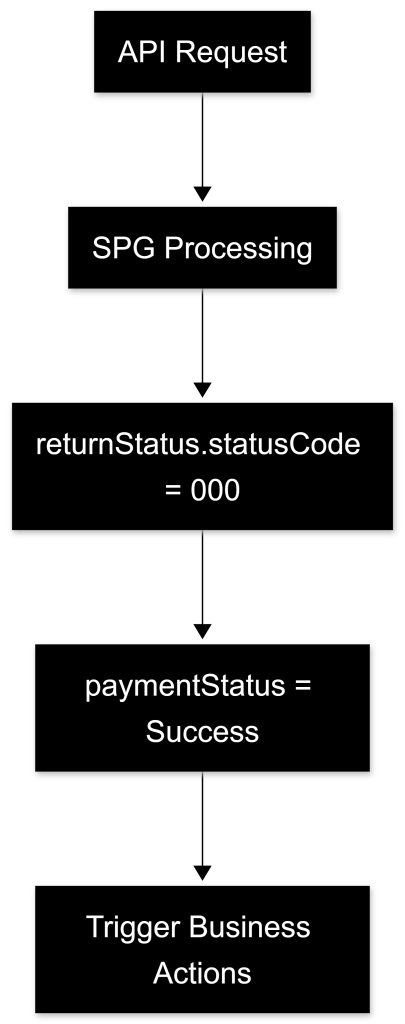
Description
In some scenarios, the payment is fully processed and finalized within the initial API response.
This typically occurs when:
- No additional authentication is required (e.g., no 3DS)
- No user interaction is needed after the request
- The payment method supports immediate confirmation
Example
{
    "returnStatus": {
        "statusCode": "000",
        "statusMsg": "Success"
    },
    "paymentStatus": "Success",
    "transactionID": "tx123456789"
}
Interpretation
- The request was successfully processed
- The payment was completed and confirmed
- No further state transitions are expected
Integrator Action
- Mark the transaction as paid
- Trigger downstream processes (e.g., order confirmation, fulfillment)
Asynchronous Success (Pending → Success)
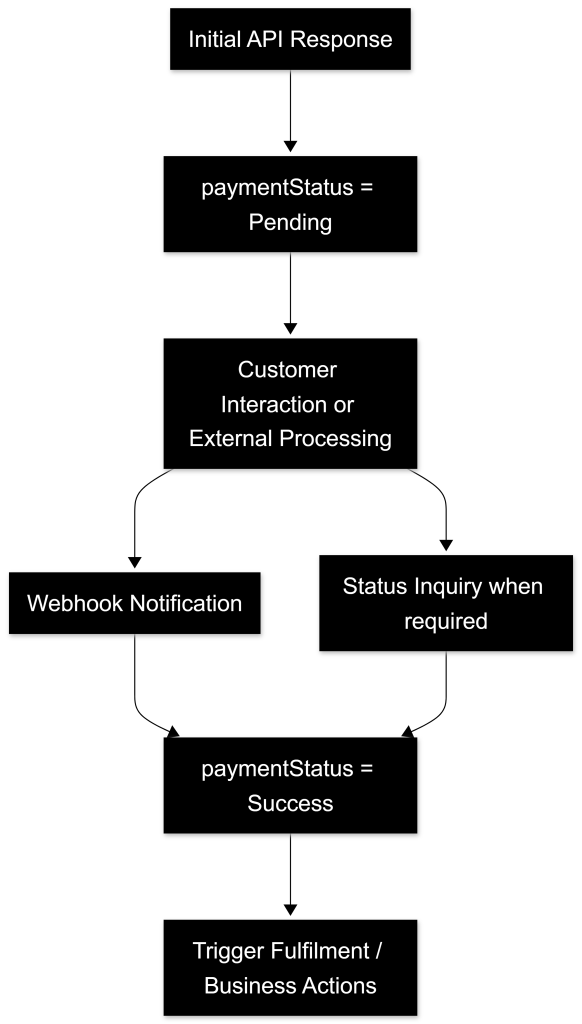
Description
Many SPG payment methods follow an asynchronous lifecycle, where the initial response does not represent the final transaction state.
This typically occurs when:
- User interaction is required (e.g., MB WAY approval)
- External systems are involved (e.g., Multibanco payment)
- Additional authentication steps are performed (e.g., 3DS)
Initial Response
{
    "returnStatus": {
        "statusCode": "000"
    },
    "paymentStatus": "Pending",
    "transactionID": "txPENDING123"
}
Final State (Webhook or Status Inquiry)
{
    "returnStatus": {
        "statusCode": "000"
    },
    "paymentStatus": "Success",
    "transactionID": "txPENDING123"
}
Interpretation
- Initial request accepted and processing started
- Final transaction state determined asynchronously
- Payment is only completed when
paymentStatus = "Success"
Integrator Action
- Do not treat the initial response as success
- Wait for:
- Webhook notification (recommended), and/or
- Status Inquiry confirmation (
GET <ROOT_URL>/payments/{transactionID}/status
- Trigger business actions only after final confirmation
For extended transaction diagnostics and additional transaction context during asynchronous flows, refer to E.2 – Status Inquiry / Get Status.
Two-Step Success (AUTH → CAPTURE)
Description
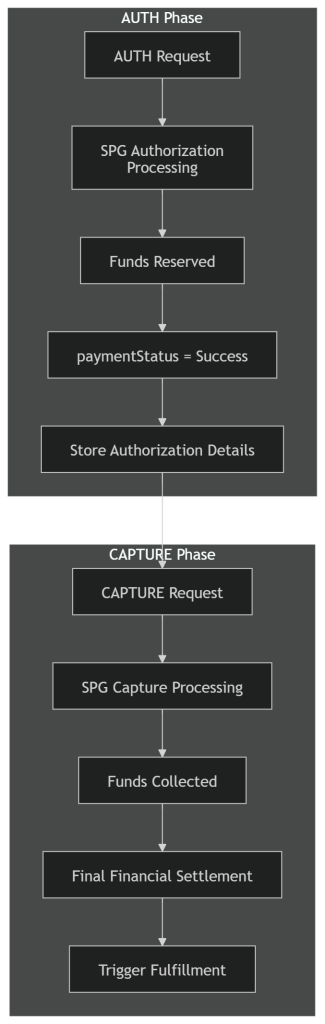
In two-step payment flows, success is achieved in two distinct phases:
- Authorization (
AUTH) → Funds are reserved - Capture (
CAPTURE) → Funds are collected
This model is commonly used when:
- Fulfillment occurs after a delay
- Final amount confirmation is required
- Risk or inventory validation is needed before capture
For detailed two-step operational flows and lifecycle behavior, refer to D.3 – Two-Step Payments and its related subchapters.
AUTH Response
{
    "returnStatus": {
        "statusCode": "000"
    },
    "paymentStatus": "Success",
    "paymentType": "AUTH",
    "transactionID": "txAUTH123"
}
CAPTURE Response
{
    "returnStatus": {
        "statusCode": "000"
    },
    "paymentStatus": "Success",
    "paymentType": "CAPTURE",
    "transactionID": "txAUTH123"
}
Interpretation
AUTHsuccess indicates that funds are reserved but not transferred- AUTH success does not represent final financial settlement of the transaction.
CAPTUREsuccess indicates that funds are effectively collected
Integrator Action
- After
AUTH:- Do not consider the payment financially completed
- Store transaction details for later capture
- After
CAPTURE:- Mark transaction as fully paid
- Trigger irreversible business actions (e.g., shipment, service delivery)
Delayed Settlement Success (Reference-Based Payments)
Description
Some payment methods (e.g., Multibanco Reference) involve delayed settlement, where payment completion depends on the customer performing an external action.
Typical flow:
- Reference is generated
- Customer completes payment outside the system
- SPG updates transaction to
Success
Interpretation
- Initial state remains
Pendinguntil customer completes payment - Final transaction success may occur minutes, hours, or days after the initial reference generation.
Integrator Action
- Persist transaction in a pending state
- Rely on:
- Webhooks for real-time updates, and/or
- Periodic Status Inquiry reconciliation
- Ensure business processes can handle long-lived pending transactions
Key Success Handling Rules
- Only consider a payment successful when:
paymentStatus = "Success"
- Always:
- Evaluate both technical (
returnStatus) and business (paymentStatus) layers - Support state transitions over time
- Evaluate both technical (
- Never:
- Assume success from
statusCode = "000"alone, without evaluatingpaymentStatus - Trigger fulfillment on
Pending
- Assume success from
Summary
Success in SPG integrations is context-dependent and varies by payment flow:
- Some payments complete synchronously
- Others require asynchronous confirmation
- Two-step flows require explicit finalization (
CAPTURE) - Reference-based methods introduce delayed settlement
Correct handling of these scenarios ensures:
- Accurate financial state management
- Proper alignment with payment lifecycle
- Reliable and consistent business operations