

Overview
MB WAY can be enabled through the supported SIBS Payment Gateway plugins for e-commerce platforms.
Once configured, MB WAY is displayed as an available payment method during checkout, allowing customers to complete the payment using the MB WAY mobile application.
The plugin handles the communication with the Payment Gateway, simplifying the integration process while maintaining the standard MB WAY payment flow.
Supported plugin platforms may include:
- WooCommerce
- Magento
- PrestaShop
- Shopify
For plugin installation, merchant credential configuration, environment setup, webhook configuration, and general plugin configuration, refer to the corresponding Plugin Integration chapters in B.3 – Integration Models – Plugin Integrations.
Payment Method Configuration
After completing the base plugin configuration, MB WAY must be enabled within the payment methods configuration section.
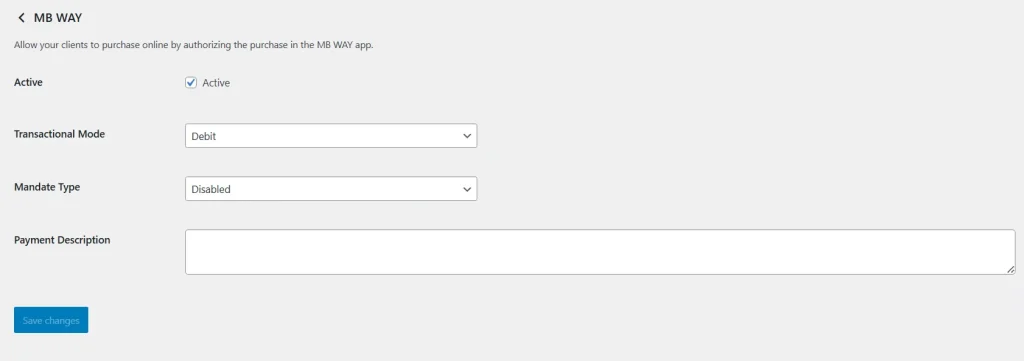
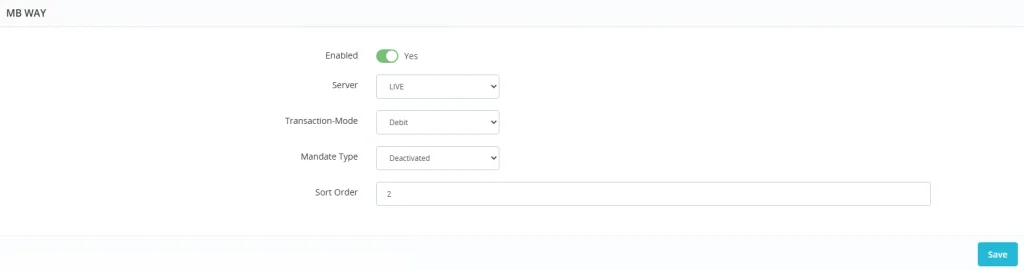
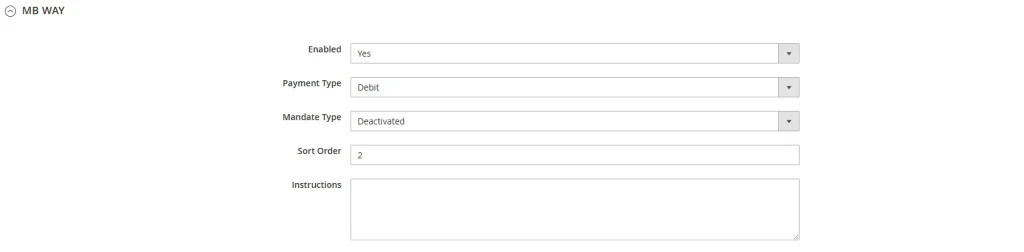
The available settings may vary slightly between platforms, but typically include the following options:
| Parameter | Description |
|---|---|
| Enable MB WAY | Enables MB WAY as an available payment method during checkout. |
| Environment | Defines whether the plugin operates in Sandbox or Production mode. |
| Transaction Mode | Defines whether transactions are processed as Debit or Pre-Authorisation (Two-Step) operations. |
| Display Configuration | Controls how MB WAY is presented during checkout. |
| Order Status Mapping | Defines how payment results are mapped to order statuses within the platform. |
The exact configuration options available may vary depending on the plugin platform and version.
Configuration examples are shown below for the available plugin platforms.
WooCommerce
PrestaShop
Magento
Transaction Mode
MB WAY Plugin Integration supports both Debit and Pre-Authorisation transaction models.
Debit
The payment is immediately processed after customer approval in the MB WAY application.
The order can be automatically updated to a successful payment status once the transaction is completed.
Pre-Authorisation
The payment amount is authorised and reserved.
A subsequent Capture operation is required to complete the transaction and collect the funds.
The selected transaction mode should be aligned with the merchant’s business process and contractual configuration.
For additional information about Authorisation and Capture flows, refer to D.3 – Two-Step Payments.
Payment Flow
The following diagram illustrates the high-level MB WAY payment flow when using a Plugin Integration.
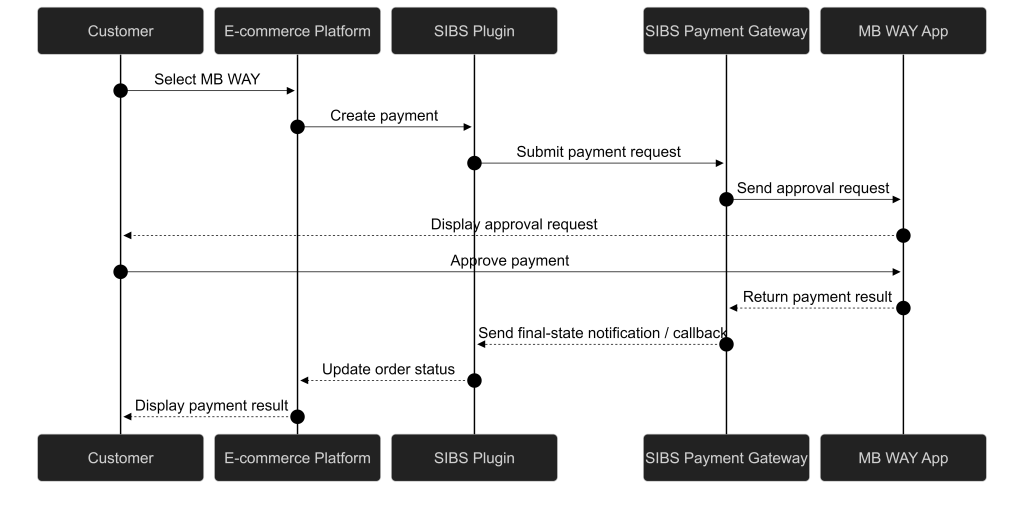

Customer Checkout Experience
When MB WAY is enabled, customers can select it during checkout and complete the payment using their mobile phone.
The typical payment flow is as follows:
- The customer selects MB WAY during checkout.
- The customer enters the mobile phone number associated with MB WAY.
- The plugin creates the payment request.
- A payment approval request is sent to the MB WAY application.
- The customer approves the payment in the MB WAY application.
- The transaction result is returned to the e-commerce platform.
- The order status is updated accordingly.
Order Management
After payment completion, the plugin updates the order information within the e-commerce platform.
Depending on the platform and configuration, merchants can view payment information directly from the order details page.
Typical information includes:
- Payment Status
- Transaction Identifier
- Payment Method
- Transaction Date and Time
- Payment Amount
- Merchant Transaction Identifier
Transaction Status
MB WAY is an asynchronous payment method.
After the payment request is submitted, the final transaction status depends on customer approval within the MB WAY application.
Merchants should rely on one or both of the following mechanisms to obtain the final transaction status:
- Merchant Notifications (Webhooks)
- Transaction Status Inquiry
The e-commerce platform order status should remain consistent with the final transaction status returned by the SIBS Payment Gateway.
For detailed information about transaction status handling, refer to:
- E. Notifications and Transaction Status
- D.1.1.2 – One-Off Payments – MB WAY [Server-to-Server Integration]
Testing Payments
The SIBS Sandbox Payment Simulator can be used to validate MB WAY payment flows during testing and integration activities.
Example sandbox simulator entry point