

Overview
This section provides a practical troubleshooting framework for diagnosing and resolving issues when integrating with the SIBS Payment Gateway (SPG).
It focuses on:
- identifying common failure scenarios
- mapping symptoms to root causes
- defining corrective actions
- ensuring consistent and safe recovery
The objective is to enable merchant systems and operators to:
- quickly diagnose integration issues
- avoid incorrect business decisions
- maintain operational continuity
This section complements the reconciliation model defined in C.7 – State Reconciliation: Query vs Webhook.
This troubleshooting framework must be applied in conjunction with the interpretation model defined in C.5 – Status Codes and Error Codes Mapping.
Troubleshooting Approach
All troubleshooting must follow a structured diagnostic process.
Step 1 – Identify Transaction
Collect:
transactionIDmerchantTransactionId
Step 2 – Retrieve Current State
GET <ROOT_URL>/payments/{transactionID}/statusStep 3 – Inspect Key Fields
Analyze:
paymentStatusreturnStatus.statusCodereturnStatus.statusMsgreturnStatus.statusDescription
Step 4 – Classify Issue
Determine whether the issue is:
- business (Declined)
- technical (Error)
- timeout / abandonment
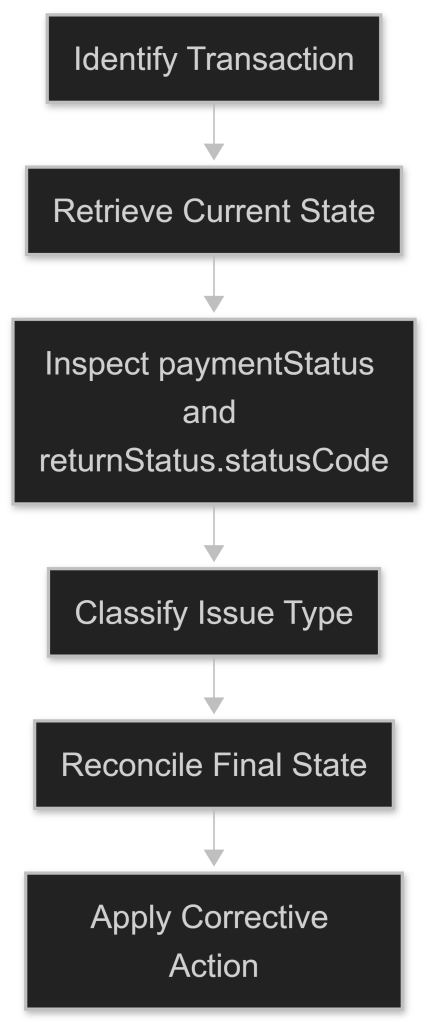
Figure – Troubleshooting and Recovery Workflow
Error classification and retry behavior must follow the handling principles defined in C.6 – Error Payloads and Handling Guidelines.
Step 5 – Apply Corrective Action
Use the scenarios below to determine next steps.
Common Scenarios and Resolution
1. Payment Stuck in Pending
Symptoms
paymentStatus = Pendingfor extended period- no final state received
Possible Causes
- user did not complete authorization (e.g., MB WAY)
- payment method still awaiting external completion
- external system or acquirer processing delay
- final state not yet available through Status Inquiry
Actions
- query Status Inquiry API repeatedly
- check whether webhook delivery is configured and reachable
- implement polling fallback
- allow the user to retry the transaction when appropriate
2. Payment Timeout
Symptoms
paymentStatus = TimeoutstatusDescriptionindicates abandonment
Possible Causes
- user inactivity
- session expiration
Actions
- treat as incomplete transaction
- allow the user to retry the transaction
- do not assume decline
3. Payment Declined
Symptoms
paymentStatus = DeclinedstatusCodeindicates business rejection
Possible Causes
- insufficient funds
- authentication failure
- user rejection
Actions
- inform user
- allow retry with different method
- do not retry automatically
4. Technical Error During Processing
Symptoms
paymentStatus = ErrorstatusCodeindicates technical issue
Possible Causes
- malformed request
- network failure
- downstream system issue
Actions
- log full payload
- retry if error is transient
- validate request format

5. Webhook Not Received
Symptoms
- no webhook received
- transaction remains unresolved
Possible Causes
- webhook endpoint unavailable
- incorrect configuration
- network issues
Actions
- verify endpoint availability
- check webhook configuration in Backoffice
- rely on Status Inquiry API polling
6. Duplicate Webhooks
Symptoms
- same notification received multiple times
Possible Causes
- webhook retry mechanism
Actions
- implement idempotent processing
- ignore duplicates
7. Out-of-Order Webhooks
Symptoms
- state appears to regress (e.g., Success → Pending)
Possible Causes
- asynchronous delivery
- retry mechanism
Actions
- enforce monotonic state progression
- ignore backward transitions
- validate with Status Inquiry API
8. Status Inquiry API vs Webhook Inconsistency
Symptoms
- webhook state differs from Status Inquiry API
Possible Causes
- delayed webhook
- out-of-order delivery
Actions
- do not automatically override a valid final-state webhook
- re-query after delay if verification is required
- process webhooks idempotently and reconcile with stored transaction state
For the complete reconciliation strategy across asynchronous flows, refer to C.7 – State Reconciliation: Query vs Webhook.
9. statusCode = "000" but Payment Not Successful
Symptoms
statusCode = "000"paymentStatus ≠ Success
Possible Causes
- operation technically successful
- business flow not completed
Actions
- rely on
paymentStatus - do not assume success
10. Duplicate Transactions
Symptoms
- multiple transactions for same business operation
Possible Causes
- retry without idempotency
- repeated API calls
Actions
- enforce idempotency
- ensure unique
merchantTransactionId - validate before retry
Diagnostic Decision Matrix
paymentStatus | Interpretation | Recommended Action |
|---|---|---|
Success | Transaction completed successfully | Proceed with business process (e.g., fulfillment) |
Declined | Business rejection | Inform user and allow retry with alternative method |
Error | Technical failure | Retry if error is transient; log and investigate |
Timeout | Incomplete transaction (timeout/abandon) | Allow user to retry; do not assume success or decline |
Pending | Awaiting external action | Wait and poll Status Inquiry API; do not take business action |
Key Diagnostic Rules
Rule 1 – paymentStatus defines the business outcome
- defines business outcome
Rule 2 – statusCode refines interpretation
- provides error classification
Rule 3 – statusDescription is diagnostic only
- must not be used for any decision logic
Rule 4 – Use Status Inquiry API when verification or recovery is required
- process valid final-state webhooks idempotently
Rule 5 – Never act on non-final states
- Pending
Preventive Best Practices
1. Implement Idempotency
- avoid duplicate transactions
- ensure safe retries
2. Use Both Webhooks and Polling
- combine event-driven and polling strategies
3. Log All Transactions
- ensure full traceability
4. Handle All Final States Explicitly
- Success
- Declined
- Error
- Timeout
5. Validate Integration Regularly
- test webhook delivery
- validate status reconciliation
Implementation Checklist
Merchant systems must:
- implement structured troubleshooting process
- classify errors correctly
- use Status Inquiry API for validation
- handle all scenarios described above
- ensure idempotent processing
- maintain detailed logs
- support retry and recovery mechanisms
Summary
SPG integrations operate in a distributed and asynchronous environment, where issues may arise due to:
- user behavior
- system failures
- network conditions
- integration errors
A structured troubleshooting approach ensures:
- fast diagnosis of issues
- correct interpretation of transaction state
- safe and predictable recovery
- robust and reliable payment processing