

Overview
The User Dashboard is the main workspace of the SIBS Backoffice platform.
After successful authentication, users are redirected to the dashboard, which provides access to the operational areas, configuration menus, reporting capabilities, and services available according to the assigned user profile and the merchant services enabled for the account.
The dashboard serves as the primary starting point for daily Backoffice operations, providing centralized access to the platform’s operational and administrative capabilities.
Dashboard Layout
The User Dashboard is organized into several functional areas that provide quick access to the platform’s capabilities.
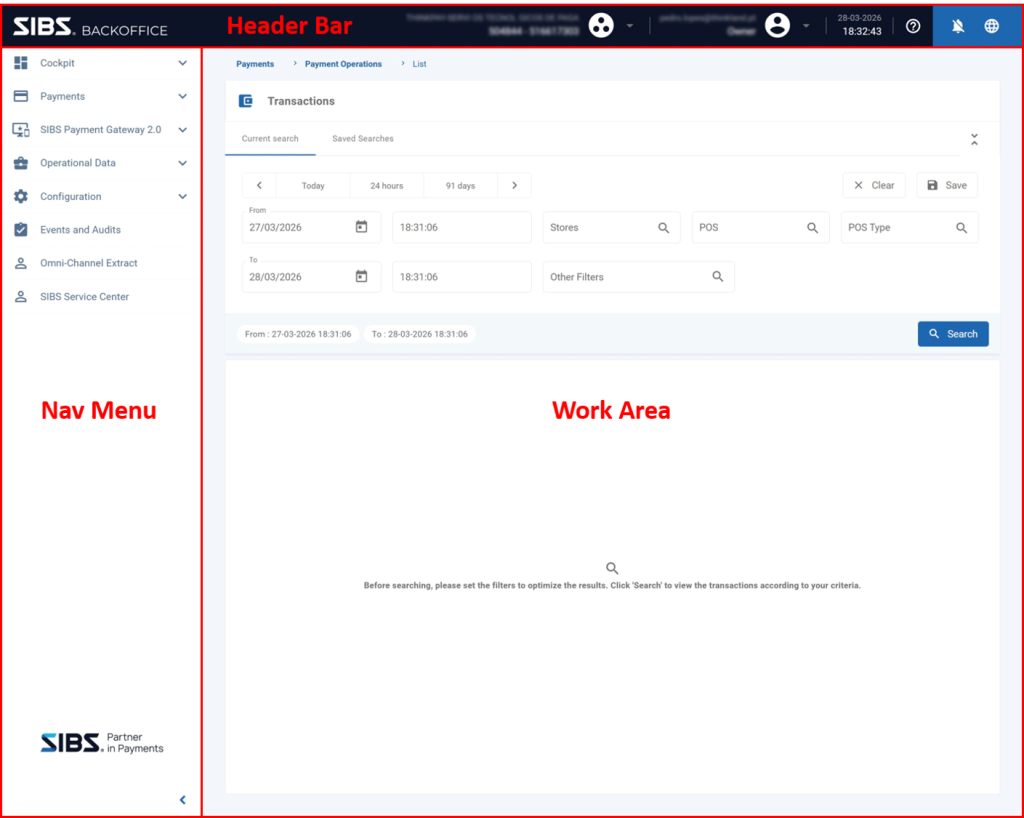
Figure 1 – SIBS Backoffice Dashboard
The dashboard typically consists of:
- Navigation Menu – Provides access to the main operational areas of the platform, such as transactions, reporting, configuration, and other Backoffice services.
- Work Area – Displays the currently selected page or operational workspace.
- Header Bar – Provides access to user-related functions, notifications, support resources, language selection, and other global platform options.
The menus and functionalities available within the dashboard depend on the permissions assigned to the authenticated user and the services enabled for the selected merchant.
Dashboard Navigation
The navigation menu provides access to the operational modules available within the Backoffice platform.
Depending on the assigned permissions and enabled merchant services, users may have access to operational areas such as:
- Transaction Management
- Dashboard and Analytics
- Merchant Configuration
- User Administration
- Terminal Management
- Payment Gateway Services
- Additional operational and reporting features
Selecting an option from the navigation menu updates the work area with the corresponding functionality.
Header Functions
The dashboard header provides access to user-specific and platform-wide functions that remain available regardless of the currently selected operational area.
The header includes:
- Profile Menu, used to access account settings, merchant selection, and session management.
- Support, providing access to frequently asked questions, documentation, and support requests.
- Notifications, displaying important operational and system messages.
- Language Selection, allowing the user interface language to be changed.
Each of these functions is described in the following sections of this chapter.
Dashboard Personalization
The information and operational areas available within the dashboard may vary depending on:
- The authenticated user profile.
- The permissions assigned to that profile.
- The selected merchant.
- The services enabled for the merchant.
As a result, different users may see different menus, dashboards, operational functions, and configuration areas while using the same Backoffice platform.