

Overview
The Payment Entity area allows merchants to configure the payment entities available for use within the SIBS Payment Gateway.
A Payment Entity identifies the entity that will be associated with supported payment operations initiated through the SIBS Backoffice. Once configured, the entity becomes available for selection in the corresponding Backoffice features that support Payment Entity selection.
Payment Entities allow merchants to organize and identify payment operations according to their business or operational requirements. Depending on the merchant configuration and enabled services, multiple Payment Entities may be defined and selected when initiating supported payment operations through the SIBS Backoffice or VTerminal.
The Payment Entity area allows authorized users to:
- Create a new Payment Entity.
- Configure the information associated with a Payment Entity.
- Make the configured Payment Entity available for supported payment operations.
Accessing the Payment Entity
The Payment Entity area is available from the SIBS Payment Gateway section of the SIBS Backoffice navigation menu.
Selecting Payment Entity displays the Payment Entity configuration page.
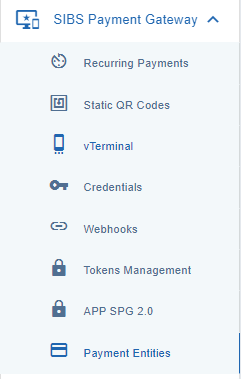
Figure 1 – Payment Entity Submenu
Creating a Payment Entity
To create a new Payment Entity:
Step 1. Open the Payment Entity area.
Step 2. Complete the required information for the new Payment Entity.
Step 3. Review the configured information.
Step 4. Select Confirm to create the Payment Entity.
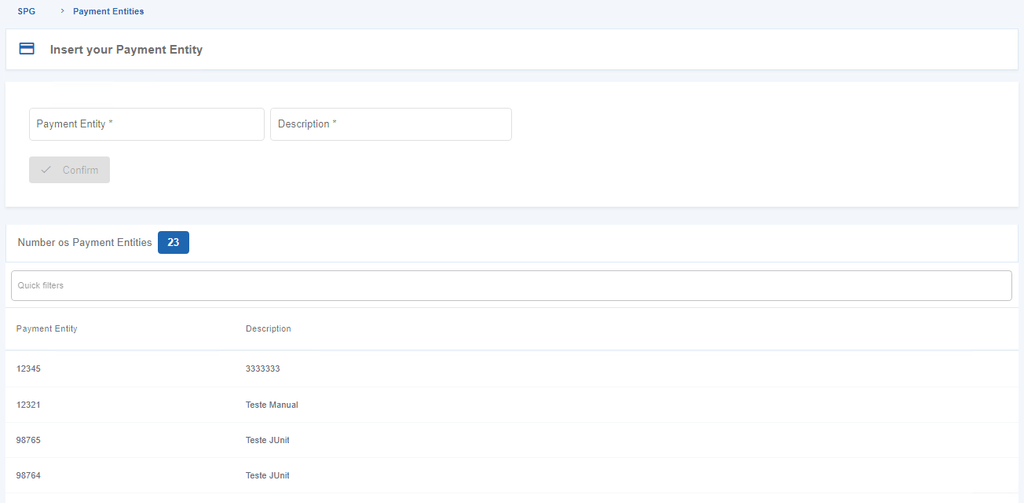
Figure 2 – Insertion of Payment Entity
After the operation is successfully completed, the configured Payment Entity becomes available for use in the supported SIBS Backoffice payment operations.
Video Tutorial – Configuring a Payment Entity
The following video provides a practical walkthrough of how to create and configure a Payment Entity in the SIBS Backoffice.
Video – Configuring a Payment Entity
Using a Payment Entity
Once a Payment Entity has been configured, it becomes available in the Entity field when initiating payment operations through the vTerminal. The configured Payment Entity can then be selected as part of the payment information associated with the operation.
The availability of Payment Entities depends on the merchant configuration and the services enabled for the merchant account.

Configured Payment Entities remain available for subsequent supported payment operations.
Permissions
Access to the Payment Entity area is controlled through the SIBS Backoffice permission model.
The operations available to each user depend on:
- The authenticated user’s profile.
- The permissions assigned to that profile.
- The currently selected merchant.
- The services enabled for the merchant account.
As a result, different users may have access to different Payment Entity operations while using the same Backoffice environment.