

Prerequisites (once per merchant/environment)
You need the following credentials and configuration elements before calling the SIBS SPG APIs:
- AuthToken : (used as
Authorization: Bearer <AuthToken>for REST calls), - TerminalId : the terminal ID assigned to the merchant, by the SIBS OnBoarding team
- X-IBM-Client-Id : merchant application identifier assigned by the SIBS OnBoarding team
Choose the appropriate API environment URL (<ROOT_URL>) for the target environment.
Please refer to A.3 – API Requests for the complete list of environment-specific URLs.
API Request Flow
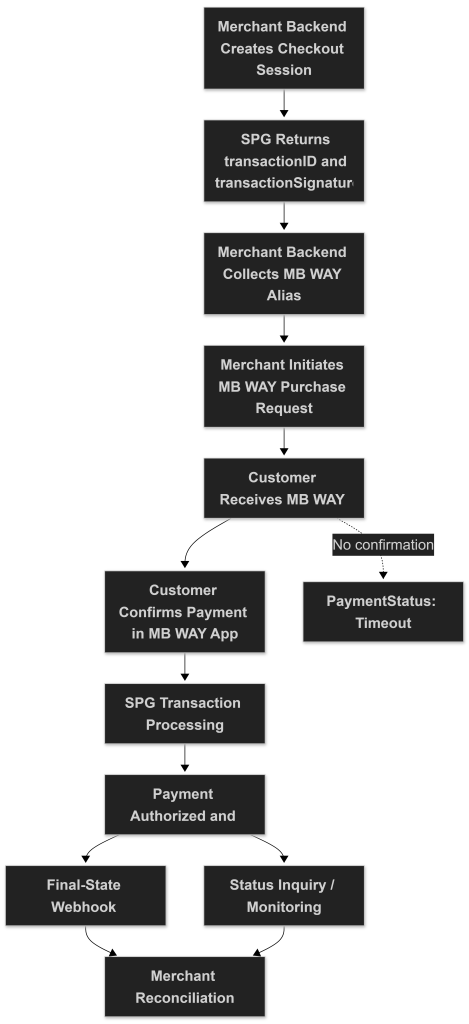
The following diagram summarizes the complete MB WAY Server-to-Server Integration flow, including checkout creation, merchant-side alias collection, MB WAY purchase initiation, asynchronous transaction processing, and merchant reconciliation.
1) Create the Checkout Session (server-to-server)
Goal: Create a checkout session in SIBS SPG and obtain the identifiers required to initiate the MB WAY payment.
Implementation steps
1.1 POST Checkout Payment to:
curl -v -X POST '<ROOT_URL>/payments' \
--header "X-IBM-Client-Id: dd43****" \
--header "Authorization: Bearer 0276****" \
--header "Accept: application/json" \
--header "Content-Type: application/json" \
--data '
{
    "merchant": {
        "terminalId": 58019,
        "channel": "web",
        "merchantTransactionId": "teste 12345"
    },
    "transaction": {
        "transactionTimestamp": "2028-12-31T00:00:00.000Z",
        "description": "Test Onboarding",
        "moto": false,
        "paymentType": "PURS",
        "amount": {
            "value": 2,
            "currency": "EUR"
        },
        "paymentMethod": [
            "MBWAY"
        ]
    }
}'
Headers:
Authorization: Bearer {AuthToken}X-IBM-Client-Id: {clientId}Content-Type: application/jsonAccept: application/json
This creates the payment session.
1.2. Store from the successful response:
The SPG transactionID should be treated as the authoritative identifier for transaction monitoring, webhook correlation, reconciliation, refund operations, and Status Inquiry requests throughout the transaction lifecycle.
From the Checkout response, you must store:
transactionID: used in subsequent callstransactionSignature: required to authorize the MB WAY purchase call. ThetransactionSignatureis generated during Checkout and must not be altered.
Notes:
- In Server-to-Server integration, the merchant backend is fully responsible for securely collecting and validating the customer’s MB WAY mobile number (alias).
- No hosted payment form is used in this flow.
- The merchant platform is fully responsible for securely handling customer data collection, transaction orchestration, frontend interaction, and operational payment lifecycle management.
2) Request MB WAY Payment (Backend)
Goal: Send the customer mobile number to SIBS SPG and trigger the MB WAY authorization request in the MB WAY application.
2.1 Collect the customer mobile number
The MB WAY alias is the customer mobile phone number.
MBWAY Alias format:
351#900000000This represents:
- Country code (e.g., 351 for Portugal)
- Separator
# - MBWAY Account Mobile number

2.2 Initiate the MB WAY purchase
curl -v -X POST '<ROOT_URL>/payments/{transactionID}/mbway-id/purchase' \
--header "X-IBM-Client-Id: dd43****" \
--header "Authorization: Digest {transactionSignature}" \
--header "Accept: application/json" \
--header "Content-Type: application/json" \
--data '{
    "customerPhone": "351#910000000"
}'
Headers
Authorization: Digest {transactionSignature}X-IBM-Client-Id: {clientId}Content-Type: application/jsonAccept: application/json
2.3 Request body
{
    "customerPhone": "351#910000000",
    "inApp": true
}
Where:
customerPhone: MB WAY alias (required)inApp: optional boolean to optimize mobile experiences
2.4 Immediate response behaviour
After the purchase request:
- MB WAY is an asynchronous payment method. After the purchase request, the transaction typically moves to
Pendingwhile the customer authorizes the payment in the MB WAY app. - The customer receives a push notification in the MB WAY app
- The final result is asynchronous
- The purchase response does not represent the final payment result.
If the customer does not confirm the MB WAY request within the allowed timeframe, the transaction expires automatically.
Optional inApp behaviour:
- If
inApp = true, the customer can be redirected back to the merchant mobile app after accepting or declining the payment. - If
inAppis absent from the request payload, the default isfalse
3) Validate the Final Transaction Status (Back-End)
Goal: Confirm the final payment outcome after the customer authorizes the MB WAY request.
Important: Do not consider the payment successful based solely on the MB WAY purchase response. Always confirm the final payment outcome via the /status endpoint or Merchant Notification.
3.1 When to check status
You should:
- Listen to Merchant Notifications (recommended)
- Optionally poll the transaction status
3.2 Status endpoints you can use
curl -v -X GET "<ROOT_URL>/payments/{transactionID}/status" \
--header "X-IBM-Client-Id: dd43****" \
--header "Authorization: Bearer 0276****" \
--header "Accept: application/json" \
--header "Content-Type: application/json"
Where:
{transactionID}is the value obtained in the checkout request (Step 1).
3.3 Required headers (status call)
Authorization: Bearer {AuthToken}X-IBM-Client-Id: {clientId}Content-Type: application/jsonAccept: application/json
3.4 Expected transaction statuses (high level)
The response includes paymentStatus with values such as:
SuccessPendingDeclinedErrorTimeout
MB WAY is an asynchronous payment method. The transaction may remain in Pending until the authorization result is processed by SPG.
3.5 Polling strategy (minimal, practical skeleton)
- A common implementation approach is to poll
GET<ROOT_URL>/payments/{transactionID}/status - Stop when
paymentStatusis one of:Success,Declined,Error,Timeout - If still
Pending, continue polling (with a 60–120 second max time cap, after the maximum customer confirmation window allowed for the MB WAY transaction)
Even if polling is implemented, SIBS SPG supports Merchant Notification (webhooks) for asynchronous payments.
Webhook notifications should be treated as the preferred mechanism for asynchronous MB WAY transaction lifecycle monitoring and operational reconciliation.
The Sandbox Payment Simulator may also be used to validate MB WAY Server-to-Server payment flows, customer confirmation interaction, asynchronous transaction progression, transaction lifecycle monitoring, and operational request/response payloads in the sandbox environment.
Example sandbox simulator entry point
For webhook implementation details, refer to E.1 – Webhooks (Notifications).
For transaction lifecycle monitoring, reconciliation, and Status Inquiry operations, refer to E.2 – Status Inquiry / Get Status.