

Prerequisites (once per merchant/environment)
You need the following credentials and configuration elements before calling the SIBS SPG APIs:
- AuthToken : (used as
Authorization: Bearer <AuthToken>for REST calls), - TerminalId : the terminal ID assigned to the merchant, by the SIBS OnBoarding team
- X-IBM-Client-Id : merchant application identifier assigned by the SIBS OnBoarding team
Choose the appropriate API environment URL (<ROOT_URL>) for the target environment.
Please refer to A.3 – API Requests for the complete list of environment-specific URLs.
IMPORTANT – PCI DSS REQUIREMENT
In Credit Card Server-to-Server integrations, the merchant collects, processes and transmits cardholder data (PAN, CVV, expiry date).
This means:
- The merchant environment must be PCI DSS compliant
- Card data must never be logged
- Card data must never be stored unless explicitly allowed under PCI scope
- Secure transmission (HTTPS/TLS 1.2+) is mandatory
If PCI scope reduction is required, use the Form Integration instead.
No hosted payment form is used in this flow.
The merchant platform is fully responsible for securely handling cardholder data collection, payment orchestration, frontend interaction, customer authentication flows, and operational payment lifecycle management.
API Request Flow
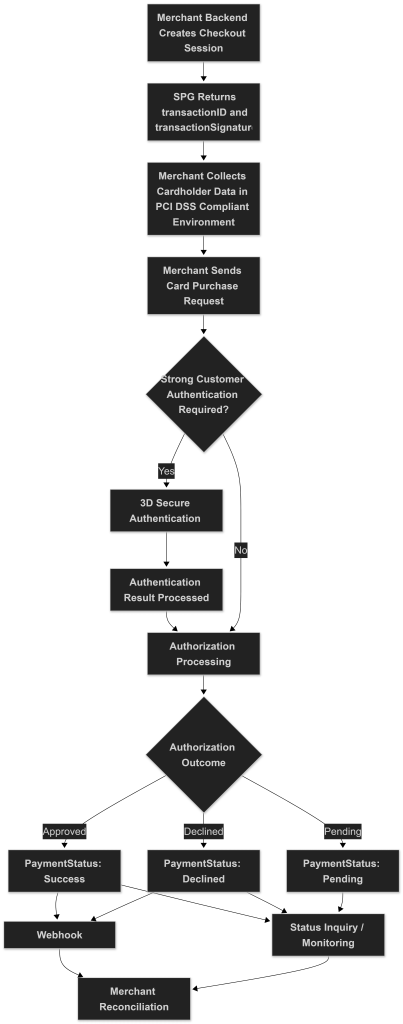
The following diagram summarizes the complete Credit Card Server-to-Server Integration flow, including checkout creation, merchant-side cardholder data collection, card purchase initiation, Strong Customer Authentication when required, authorization processing, and merchant reconciliation.
1) Create the Checkout Session (server-to-server)
Goal: Create a checkout session in SIBS SPG and obtain the identifiers required to initiate the Credit Card payment.
What you do
1.1 POST Checkout Payment to:
curl -v -X POST '<ROOT_URL>/payments' \
--header "X-IBM-Client-Id: dd43****" \
--header "Authorization: Bearer 0276****" \
--header "Accept: application/json" \
--header "Content-Type: application/json" \
--data '
{
    "merchant": {
        "terminalId": 66645,
        "channel": "web",
        "merchantTransactionId": "863b730df285443ca404e008chck11"
    },
    "transaction": {
        "transactionTimestamp": "2028-12-31T00:00:00.000Z",
        "description": "Teste",
        "moto": false,
        "paymentType": "PURS",
        "amount": {
            "value": 19.2,
            "currency": "EUR"
        },
        "paymentMethod": [
            "CARD"
        ]
    },
    "customer": {
        "customerInfo": {
            "customerName": "Teste",
            "customerEmail": "email@email.pt",
            "billingAddress": {
                "street1": "First street",
                "street2": "Menef Square",
                "city": "Lisbon",
                "postcode": "1700-123",
                "country": "PT"
            }
        }
    }'
Headers:
Authorization: Bearer {AuthToken}X-IBM-Client-Id: {clientId}Content-Type: application/jsonAccept: application/json
This creates the payment session.
1.2. Store from the successful response:
The SPG transactionID should be treated as the authoritative identifier for transaction monitoring, webhook correlation, reconciliation, refund operations, and Status Inquiry requests throughout the transaction lifecycle.
- transactionID : used in subsequent calls
transactionSignature: required to authorize the card purchase call
Field Notes
merchant
terminalId: Merchant terminal provided by SIBSchannel: Integration channel (web,app, etc.)merchantTransactionId: Unique merchant-side identifier (must be idempotent)
transaction
transactionTimestamp: Current timestamp in ISO 8601 formatdescription: Free text descriptionmoto: Mail Order / Telephone Order flagpaymentType:PURS(Purchase)amount.value: Decimal value (dot as decimal separator, e.g. 19.20)amount.currency: ISO currency codepaymentMethod: Must include"CARD"for card purchase
customer
Billing information is required for card transactions and may be used for fraud screening and 3DS evaluation.
2) Request Credit Card Payment (Back-End)
Goal: Send the card details to SPG and perform a Purchase transaction (Authorization + Capture in a single step), as defined in the Checkout request (paymentType = PURS).
This step performs the card purchase (Authorization + Capture) as defined in Step 1.
IMPORTANT – PCI DSS REQUIREMENT
At this stage, the merchant backend is transmitting sensitive cardholder data:
- PAN
- secureCode (CVV/CVC)
- validationDate
- cardholderName
The collection, processing and transmission of these fields must be fully PCI DSS compliant.
The merchant must ensure:
- Card data is never logged
- Card data is never stored (unless explicitly allowed under PCI scope)
- TLS encryption is enforced
- Monitoring systems do not capture raw payloads
If PCI compliance cannot be ensured, use Form Integration instead.
2.1 Collect Card Data (PCI DSS Compliant)
The merchant backend must securely collect the cardholder data required for authorization:
PAN: The full card number printed on the card (Primary Account Number).secureCode: The card security code (CVV/CVC), used for additional fraud validation.validationDate: Card expiry date in the format required by the SPG API.cardholderName: The name of the cardholder as printed on the card.
All these fields are considered sensitive cardholder data and must be handled in full compliance with PCI DSS requirements.
If tokenization is required for future transactions:
- Set
createToken = true
If 3DS Method was previously executed, you must include the actionProcessed object.
2.2 Initiate Card Purchase (Authorization + Capture)
curl -v -X POST '<ROOT_URL>/payments/{transactionID}/card/purchase' \
--header "X-IBM-Client-Id: dd43****" \
--header "Authorization: Digest {transactionSignature}" \
--header "Accept: application/json" \
--header "Content-Type: application/json" \
--data '{
  "cardInfo": {
    "PAN": "5309770069960461",
    "secureCode": "220",
    "validationDate": "2025-12-10T00:00:00.000Z",
    "cardholderName": "SIBS",
    "createToken": true
  },
  "actionProcessed": {
    "id": "123456789",
    "type": "THREEDS_METHOD",
    "executed": true
  }
}'
Headers
Authorization: Digest {transactionSignature}X-IBM-Client-Id: {clientId}Content-Type: application/jsonAccept: application/json
Field Notes
cardInfo
PAN: Full card numbersecureCode: CVV/CVC (numeric string, typically 3 or 4 digits)validationDate: Card expiry date in the format required by the SPG APIcardholderName: Name printed on the cardcreateToken:true: SPG generates a reusable card tokenfalse: No token is created
actionProcessed
Used when 3DS Method has already been executed on the merchant side.
type: Must beTHREEDS_METHODexecuted: Must betrueif already executedid: Identifier of the processed action
If no prior 3DS Method step was performed, this object may be omitted depending on your integration model.
2.4 Immediate Response Behaviour (PURS)
For paymentType = PURS:
- Authorization and Capture are performed in a single step.
- No additional Capture call is required.
Possible high-level statuses:
Success: Payment authorized and captured (forpaymentType = PURS)Declined: Payment rejectedPending: Additional authentication or processing in progress (e.g., 3DS challenge)TimeoutError
The merchant should confirm the final state through Merchant Notifications and/or Status Inquiry. If the transaction remains Pending, the merchant may poll the Status endpoint briefly while awaiting the final outcome.
3) Check Payment Status (Back-End)
Goal: Confirm the final payment outcome after the card authorization (and 3DS authentication, if applicable).
3.1 When to check status
You should:
- Listen to Merchant Notifications (recommended)
- Optionally poll the transaction status
3.2 Status endpoints you can use
curl -v -X GET "<ROOT_URL>/payments/{transactionID}/status" \
--header "X-IBM-Client-Id: dd43****" \
--header "Authorization: Bearer 0276****" \
--header "Accept: application/json" \
--header "Content-Type: application/json"
Where:
{transactionID}is the value obtained in the checkout request (Step 1).
3.3 Required headers (status call)
Authorization: Bearer {AuthToken}X-IBM-Client-Id: {clientId}Content-Type: application/jsonAccept: application/json
3.4 What statuses to expect (high level)
The response includes paymentStatus with values such as:
Success: Payment authorized and capturedDeclined: Payment rejectedPending: Awaiting additional processing (e.g. 3DS)Timeout: Approval timeoutError: Approval or processing error
The merchant should consider the transaction final only when a definitive status is obtained: Success, Declined, Error, or Timeout.
3.5 Polling strategy (minimal, practical skeleton)
- A common implementation approach is to poll
GET<ROOT_URL>/payments/{transactionID}/status - Stop when
paymentStatusis one of:Success,Declined,Error,Timeout - If still
Pending, continue polling (with a 60–120 second max time cap, depending on the expected authentication and processing duration for the transaction)
If the status is:
Pending
The merchant should:
- Wait a few seconds
- Poll the Status endpoint again
- Stop polling when a final state is reached
Recommended polling strategy:
- Interval: 3–5 seconds
- Maximum duration: 60-120 seconds
- Always implement idempotent processing logic
Even if polling is implemented, SIBS SPG supports Merchant Notification (webhooks) for asynchronous payments.
The Sandbox Payment Simulator may also be used to validate Credit Card Server-to-Server payment flows, card authorization scenarios, transaction lifecycle progression, transaction lifecycle monitoring, and operational request/response payloads in the sandbox environment.
Example sandbox simulator entry point
For webhook implementation details, refer to E.1 – Webhooks (Notifications).
For transaction lifecycle monitoring and Status Inquiry operations, refer to E.2 – Status Inquiry / Get Status.