

Prerequisites (once per merchant/environment)
You need the following credentials and configuration elements before calling the SIBS SPG APIs:
- AuthToken : (used as
Authorization: Bearer <AuthToken>for REST calls) - TerminalId : the terminal ID assigned to the merchant, by the SIBS OnBoarding team
- X-IBM-Client-Id : merchant application identifier assigned by the SIBS OnBoarding team
Choose the appropriate API environment URL (<ROOT_URL>) for the target environment.
Please refer to A.3 – API Requests for the complete list of environment-specific URLs.
API Request Flow
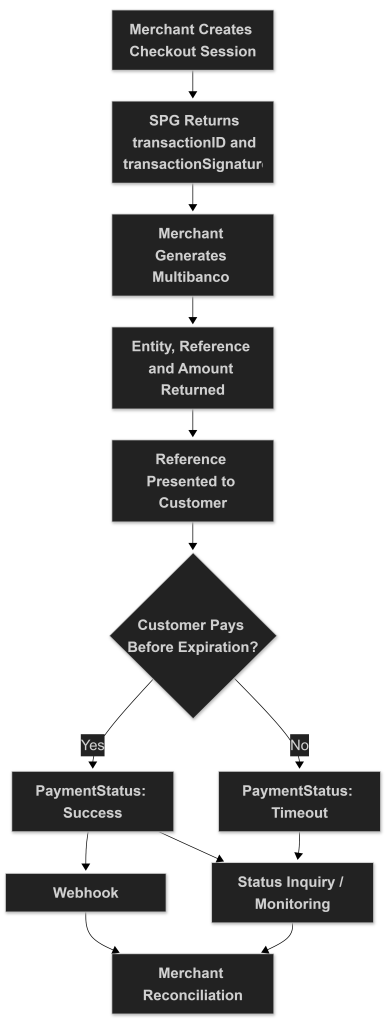
The following diagram summarizes the complete Multibanco Reference Server-to-Server Integration flow, including checkout creation, reference generation, asynchronous payment processing, expiration handling, and merchant reconciliation.
1) Create the Checkout Session (server-to-server)
Goal: Create a checkout session in SIBS SPG and obtain the identifiers required to initiate the Multibanco Reference.
Implementation steps
1.1 POST Checkout Payment to:
curl -v -X POST '<ROOT_URL>/payments' \
--header "X-IBM-Client-Id: dd43****" \
--header "Authorization: Bearer 0276****" \
--header "Accept: application/json" \
--header "Content-Type: application/json" \
--data '
{
    "merchant": {
        "terminalId": 58019,
        "channel": "web",
        "merchantTransactionId": "teste 12345"
    },
    "transaction": {
        "transactionTimestamp": "2028-12-31T00:00:00.000Z",
        "description": "Test Onboarding",
        "moto": false,
        "paymentType": "PURS",
        "amount": {
            "value": 5.10,
            "currency": "EUR"
        },
        "paymentMethod": [
            "REFERENCE"
        ]
    }
}'
Notes:
- For Multibanco Reference,
paymentType = PURScreates the transaction container. The actual payment instrument is generated in Step 2. merchantTransactionIdmust be unique per transaction.
Headers:
Authorization: Bearer {AuthToken}X-IBM-Client-Id: {ClientId}Content-Type: application/jsonAccept: application/json
This creates the payment session.
1.2. Store from the successful response:
The SPG transactionID should be treated as the authoritative identifier for transaction monitoring, webhook correlation, reconciliation, refund operations, and Status Inquiry requests throughout the transaction lifecycle.
From the Checkout response, you must store:
transactionID: used in subsequent callstransactionSignature: required to authorize the Multibanco Reference generation call
At this stage, the transaction is created but no reference exists yet.
2) Generate Multibanco Reference (Back-End)
Goal: Request the generation of the Multibanco Reference for the created transaction.
2.1 Generate Reference
curl -v -X POST '<ROOT_URL>/payments/{transactionID}/service-reference/generate' \
--header "X-IBM-Client-Id: dd43****" \
--header "Authorization: Digest {transactionSignature}" \
--header "Accept: application/json" \
--header "Content-Type: application/json" \
--data '{
  "expiration_date": "2028-12-31T00:00:00.000Z",
  "amount": 5.10,
  "currency": "EUR"
}'
Headers
Authorization: Digest {transactionSignature}X-IBM-Client-Id: {ClientId}Content-Type: application/jsonAccept: application/json
2.2 Request body
{
    "expiration_date": "2028-12-31T00:00:00.000Z",
    "amount": 5.10,
    "currency": "EUR"
}
Where:
expiration_date: Date and time until which the reference is valid (ISO format)amount: Payment amount (decimal format)currency: Currency code (e.g., EUR)
Important:
- The
amountmust match the intended payment amount. - If the reference expires without payment, the transaction will move to an expired state.
2.3 Successful Response
The response will contain the Multibanco payment details:
{
    "entity": "12345",
    "reference": "123 456 789",
    "amount": 5.10,
    "currency": "EUR",
    "expiration_date": "2028-12-31T00:00:00.000Z"
}
The merchant must present to the customer:
- Entity
- Reference
- Amount
- Expiration date
The customer completes the payment externally via:
- ATM
- Online banking
- Mobile banking application
2.4 Immediate Response Behaviour
After reference generation:
- The transaction moves to Pending
- No real-time authorization occurs
- Payment confirmation is asynchronous
- Final status depends on the customer completing the reference payment within the validity period
The merchant system must wait for confirmation via:
- Merchant Notifications (recommended)
- Or status polling
3) Monitor / Confirm the Final Transaction Status (Back-End)
Goal: Confirm the final payment outcome after the customer executes the Multibanco Reference payment.
3.1 When to check status
Multibanco Reference is an asynchronous payment method.
You should:
- Listen to Merchant Notifications (recommended)
- Optionally poll the transaction status
Unlike MB WAY (where customer authorization must occur within a short timeframe – typically within minutes), Multibanco Reference payments may take hours or several days to be completed, depending on the configured expiration date.
The final payment result is not immediate and depends on the customer executing the payment before the reference expires.
3.2 Status endpoints you can use
curl -v -X GET "<ROOT_URL>/payments/{transactionID}/status" \
--header "X-IBM-Client-Id: dd43****" \
--header "Authorization: Bearer 0276****" \
--header "Accept: application/json" \
--header "Content-Type: application/json"
Where:
{transactionID}is the value obtained in the checkout request (Step 1).
3.3 Required headers (status call)
Authorization: Bearer {AuthToken}X-IBM-Client-Id: {ClientId}Content-Type: application/jsonAccept: application/json
3.4 What statuses to expect (high level)
The response includes paymentStatus, with values such as:
SuccessPendingDeclinedErrorTimeout
Multibanco Reference behaviour
- After reference generation, the transaction moves to Pending.
- It may remain in Pending state for an extended period (hours or days).
- When the customer completes the payment via ATM or home banking, the status changes to
Success. - If the expiration date is reached without payment, the transaction should be treated as a
Timeout - If the merchant cancels the reference before payment and before the expiration date is reached, the transaction should no longer be treated as payable and must be reconciled according to the status returned by SPG.
The transaction must only be considered completed when the status is Success.
3.5 Polling strategy (minimal, practical skeleton)
Because Multibanco Reference payments can take significantly longer than MB WAY:
- Do not poll every few seconds.
- Avoid aggressive short-interval polling strategies.
Recommended approach
- Rely primarily on Merchant Notifications (webhooks)
- Optionally implement low-frequency polling
Suggested polling pattern
- Poll once immediately after reference generation (optional).
- Then poll at longer intervals (e.g., every 30–60 minutes).
- Stop polling when:
paymentStatus=SuccesspaymentStatus=DeclinedpaymentStatus=ErrorpaymentStatus = Timeout
- Implement a maximum polling duration aligned with the reference expiration date.
Webhook notifications should be treated as the preferred mechanism for asynchronous Multibanco Reference transaction lifecycle monitoring and operational reconciliation.
The Sandbox Payment Simulator may also be used to validate Multibanco Reference Server-to-Server payment flows, reference generation behaviour, transaction lifecycle progression, expiration scenarios, payment confirmation processing, transaction lifecycle monitoring, and operational request/response payloads in the sandbox environment.
Example sandbox simulator entry point
For webhook implementation details, refer to E.1 – Webhooks (Notifications).
For transaction lifecycle monitoring and Status Inquiry operations, refer to E.2 – Status Inquiry / Get Status.
Important Notes
- There is no capture step in Multibanco Reference.
- The transaction is automatically settled after confirmed payment.
- Expiration handling must be aligned with the configured
expiration_date. - Webhooks are strongly recommended to avoid unnecessary system load.