

Overview
This section provides a complete end-to-end example of a transaction lifecycle, illustrating how to combine:
- Status Inquiry APIs (Query)
- Webhook notifications
- Polling strategies
- Reconciliation logic
The objective is to demonstrate how integrators should orchestrate all mechanisms together to ensure correct and reliable transaction processing.
Scenario Description
The following example represents a typical asynchronous payment flow (e.g., MB WAY or similar):
- A transaction is initiated
- User interaction is required
- The system processes the transaction asynchronously
- Final state is determined after external confirmation
Step 1 – Transaction Initiation
The merchant initiates a transaction via the SIBS Payment Gateway.
Outcome:
- A
transactionIDis generated - The transaction is created in an initial state
Step 2 – Start Polling
The merchant system initiates polling using the Status Inquiry APIs.
GET <ROOT_URL>/payments/{transactionID}/statusInitial Response Example:
{
    "returnStatus": {
        "statusCode": "000",
        "statusMsg": "Success"
    },
    "paymentStatus": "Pending"
}
Interpretation:
- Request processed successfully
- Transaction is awaiting user action
Action:
- Continue polling according to the defined strategy
Step 3 – User Interaction
The user performs the required action (e.g., approves payment in mobile app).
System Behavior:
- Transaction progresses internally
- No immediate guarantee of webhook delivery
Step 4 – Intermediate Status Check
Polling continues.
Response Example:
{
    "returnStatus": {
        "statusCode": "000",
        "statusMsg": "Success"
    },
    "paymentStatus": "Pending"
}
Interpretation:
- Transaction is being processed
- Final outcome not yet determined
Action:
- Continue polling using the defined strategy
Step 5 – Webhook Notification Received
A webhook notification is received:
{
    "returnStatus": {
        "statusCode": "000",
        "statusMsg": "Success"
    },
    "paymentStatus": "Success",
    "transactionID": "123456789"
}

Step 6 – Status Validation (Critical Step)
Validate the transaction state using Status Inquiry APIs when additional confirmation is required.
GET <ROOT_URL>/payments/{transactionID}/statusResponse Example:
{
    "returnStatus": {
        "statusCode": "000",
        "statusMsg": "Success"
    },
    "paymentStatus": "Success"
}
Interpretation:
- Transaction reached a validated final business state
Step 7 – Stop Polling
Since a final state has been reached:
- Stop active transaction polling processes
Step 8 – Trigger Business Action
Execute business logic:
- Confirm order
- Deliver service or product
- Update internal systems
Alternative Scenario: Webhook Missing
Situation
- No webhook is received
- Polling detects final state
Polling Response Example:
{
    "returnStatus": {
        "statusCode": "000",
        "statusMsg": "Success"
    },
    "paymentStatus": "Success"
}
Action:
- Proceed with appropriately validated business logic
- Log missing webhook for monitoring
Alternative Scenario: Inconsistent State
Situation
- A retry of an earlier
PendingMultibanco Reference generation notification is received after a later finalSuccessstate
Handling:
- Treat as temporary inconsistency
- Continue polling until resolved
Reconciliation patterns and transaction-state validation strategies are described in E.2.7 – Reconciliation Patterns.
Alternative Scenario: Declined Transaction
Response Example:
{
    "returnStatus": {
        "statusCode": "10.106.0001",
        "statusMsg": "Declined"
    },
    "paymentStatus": "Declined"
}
Action:
- Treat as typically final state
- Do not retry automatically
- Notify user or system
Error classification, retryability semantics, and edge-case handling strategies are described in E.2.8 – Error Handling and Edge Cases.
Sequence Flow Summary
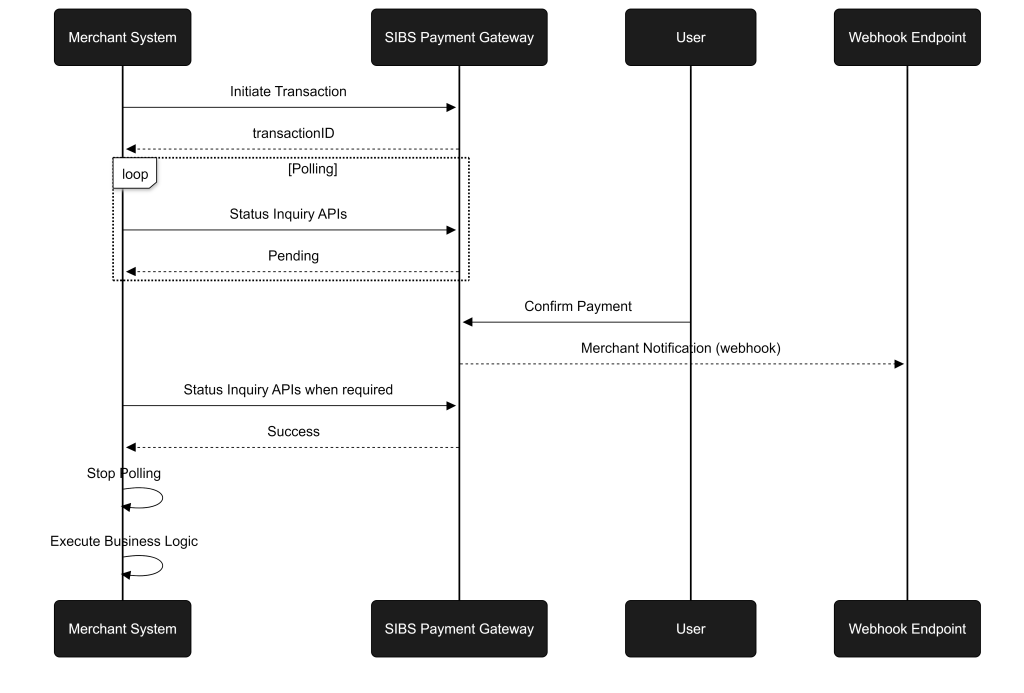
- Initiate transaction
- Start polling
- Receive webhook notification (optional timing)
- Validate state via Status Inquiry APIs
- Detect validated final state
- Stop polling
- Execute business action
Key Observations
- Webhooks may arrive:
- Before final state
- After final state
- Not at all
- Polling ensures:
- Real-time transaction-state visibility
- Fallback validation mechanism when required
- Status Inquiry APIs ensure:
- Status Inquiry validation when required
Integration Guarantees
By following this pattern, integrators ensure:
- Correct handling of asynchronous flows
- Protection against missing or duplicated events
- Accurate determination of final transaction state
- Idempotent and safe execution of business logic
Key Integration Principles
- Validate webhook data using Status Inquiry APIs when no final webhook is available or when additional confirmation is required
- Do not trigger business actions without final state confirmation
- Combine polling and webhook mechanisms
- Design for eventual consistency
- Ensure idempotent processing
Summary
This end-to-end example demonstrates how to correctly orchestrate:
- Event-driven notifications (webhooks)
- Synchronous validation (Status Inquiry APIs)
- Polling strategies and fallback mechanisms
By applying this model, integrators can build robust, resilient, and enterprise-grade payment flows, ensuring consistent and reliable transaction processing across all scenarios.
This flow must be interpreted in conjunction with the consistency model defined in E.2.6 – Consistency Model: Query vs Webhook.