

Overview
This section provides complete, end-to-end transaction examples illustrating how SIBS Payment Gateway (SPG) integrations operate across the full lifecycle of a payment.
The examples demonstrate how a merchant system interacts with SPG through:
- Checkout creation
- Payment execution or customer interaction
- Webhook notification handling
- Status validation through the API
- Final transaction state reconciliation
This section is intended to bridge the gap between conceptual payment flows and their practical implementation, particularly in scenarios involving asynchronous processing and delayed final states.
All examples reflect real execution behavior and are aligned with the operational models defined across the documentation.
Depending on the payment method, the time required to reach a final state may vary significantly, ranging from immediate responses to delayed completion requiring user interaction or external processing.
Purpose
The purpose of this section is to:
- Provide practical and reproducible transaction flows
- Demonstrate correct sequencing of SPG API interactions
- Illustrate how Webhooks and Status Inquiry APIs are combined
- Show method-specific behavior in real-world scenarios
- Support implementation, validation, and troubleshooting
The examples focus on how integrations behave in practice, rather than redefining the flows already described elsewhere.
How to Use This Section
Each example in this section follows a consistent structure designed to support implementation:
- Definition of the business goal
- Required setup and assumptions
- Sequence of API interactions
- Relevant request and response examples
- Webhook handling considerations
- Status validation step
- Final outcome and reconciliation
Examples should be executed and validated using the SIBS Postman Collection, which provides pre-configured requests aligned with SPG v2.
SIBS Postman Collections:
General End-to-End Execution Model
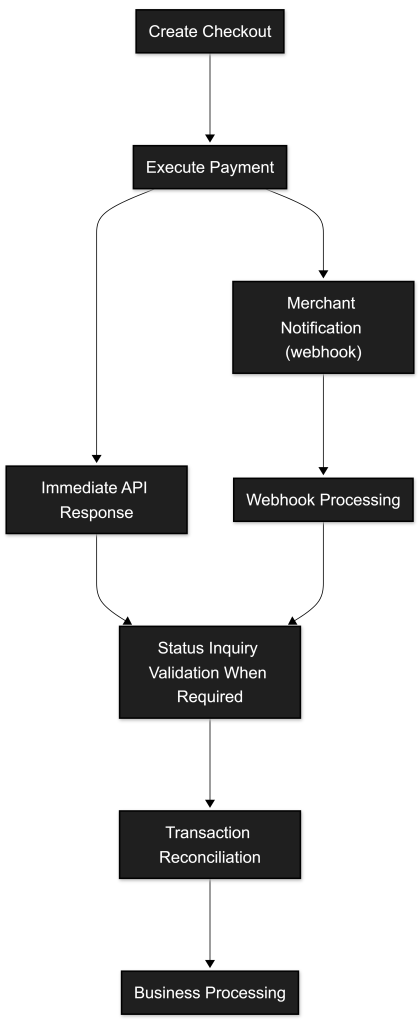
Figure – Operational End-to-End Reconciliation Flow
Although payment methods differ in behavior, most integrations follow the same core pattern.
Depending on the payment method and operational flow, transactions may temporarily remain in non-final states such as Pending before reaching a final outcome.

Step 1 – Create Checkout
The merchant initiates the process by creating a checkout.
Endpoint
POST <ROOT_URL>/paymentsHeaders
Authorization: Bearer <AuthToken>
X-IBM-Client-Id: <clientId>
Content-Type: application/json
Accept: application/json
Example Request
{
    "merchant": {
        "terminalId": "11111",
        "channel": "web",
        "merchantTransactionId": "ORDER-20260414-0001"
    },
    "transaction": {
        "transactionTimestamp": "2026-04-14T10:15:30.000Z",
        "description": "Order payment",
        "paymentType": "PURS",
        "paymentMethod": [
            "CARD",
            "MBWAY"
        ],
        "amount": {
            "value": 49.90,
            "currency": "EUR"
        }
    }
}
Example Response
{
    "returnStatus": {
        "statusCode": "000",
        "statusMsg": "Success"
    },
    "transactionID": "s2ExampleTx123456789",
    "merchant": {
        "merchantTransactionId": "ORDER-20260414-0001"
    },
    "paymentMethodList": [
        "CARD",
        "MBWAY"
    ],
    "execution": {
        "startTime": "2026-04-14T10:15:30.050Z",
        "endTime": "2026-04-14T10:15:30.210Z"
    }
}
The merchant must persist:
transactionIDmerchantTransactionIdnotificationID(when applicable)
The corresponding request in the SIBS Postman Collection should be used to validate payload structure and response handling (see SPG Payment Gateway Collection).
Step 2 – Execute the Payment Method
After checkout creation, the merchant proceeds with the selected payment method.
Credit Card
POST <ROOT_URL>/payments/{transactionID}/card/purchase{
"cardInfo": {
"PAN": "4111111111111111",
"secureCode": "123",
"validationDate": "2028-12-31T00:00:00.000Z",
"cardholderName": "JOHN DOE"
}
}
MB WAY
POST <ROOT_URL>/payments/{transactionID}/mbway-id/purchase{
"customerPhone": "351#912345678"
}
Multibanco Reference
POST <ROOT_URL>/payments/{transactionID}/service-reference/generate{}Depending on the payment method, the result may be:
- Immediate (
Success/Declined) - Pending user action
- Deferred completion
These requests are available in the Postman Collection and should be executed from there (see SPG Payment Gateway Collection).
Step 3 – Receive and Process Webhook Notifications
For asynchronous flows, SPG sends notifications to the merchant system.
The merchant must:
- Receive the notification
- Validate and process it
- Store and process the notification in an idempotent manner, using the
notificationIDas the unique identifier to prevent duplicate processing. - Acknowledge it correctly
Webhook Endpoint Example
POST https://merchant.example.com/api/spg/webhooksExpected Response
{
    "statusCode": "000",
    "statusMsg": "Success",
    "notificationID": "notif-123456"
}
The notificationID must match the value received in the webhook payload.
Example Notification Payload
{
    "returnStatus": {
        "statusCode": "000",
        "statusMsg": "Success"
    },
    "paymentStatus": "Success",
    "transactionID": "s2ExampleTx123456789",
    "paymentMethod": "CARD",
    "paymentType": "PURS",
    "notificationID": "notif-123456"
}
The reconciliation and validation mechanisms described in E. Notifications and Transaction Status should be followed where applicable.
Step 4 – Confirm Final State (Status Inquiry APIs)
The merchant may confirm the final state using Status Inquiry when no final webhook is available or when additional confirmation, recovery, or reconciliation is required.
GET <ROOT_URL>/payments/{transactionID}/statusExample Response
{
    "returnStatus": {
        "statusCode": "000",
        "statusMsg": "Success"
    },
    "paymentStatus": "Success",
    "transactionID": "s2ExampleTx123456789",
    "amount": {
        "value": 49.9,
        "currency": "EUR"
    }
}
This provides query-driven validation of the latest transaction state available through the query API.
For scenarios requiring extended operational or financial information, integrations may additionally use the Inquiry Details endpoint documented in E.2 Status Inquiry / Get Status.
The Postman Collection includes ready-to-use status requests and should be used for validation and troubleshooting (see SPG Payment Gateway Collection).
Implementation Baseline
All examples in this section assume:
- Valid SPG application credentials (see G.1.7.3 – Credentials) and the corresponding environment configuration.
- Persistent storage of transaction identifiers
- Webhook endpoint correctly implemented
- Idempotent processing of notifications
- Status Inquiry APIs used when no final webhook is available or when additional confirmation, recovery, or reconciliation is required
- Retry operations and repeated requests implemented using idempotent processing strategies
These conditions are mandatory for a robust integration.
The transactionID must be used as the primary correlation identifier across all API calls, webhook processing, and status validation.
Operational logs and monitoring systems should correlate transactionID, merchantTransactionId, and notificationID across all integration components.
Use of the SIBS Postman Collection
The SIBS Postman Collections should be used as the execution layer for all examples.
SIBS Postman Collections:
These collections allow:
- Direct execution of API calls
- Validation of requests and responses
- Faster troubleshooting
- Simulation of different transaction scenarios (via Sandbox)
References to specific requests are included at the relevant steps where execution is required.
Covered Scenarios
This section includes a selected set of representative end-to-end examples covering the most relevant integration scenarios.
Each example focuses on a specific combination of payment method and operational model, chosen to illustrate distinct behaviors such as synchronous execution, asynchronous authorization, deferred completion, and recurring transaction handling.
Final Notes
The examples in this section are designed to support real-world implementations.
They should be used in conjunction with:
- Webhook processing logic
- Status validation patterns
- Proper error handling and retry strategies
Across all scenarios, the integration must follow a consistent approach:
- Use API responses for immediate processing
- Use Webhooks for near real-time updates
- Use Status Inquiry APIs when no final webhook is available or when additional confirmation, recovery, or reconciliation is required
This approach ensures reliable transaction processing, consistent reconciliation, and predictable system behavior under both normal and exceptional conditions in production environments.