

Overview
This section describes the different error patterns that may occur in SIBS Payment Gateway (SPG) integrations.
Errors must be interpreted using the dual-layer model:
- Technical layer →
returnStatus.statusCode - Business layer →
paymentStatus(when applicable)
The combination of these fields determines:
- Whether a transaction exists
- Whether it was processed
- What action the integrator must take
For the complete list of error codes and their meaning, refer to C.5 – Status Codes and Error Codes Mapping and its subchapters.
Error classification and handling behavior must follow the interpretation model defined in C.6 – Error Payloads and Handling Guidelines.
Technical Errors (Request Rejected)
Description
Errors where the request is invalid and rejected before processing.
Example (Invalid Request / Missing Data)
{
    "returnStatus": {
        "statusCode": "Exxxx",
        "statusMsg": "Error",
        "statusDescription": "Invalid request, data is missing or is invalid"
    }
}
Interpretation
- Request not processed
- No transaction created
- No
paymentStatus
Integrator Action
- Validate request payload:
- Mandatory fields
- Amount and currency
- Terminal configuration (e.g.,
terminalId = 12345)
- Do not retry without correction
Business Errors (Declined Transactions)
Description
Errors where:
- Request is valid
- Transaction is created
- Payment is refused
Example (Insufficient Funds)
{
    "paymentStatus": "Declined",
    "returnStatus": {
        "statusCode": "Exxxx",
        "statusMsg": "Error",
        "statusDescription": "Insufficient funds"
    },
    "transactionID": "tx_A1B2C3D4"
}
Interpretation
- Transaction exists
- Payment failed at business level
- The specific cause must be interpreted according to the error definitions described in C.5 – Status Codes and Error Codes Mapping and its subchapters.
Integrator Action
- Inform the user
- Allow retry with:
- Different payment method
- Different credentials
- Do not retry automatically
Duplicate / Conflict Errors
Description
Errors caused by duplicate submission or conflicting requests.
Example
{
    "returnStatus": {
        "statusCode": "Txxxx",
        "statusMsg": "Error",
        "statusDescription": "Duplicate or conflicting transaction"
    }
}
Interpretation
- A transaction with equivalent business intent may already exist
- Request rejected to prevent duplication
Integrator Action
- Retrieve transaction via Status Inquiry
- Ensure unique
merchantTransactionId - Implement idempotency
For detailed retry and idempotency strategies, refer to F.6.2 – Idempotency and Duplicate Protection.
Temporary Errors (Potentially Retryable)
Description
Errors caused by temporary system conditions.
Example
{
    "returnStatus": {
        "statusCode": "Txxxx",
        "statusMsg": "Temporary error",
        "statusDescription": "SIBS temporary internal error"
    }
}
Interpretation
- Request may not have completed successfully, and the final transaction state may be unknown or only partially processed
Integrator Action
- Retry using a retry with backoff strategy
- Automatic retries must avoid generating duplicate financial operations and should always be combined with reconciliation logic
- If uncertainty remains:
- Confirm via Status Inquiry or webhook
- Include in reconciliation
Authentication and Authorization Errors
Description
Errors occurring at the security layer.
Example
{
    "returnStatus": {
        "statusCode": "Exxxx",
        "statusMsg": "Error",
        "statusDescription": "Authentication or authorization error"
    }
}
Interpretation
- Request rejected before processing
- Invalid or missing credentials
Integrator Action
- Validate:
- Authorization headers
- Client credentials
- Regenerate credentials if needed
- Do not retry automatically without classification and validation
Payment Method-Specific Errors
Description
Errors specific to payment method validation and processing rules.
Card Example (Invalid Card Data)
{
    "paymentStatus": "Declined",
    "returnStatus": {
        "statusCode": "Exxxx",
        "statusMsg": "Error",
        "statusDescription": "Invalid card data"
    }
}
MB WAY Example (Invalid Alias)
{
    "paymentStatus": "Declined",
    "returnStatus": {
        "statusCode": "Exxxx",
        "statusMsg": "Error",
        "statusDescription": "The provided alias is not correct"
    }
}
Multibanco Example (Invalid Currency)
{
    "returnStatus": {
        "statusCode": "Exxxx",
        "statusMsg": "Error",
        "statusDescription": "Invalid currency"
    }
}
Interpretation
- Error depends on payment method constraints
- May occur at validation or processing stage
Integrator Action
- Apply method-specific validation
- Provide clear user feedback
- Avoid generic retry logic
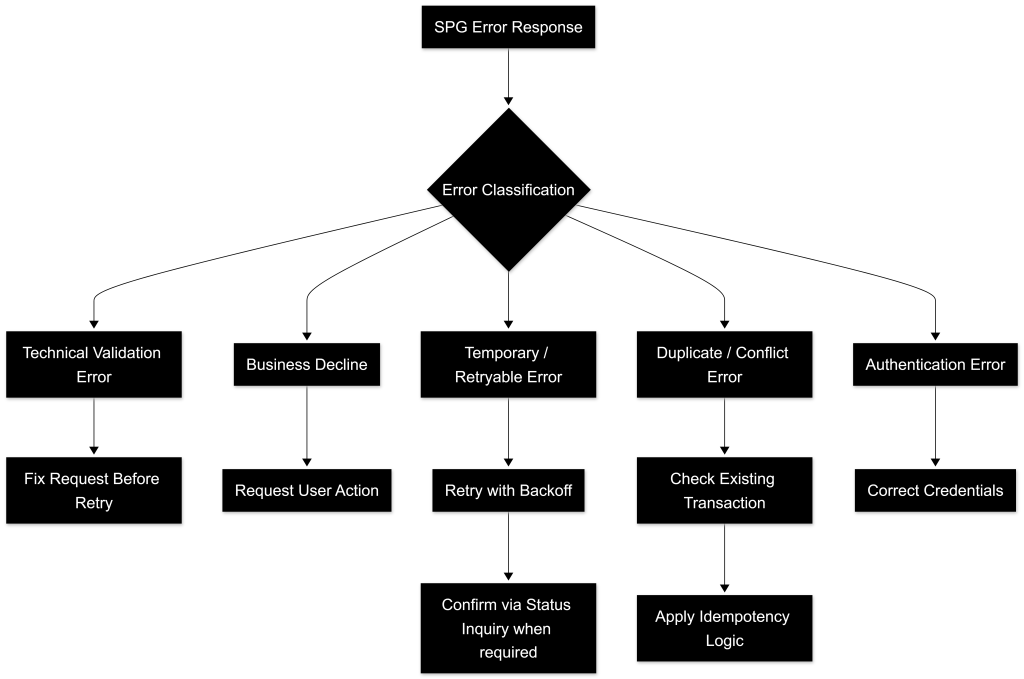
Key Error Handling Rules
- Always evaluate:
returnStatus.statusCodepaymentStatus(when present)
- Always:
- Use
returnStatus.statusDescriptionfor diagnostics - Use Status Inquiry when outcome is unclear
- Use
- Never:
- Retry without classification
- Treat all errors as retryable
- Assume
Declinedis a technical failure
For extended diagnostics and additional transaction context, refer to E.2 – Status Inquiry / Get Status.
Summary
Error handling requires explicit classification and deterministic response strategies.
Each error category implies a different handling approach:
- Validation errors → fix request
- Business declines → user action
- Temporary errors → retry
- Security errors → correct credentials
Correct handling ensures:
- Consistent transaction state management
- Controlled retry behavior
- Reliable production operation