

Overview
Webhook notifications in SIBS Payment Gateway (SPG) follow a consistent structural model, but their content and behavioral implications vary depending on the payment method and transaction type.
This section provides focused examples highlighting method-specific differences in webhook payloads and processing considerations, enabling integrators to correctly interpret and handle notifications across different payment scenarios.
The objective is not to restate full payload definitions, but to emphasize the relevant structural variations and their impact on processing logic.
Credit Card Webhook Example (One-Off and Two-Step)
In Credit Card transactions, webhook notifications typically reflect the outcome of operations such as:
AUTH(authorization)CAPTURE(funds capture)PURS(purchase)
Relevant characteristics:
paymentMethodisCARDpaymentStatusreflects the result of the specific operation- Additional data may include tokenization or 3DS-related context (if applicable)
Example (simplified):
{
    "paymentMethod": "CARD",
    "paymentType": "AUTH",
    "paymentStatus": "Success",
    "transactionID": "tx123",
    "notificationID": "notif001"
}
Processing considerations:
- Distinguish between
AUTHandCAPTUREevents - Do not assume funds are captured after a successful
AUTH - For two-step flows, wait for
CAPTUREconfirmation before finalizing business actions - Use Status Inquiry / Get Status when transaction-state confirmation or reconciliation is required
MB WAY Webhook Example (One-Off and Mandate-Based)
MB WAY webhook notifications may represent both payment execution events and mandate lifecycle events, depending on the transaction type.
Relevant characteristics:
paymentMethodisMBWAY- Webhooks may include mandate-related data when applicable
- In mandate-based scenarios, webhook notifications may present
paymentMethodasMANDATE, indicating that the event relates to a mandate lifecycle rather than a direct payment execution - Processing is inherently asynchronous
Example (simplified):
{
    "paymentMethod": "MBWAY",
    "paymentStatus": "Success",
    "transactionID": "tx456",
    "notificationID": "notif002"
}
Mandate-related scenarios may include additional fields such as:
mandateIdentificationmandateAction(e.g., creation, cancellation)mandateActionStatus
Processing considerations:
- Treat mandate lifecycle events as operationally distinct from payment execution events
- Do not assume immediate completion – user interaction is often required
- Handle asynchronous confirmation delays
- Use Status Inquiry / Get Status when transaction-state confirmation or reconciliation is required before applying business logic
Multibanco Reference Webhook Example
Multibanco Reference payments involve delayed customer action, where the payment is completed outside the system using a generated reference.
Relevant characteristics:
paymentMethodisREFERENCE- Webhook represents asynchronous notification of payment-state transition, which may require confirmation through Status Inquiry / Get Status before final business processing, depending on the integration scenario
- A reference block may be present in the payload
Example (simplified):
{
    "paymentMethod": "REFERENCE",
    "paymentStatus": "Success",
    "transactionID": "tx789",
    "notificationID": "notif003"
}
Processing considerations:
- Expect delays between reference generation and payment completion
- Do not treat reference generation as payment success
- Process final business logic only after a validated final paymentStatus, or after Status Inquiry / Get Status confirmation when required
- Handle expiration scenarios where payment may never occur
Structural Differences Across Payment Methods
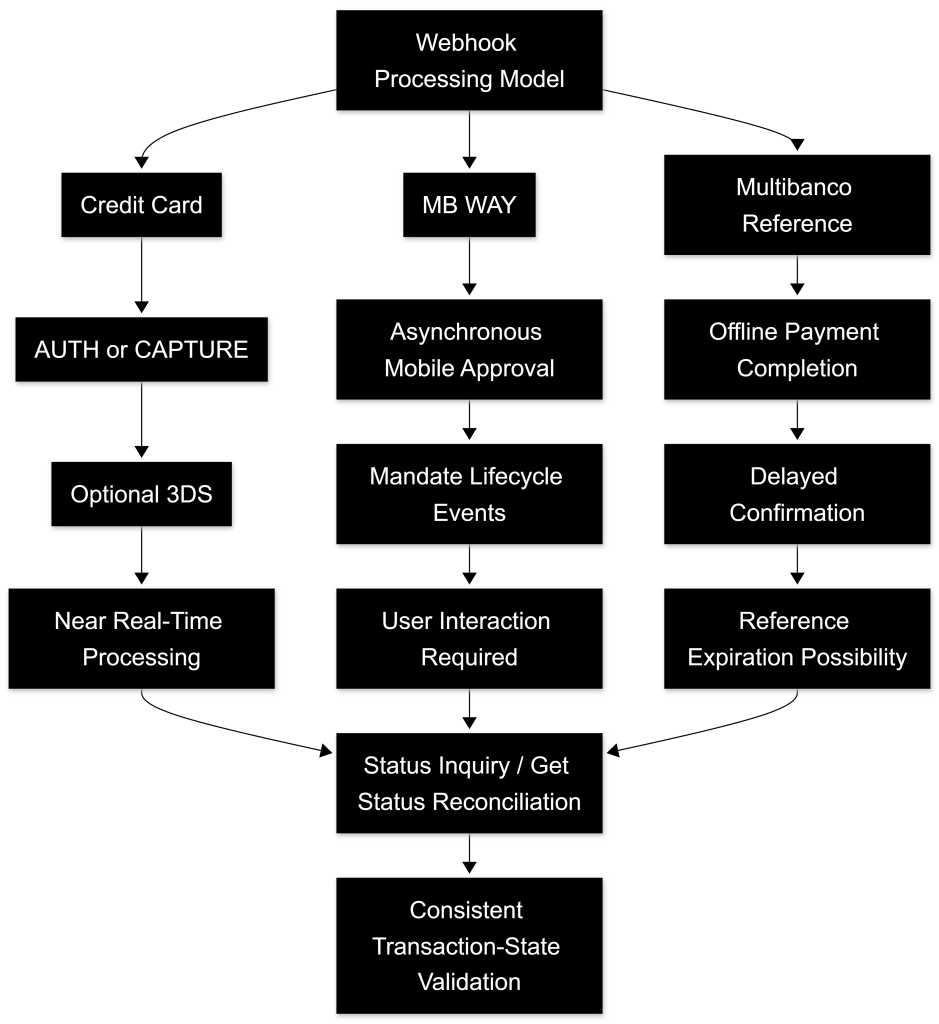
While all webhook notifications share a common base structure, the following aspects vary across methods:
| Aspect | Credit Card | MB WAY | Multibanco Reference |
|---|---|---|---|
| Execution Type | Immediate or two-step | Asynchronous | Delayed (offline) |
| User Interaction | Optional (3DS) | Required | Required |
| Timing | Immediate or near real-time | Near real-time | Potentially delayed |
| Additional Blocks | Token, 3DS | Mandate | Reference details |
| Finality Detection | Depends on flow (AUTH vs CAPTURE) | Webhook / Status when required | Webhook / Status when required |
These differences directly impact how webhook notifications must be interpreted, orchestrated, and reconciled.
Processing Implications
Regardless of payment method, the following principles must always be applied:
- Do not rely solely on the webhook payload for final decision-making
- Use Status Inquiry / Get Status when transaction-state confirmation or reconciliation is required
- Handle asynchronous behavior explicitly
- Ensure idempotent processing across all methods
- Avoid assumptions based on a single notification
Method-specific differences must influence processing logic but not override the core consistency model.
This validation model follows the transaction-state confirmation and reconciliation principles defined in E.2 – Status Inquiry / Get Status.
When extended operational diagnostics are required for method-specific lifecycle analysis or troubleshooting, additional visibility may leverage Inquiry Details as described in E.2.10 – Inquiry Details API.
Final Consideration
Webhook notifications vary in structure and behavior depending on the payment method, but they must always be processed within the same consistent, resilient, and reconciliation-oriented integration model.
A correct implementation requires:
- understanding method-specific nuances
- applying appropriate processing logic
- maintaining consistent validation and reconciliation practices
By combining method-specific awareness with a unified processing model, integrators ensure that webhook handling remains accurate, reliable, and consistent across all supported payment methods.