

Overview
The Transaction Details page provides comprehensive information about an individual transaction processed through the SIBS Payment Gateway.
From the transaction search results, users can open a specific transaction to review its operational, financial, and technical information. The information displayed depends on the type of transaction being viewed.
To open the Transaction Details page:
Step 1. Locate the desired transaction using the Transaction Search feature.
Step 2. Select the transaction.
Step 3. Select Details.
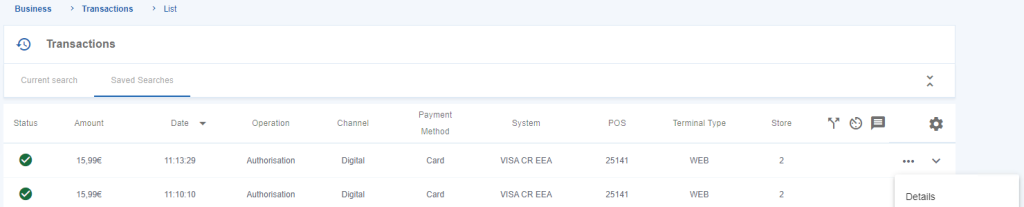
Figure 1 – View transaction details
Transaction Information
The Transaction Details page groups information into logical sections according to the type of information being presented, allowing users to review all available operational, financial, and technical information associated with the selected transaction.
Depending on the transaction type, the displayed information may vary. These groups are described later in this chapter.
Transaction Fields
The information presented within the Transaction Details page includes operational, identification, merchant, terminal, card, customer, and payment reference information.
The available fields may include:
| Group | Information |
|---|---|
| Transactions | Date, Operation, Amount, Currency Code, Status, Error Reason, Error Description, Transaction ID, Merchant Transaction ID, Authorisation ID, Authorisation Key, Original Authorisation Key |
| Merchant | Merchant, Store |
| Terminal | POS, Terminal Type, Channel |
| Acceptance | Acceptance Code in the Network, Acceptance Code Type in the Channel, Data Entry Mode |
| Card | Country Code, Presence, Alias, Masked PAN |
| Cardholder | Code, Presence, Name, E-mail, Phone, Mobile Phone, Postal Code, City |
| Payment Reference | Payment Owner Code, Payment Entity Code, Payment Reference |
The availability of individual fields depends on the transaction type and the payment method used.
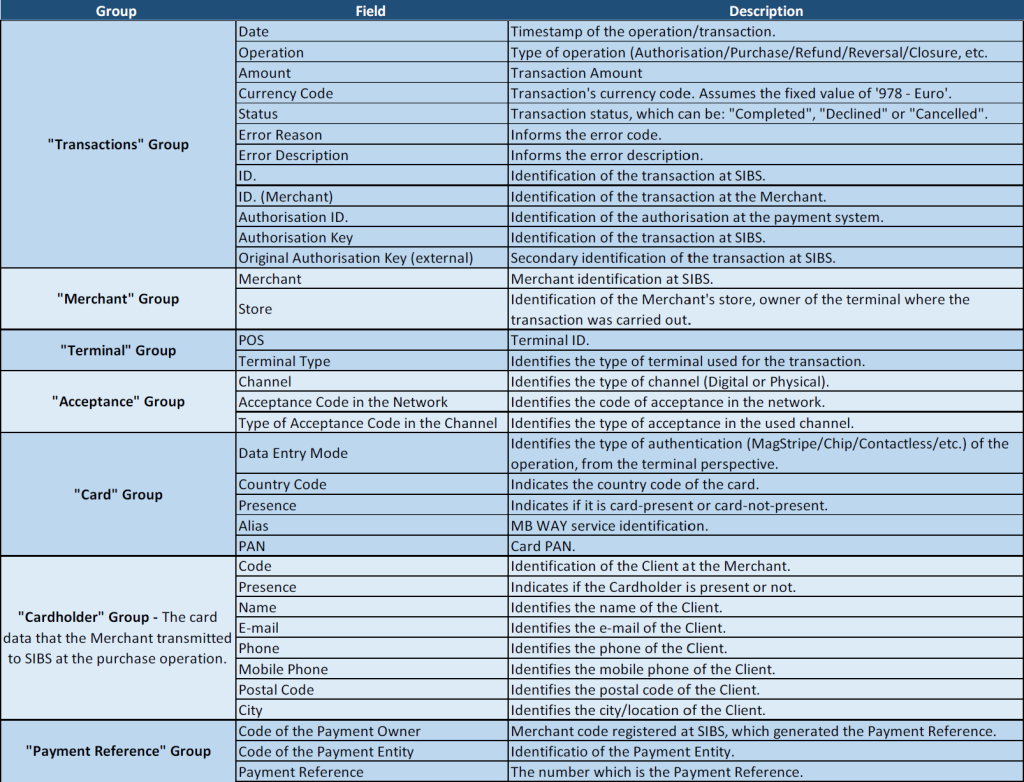
Figure 2 – Fields displayed on the transaction details
Transaction Information Groups
The information displayed within the Transaction Details page is organised according to its purpose.
Transactions
Provides the operational information associated with the selected transaction, including transaction identifiers, status, amount, currency, dates, and authorisation information.
Merchant
Displays the merchant and store associated with the transaction.
Terminal
Displays information about the terminal that processed the transaction, including the terminal identifier, terminal type, and processing channel.
Acceptance
Displays information associated with transaction acceptance and the authentication method used during processing.
Card
Displays the card information associated with the transaction, when applicable.
Cardholder
Displays the customer information provided during the transaction, when available.
Payment Reference
Displays the payment reference information associated with MULTIBANCO Reference transactions.