

Overview
The Associated Transactions view displays all transactions related to the selected transaction, allowing users to understand the complete lifecycle of a payment.
Associated transactions provide visibility into the operations performed throughout a payment’s lifecycle, enabling users to determine whether a transaction has been completed, refunded, or whether an authorisation has been cancelled.
This view also provides access to the operational actions that may be available for each associated transaction.
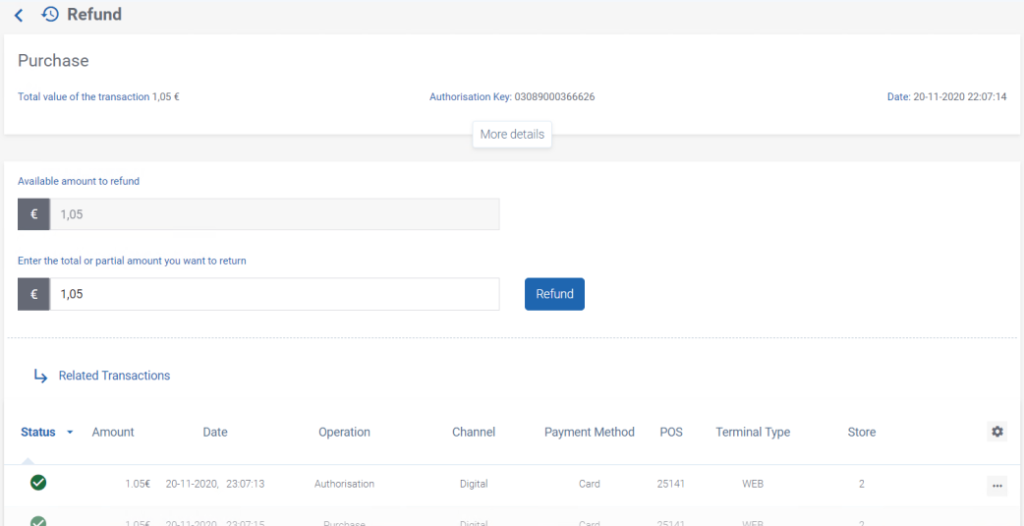
Figure 1 – Associated Transactions Inquiry
Transaction Relationships
Associated transactions are displayed in descending chronological order, showing all transactions related to one another.
This organisation allows users to understand the relationship between transactions and to follow the progression of a payment throughout its lifecycle.
For example, associated transactions can be used to determine whether:
- A purchase authorisation has been collected (captured).
- A purchase authorisation has been cancelled (authorisation reversal).
- A completed payment has been refunded.
Available Operations
Each associated transaction provides access to the operations that are applicable to its current status.
The available operations depend on:
- The transaction type.
- The current transaction status.
- The services enabled for the merchant.
- The permissions assigned to the authenticated user.
The transaction currently being viewed does not display an operations menu.
Operational Context
Associated Transactions provides the operational context required before performing transaction operations.
For example, before performing certain operations, users should verify the associated transactions to confirm the current state of the payment lifecycle.
This allows users to determine whether:
- An authorisation has already been cancelled.
- An authorisation has already been collected.
- A payment has already been refunded.
The corresponding operational procedures are described in G.1.4.4 – Transaction Operations.