

Overview
The Reporting area provides access to operational reports and analytical information available within the SIBS Backoffice platform.
Depending on the authenticated user’s permissions and the services enabled for the merchant, users can consult and download reports that support operational monitoring, reconciliation activities, and business analysis.
The availability of individual reports depends on the merchant configuration, enabled services, and assigned user profile.
Accessing Reports
Reporting capabilities are available from the Analytics section of the SIBS Backoffice navigation menu.
Selecting the Reports option displays the reports available for the authenticated user.
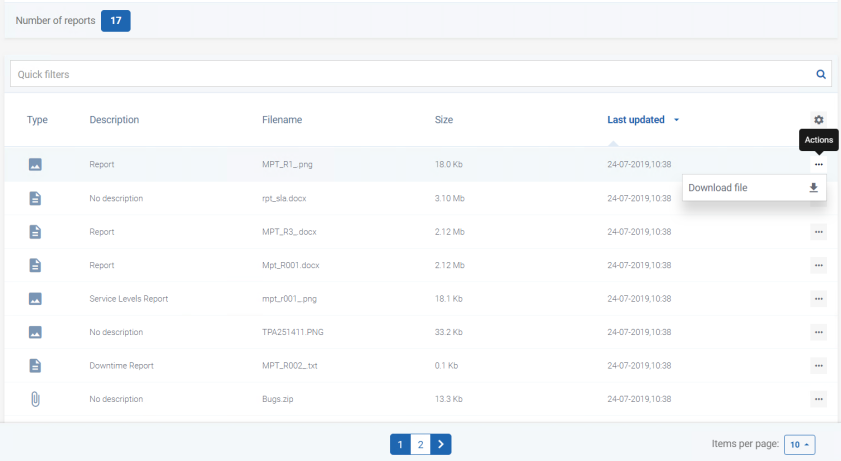
Figure 1 – Accessing the Reports section from the Analytics menu
Downloading Reports
Available reports can be downloaded directly from the Reports section.
To download an available report:
Step 1. Open the Analytics menu.
Step 2. Select Reports.
Step 3. Locate the required report.
Step 4. Click the corresponding Download action.
Step 5. Save the downloaded file to a secure location on your local computer.
The downloaded file can then be used for operational analysis, reconciliation activities, or offline processing.
Supported Download Formats
Depending on the type of file being downloaded, the Backoffice may provide files in one of the following formats:
- JPEG
- PNG
- GIF
- ZIP
- DOC
- XLS
The available file format depends on the type of report or file being downloaded and is determined by the Backoffice platform.

Available Reports
The exact reports available vary according to the services enabled for the merchant and may evolve over time as new capabilities are introduced.
The reports available for a merchant depend on:
- Merchant services enabled.
- User profile and permissions.
- Operational configuration of the Backoffice environment.
Depending on the configured services, reports may provide information related to:
- Payment transactions.
- Operational activity.
- Payment Gateway services.
- Merchant operations.
- Other analytical information available within the Backoffice.
Permissions
Access to reporting functionality is controlled through the Backoffice permission model.
Users may only access reports that are available for their assigned profile and merchant scope.
Depending on the assigned permissions, users may have access to:
- Viewing available reports.
- Downloading report files.
- Accessing analytical information.
- Exporting operational data.
Best Practices
When working with reports, consider the following recommendations:
- Verify that the selected merchant context is correct before downloading a report.
- Ensure that the reporting period matches the intended operational analysis.
- Store downloaded reports securely, as they may contain operational and financial information.
- Correlate downloaded reports with transaction searches, dashboards, and notification logs when performing reconciliation or investigating operational issues.