

Overview
The Token Management area allows merchants to manage payment card tokens generated during SIBS Payment Gateway payment operations that support card tokenization.
Card tokenization replaces sensitive payment card information with a unique token that can subsequently be used to identify the underlying payment instrument without exposing the original card data. This mechanism enables applications to perform subsequent payment operations without storing sensitive card information, helping reduce the handling of cardholder data.
From the Token Management area, authorized users can:
- View the card tokens generated by the SIBS Payment Gateway.
- Review the tokens associated with the selected merchant.
- Remove tokens that are no longer required.
Token management is performed exclusively through the SIBS Backoffice and is available only to users with the appropriate permissions.
Relationship with Payment Tokenization
Payment card tokens are automatically generated by the SIBS Payment Gateway during payment operations that support card tokenization. Once created, these tokens become available in the Token Management area for operational management.
These tokens uniquely identify the associated payment card while preventing applications from storing or processing the original card number.
This chapter describes the operational management of generated tokens from the SIBS Backoffice.
The functional use of payment card tokens during payment operations depends on the integration model and payment method being implemented. Detailed implementation examples are provided in D. Payment Methods, while complete transaction scenarios using tokenized payments are illustrated in F.1 – End-to-End Integration Examples.
Accessing Token Management
The Token Management area is available from the SIBS Payment Gateway section of the SIBS Backoffice navigation menu.
Selecting Token Management displays the list of payment card tokens associated with the currently selected merchant.
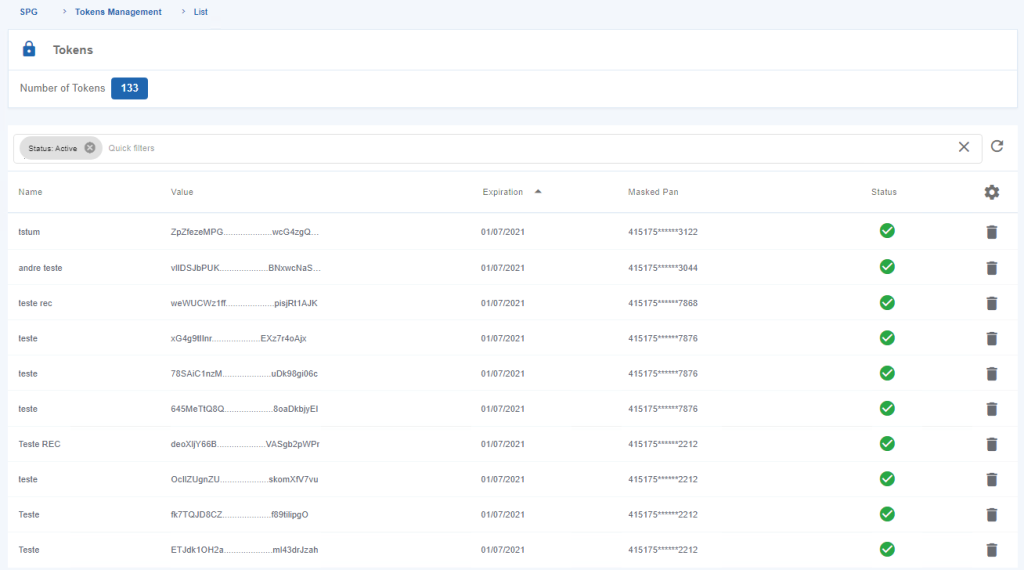
Figure 1 – List of Tokens Generated by the SPG
Viewing Generated Tokens
The Token Management page provides a consolidated view of all payment card tokens generated by the SIBS Payment Gateway for the selected merchant.
Each entry represents a payment card that has been tokenized by the SIBS Payment Gateway. The generated token may subsequently be referenced by supported payment operations that allow the reuse of previously tokenized payment cards.
The Backoffice allows authorized users to review the tokens currently associated with the merchant account.
Token List
The token list displays the payment card tokens currently managed by the SIBS Payment Gateway.
Depending on the merchant configuration and the payment operations performed, multiple payment card tokens may be available for consultation.
The list allows merchants to identify the payment card tokens currently stored by the SIBS Payment Gateway and available for supported payment operations.
Removing a Token
Payment card tokens that are no longer required can be removed from the Backoffice.
Removing an existing payment card token permanently deletes the token from the merchant’s token repository. After removal, the token can no longer be referenced by supported payment operations.
To remove a token:
Step 1. Locate the required payment card token.
Step 2. Open the Options menu (three vertical dots).
Step 3. Select Delete.
Confirm the operation when prompted.
After confirmation, the selected payment card token is removed from the merchant’s token list.
Important
Payment card tokens managed from the Token Management area are distinct from the Bearer Tokens used for API authentication.
- Payment card tokens identify tokenized payment cards and are generated as part of supported payment operations.
- Bearer Tokens authenticate applications when invoking the SIBS Payment Gateway APIs and are obtained through the authentication process described elsewhere in this documentation.

Permissions
Access to the Token Management area is controlled through the SIBS Backoffice permission model.
The token management operations available to each user depend on:
- The authenticated user’s profile.
- The permissions assigned to that profile.
- The currently selected merchant.
- The Token Management service being enabled for the merchant account.
As a result, different users may have access to different token management operations while using the same Backoffice environment.