

Overview
The Common Interface Features described in this chapter are shared across multiple areas of the SIBS Backoffice.
Rather than being specific to a particular module or payment service, these features provide a consistent user experience when navigating, organizing, and exporting tabular information displayed throughout the platform.
Depending on the operational area being used, these common interface capabilities allow users to:
- Navigate large datasets using pagination.
- Control the number of records displayed on each page.
- Export displayed information for offline analysis or reporting.
- Sort table contents according to the available columns.
These interface features behave consistently across the various Backoffice modules, allowing users to work efficiently with operational information regardless of the functional area being accessed.
Pagination
Many Backoffice pages display information in tabular format. When the number of available records exceeds the number of items configured for a page, the Backoffice automatically organizes the information into multiple pages.
The Items per page option allows users to select how many records are displayed on each page. The available options are:
- 10 items
- 20 items
- 50 items
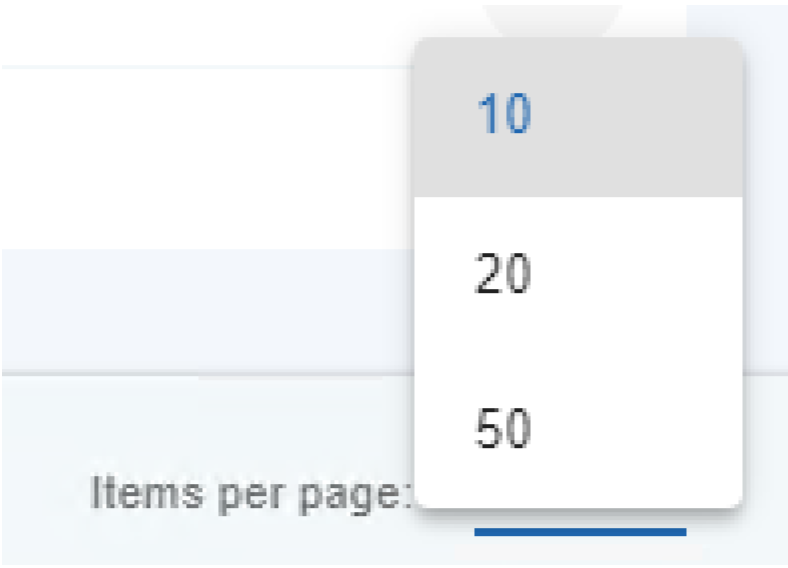
Figure 1 – Setting the Number of Items per Page
When the total number of records exceeds the selected page size, pagination controls are displayed below the table, allowing users to navigate through the available pages.

Figure 2 – Example of Pagination
The SIBS Backoffice loads records in blocks of 50 items. When additional records are available, users must navigate to the last loaded page and then select the Next navigation control to load the following block of 50 records. This process can be repeated until all available records have been loaded.
Export
Many Backoffice pages allow the information currently displayed to be exported as a CSV (Comma-Separated Values) file for further analysis or processing.
Selecting the Export button downloads a CSV file containing the records currently loaded in the table.
Before exporting data, users should ensure that all required records have been loaded. Since the Backoffice retrieves information in blocks of 50 records, users may need to continue navigating through the pagination controls until every required record has been loaded.

Figure 3 – Export Button
Once all required records have been loaded, the generated CSV file contains all records currently loaded in the table.

Sorting
Most Backoffice tables support sorting by column.
Users can sort the displayed information in ascending or descending order by selecting the corresponding column header. Repeatedly selecting the column header changes the sorting order, allowing information to be organized according to the values displayed in that column.

Figure 4 – Sorting Columns
Sorting is applied to the information currently displayed within the selected table, making it easier to locate and analyze specific records.
These common interface features are available wherever supported by the corresponding Backoffice module, providing a consistent user experience across the platform.