

Overview
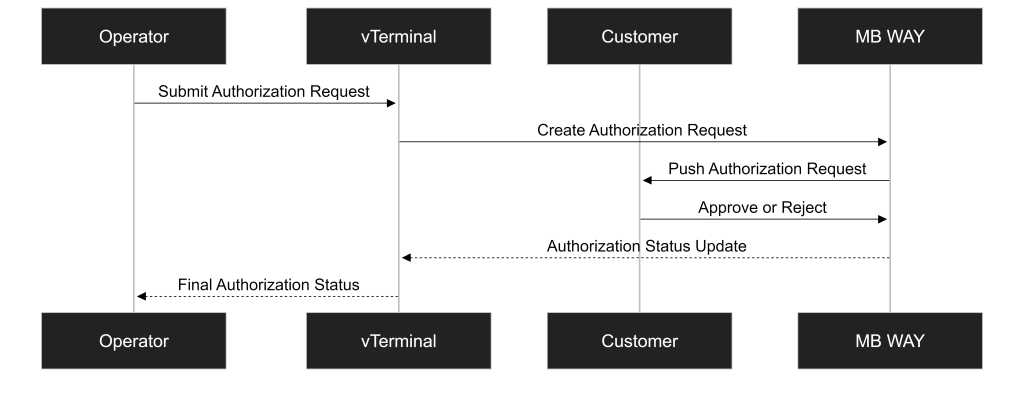
The MB WAY Authorized Payment flow in the Virtual Terminal allows an operator to manually initiate a customer authorization request directly from Backoffice.
This operation is used when the merchant needs to obtain customer approval for future merchant-initiated MB WAY payment collections.
This flow is:
- Immediately initiated by the operator through the vTerminal
- Asynchronously completed following customer approval in the MB WAY application
The authorization is only completed after the customer approves the request in the MB WAY application.
This chapter describes the end-to-end operational flow, including:
- Form completion
- Authorization initiation
- Customer interaction
- Final status validation
A successful authorization creates a reusable customer authorization that may later be used for future merchant-initiated payment collections, depending on the merchant’s payment model.
This chapter explains how to manually create an MB WAY authorization through the Virtual Terminal interface.
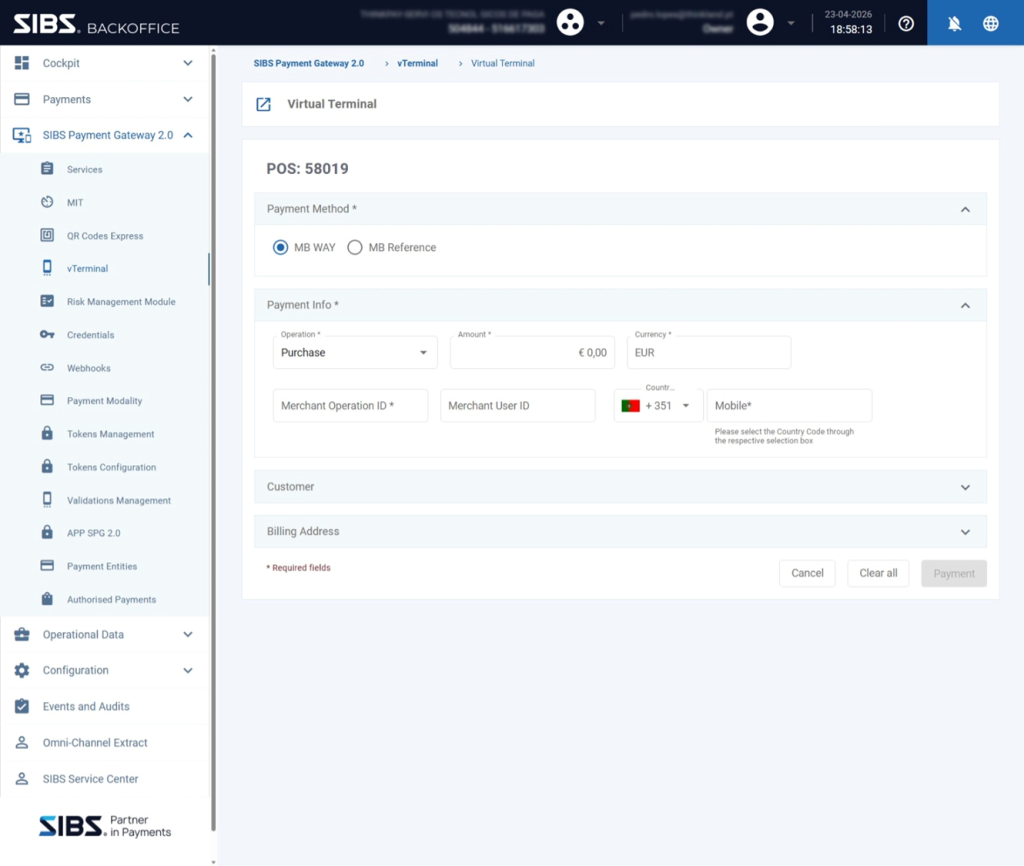
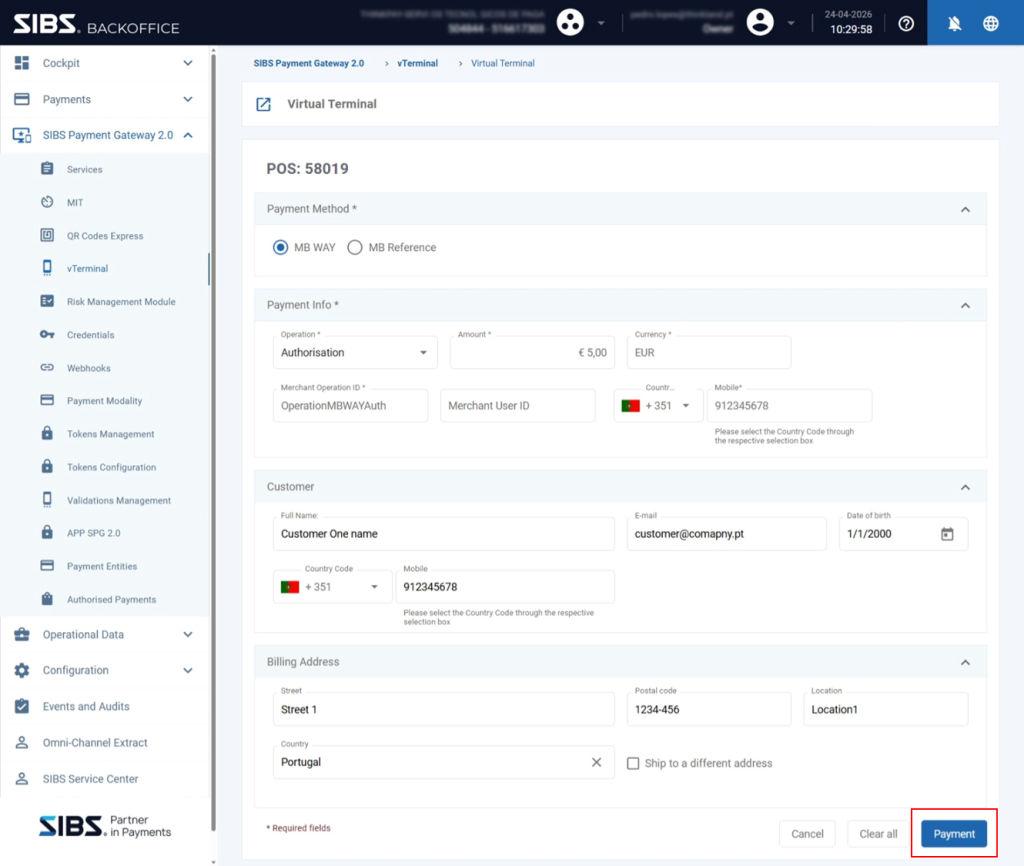
Step 1 – Access Virtual Terminal
Navigate to:
SIBS Payment Gateway 2.0 → vTerminal → Virtual Terminal
When the page loads:
- MB WAY is selected by default
- The default operation type is configured as Purchase
The operator must review the screen configuration before proceeding.
Step 2 – Select Authorization Operation
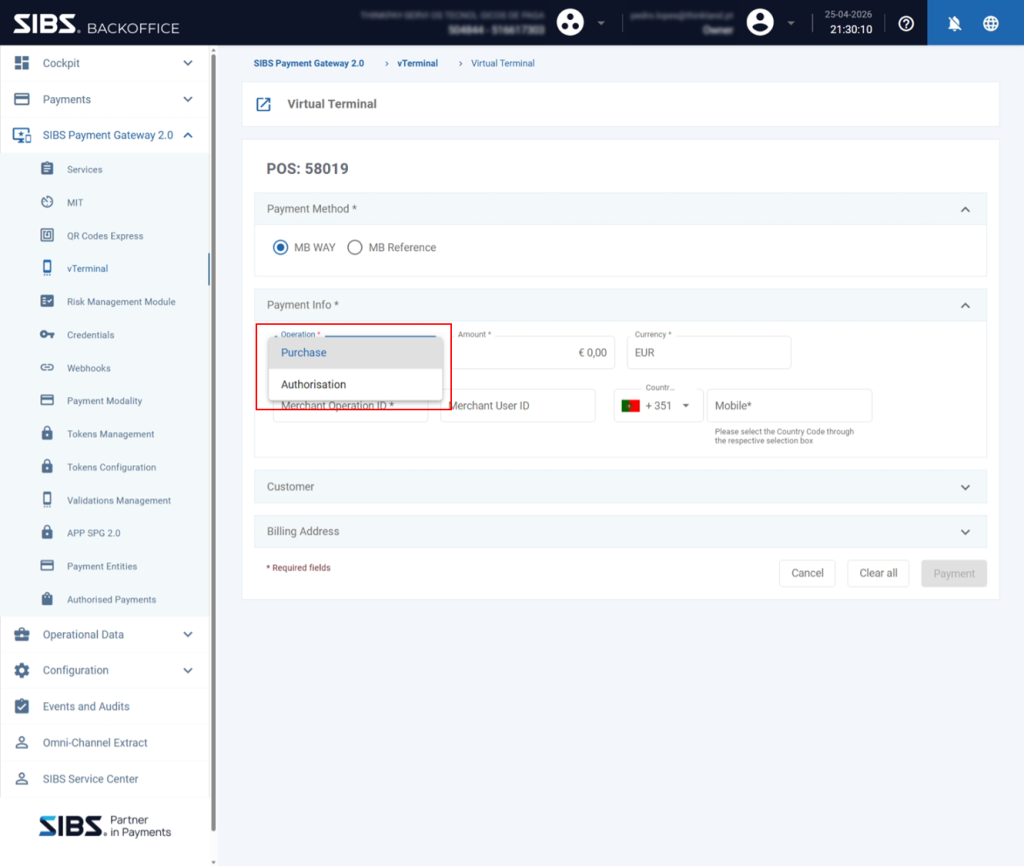
In the Operation field:
Change:
Purchase
To:
Authorization
This changes the transaction behavior from an immediate payment request to an authorization request.
After this step:
The platform prepares the transaction as an MB WAY authorization flow.
Step 3 – Expand Customer and Billing Sections
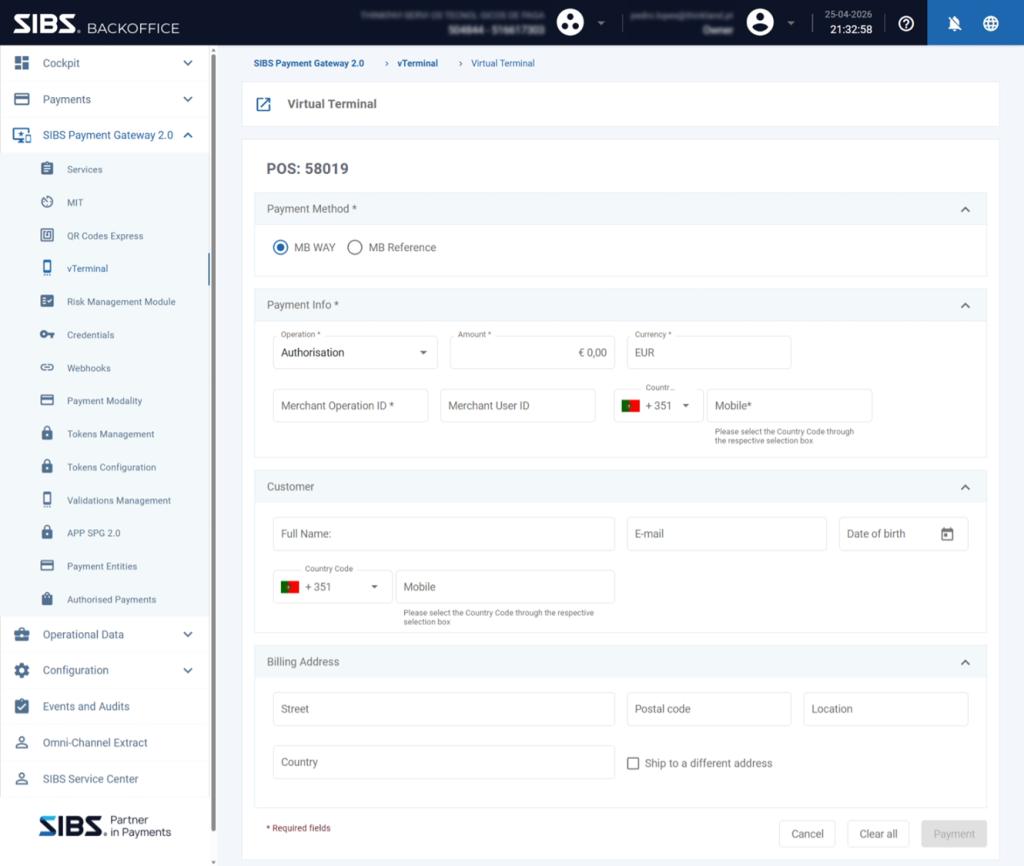
Expand:
- Customer
- Billing Address
These sections allow additional customer information to be registered before the authorization request is submitted.
Customer information should be collected and handled according to the applicable data protection and privacy requirements defined by the merchant operational environment.
Customer section includes:
- Full Name
- Date of Birth
- Mobile Number
Billing Address section includes:
- Street
- Postal Code
- Location
- Country
These fields may support:
- Customer traceability
- Internal reconciliation processes
- Operational reporting
- Support investigations
Step 4 – Fill Payment Information
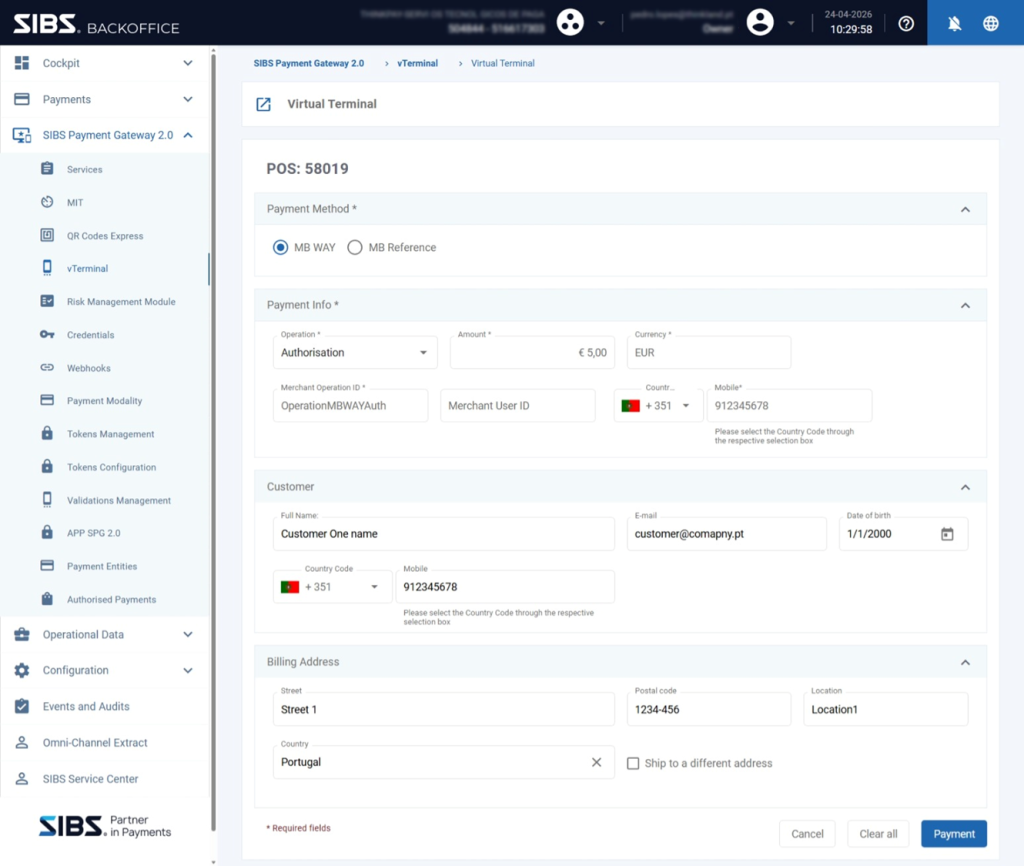
Complete all required fields before submitting the authorization request.
Amount
Defines the authorization amount associated with the request.
Depending on the merchant configuration, this may represent:
- A validation amount
- A predefined amount associated with the authorization request
- A customer approval authorization for future merchant-initiated payment collections
Currency
Defines the transaction currency.
This should match the merchant terminal configuration.
Merchant Operation ID (merchantTransactionId)
Merchant-defined identifier used for transaction tracking.
This value should remain unique for each authorization request because it supports:
- Reconciliation
- Operational monitoring
- Support investigations
- Transaction traceability
Merchant User ID
Optional internal customer identifier defined by the merchant.
This field may be used to associate the authorization with an internal customer record.
Country Code
Defines the country prefix associated with the customer mobile number.
This should match the customer’s phone number.
Mobile Number
Defines the customer mobile number registered in MB WAY.
This is one of the most critical fields in the process because the authorization request is sent to this number.
Incorrect information may result in:
- Failed request delivery
- Customer inability to approve
- Authorization expiration
Customer Information
Customer information helps identify the customer associated with the authorization request.
These fields include:
- Full Name
- Date of Birth
- Mobile Number
Billing Address
Billing information may support internal merchant processes and customer record management.
These fields include:
- Street
- Postal Code
- Location
- Country
Before submitting the request, operators should validate all information carefully.
Step 5 – Submit Authorization Request
Click Payment.
This action:
- Submits the authorization request
- Sends the authorization request for customer approval through MB WAY
- Initiates the customer approval flow
At this stage:
The authorization is not yet completed.
The platform only confirms that the request was successfully initiated.
Step 6 – Session Handling (Conditional)
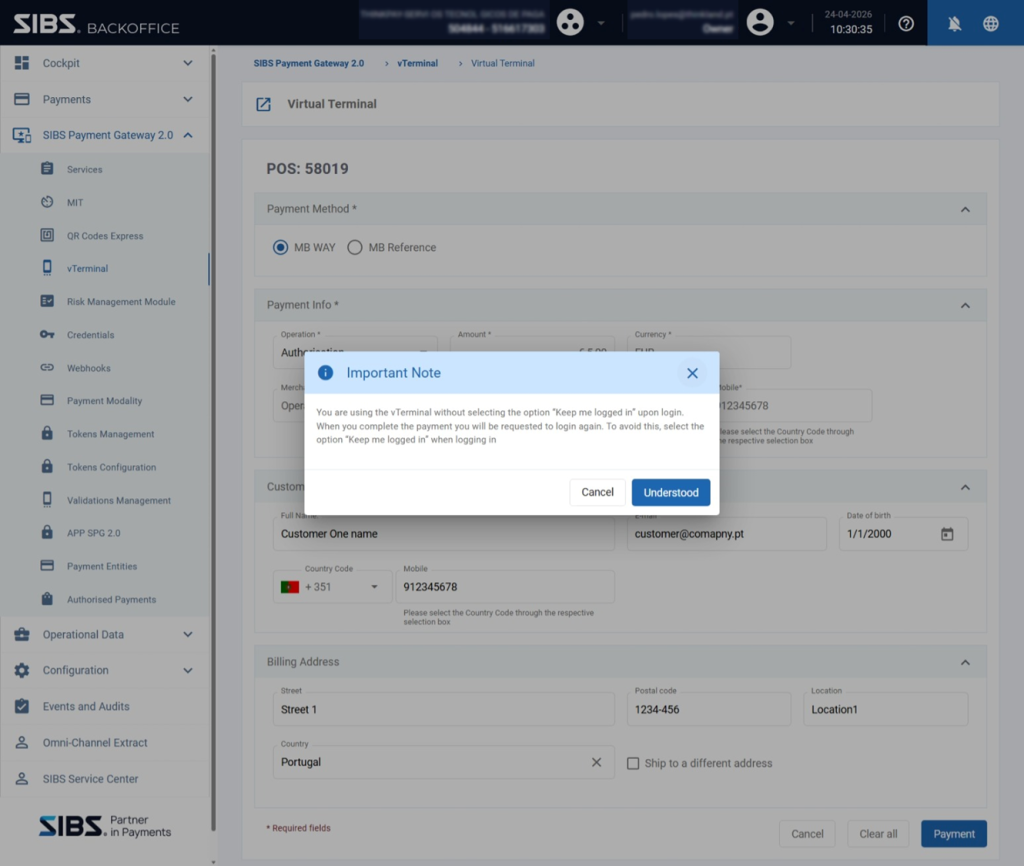
If the operator did not enable the Keep me logged in option during login:
The platform may display a warning indicating that re-authentication may be required after submission.
This behavior does not affect:
- The authorization request
- Customer approval
- Transaction processing
Step 7 – Customer Authorization
After submission:
The customer receives the authorization request in the MB WAY application.
The customer must:
- Open the MB WAY application
- Review the request
- Approve or reject the authorization
This customer interaction happens outside the Backoffice platform.
The authorization request remains available for customer approval for up to approximately 10 minutes, after which it expires automatically if no action is taken.
Possible customer outcomes include:
- Approval
- Rejection
- No action (expiration)
Authorization Lifecycle Considerations
A successful approval creates a reusable MB WAY authorization that may later be used for future merchant-initiated payment collections.
The platform internally associates the authorization with the customer approval record created during this process. Depending on the merchant integration model, this authorization reference may later be used in subsequent recurring or merchant-initiated payment operations.
Depending on the merchant implementation:
- Future payments may be executed using the existing authorization
- The customer may not need to manually approve each future transaction
- Authorization lifecycle actions may later include renewal, suspension, reactivation, or cancellation
The Virtual Terminal flow only handles the initial authorization creation step.
Subsequent collections or lifecycle actions may be handled through other operational or API-based processes.
Step 8 – Re-Authentication (Conditional)
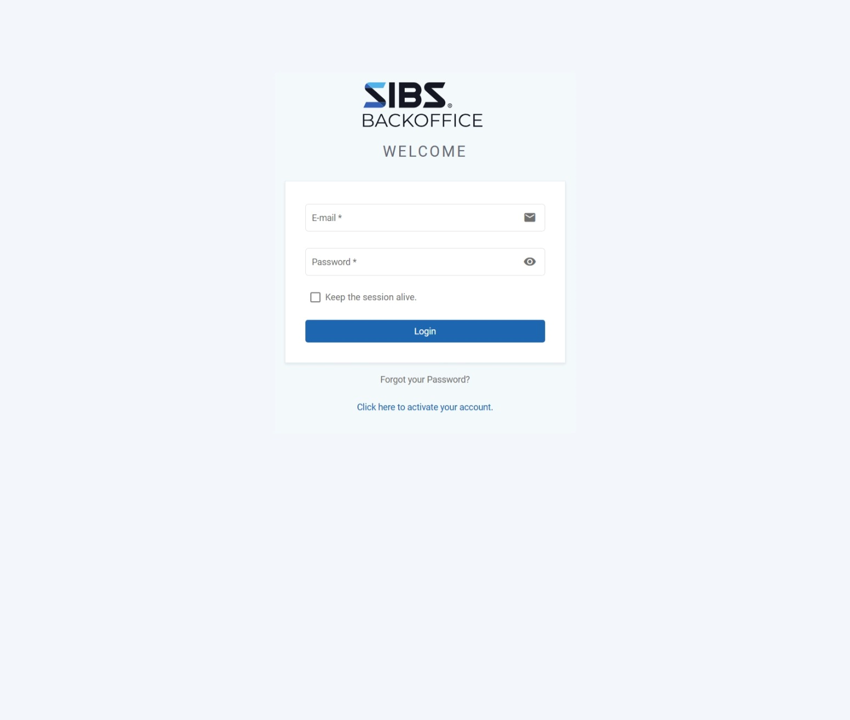
If the session expires:
The operator may be redirected to the login page.
The operator must:
- Authenticate again
- Return to Backoffice
This does not interrupt the authorization request already submitted.
Step 9 – Check Authorization Status
After authentication:
The platform redirects the operator to the transaction status screen.
The operator may refresh the page until the authorization reaches a final state, including successful approval, rejection, or expiration.
For additional information regarding transaction states, status interpretation, and asynchronous transaction processing, refer to the SPG transaction status and notification chapters of this documentation.
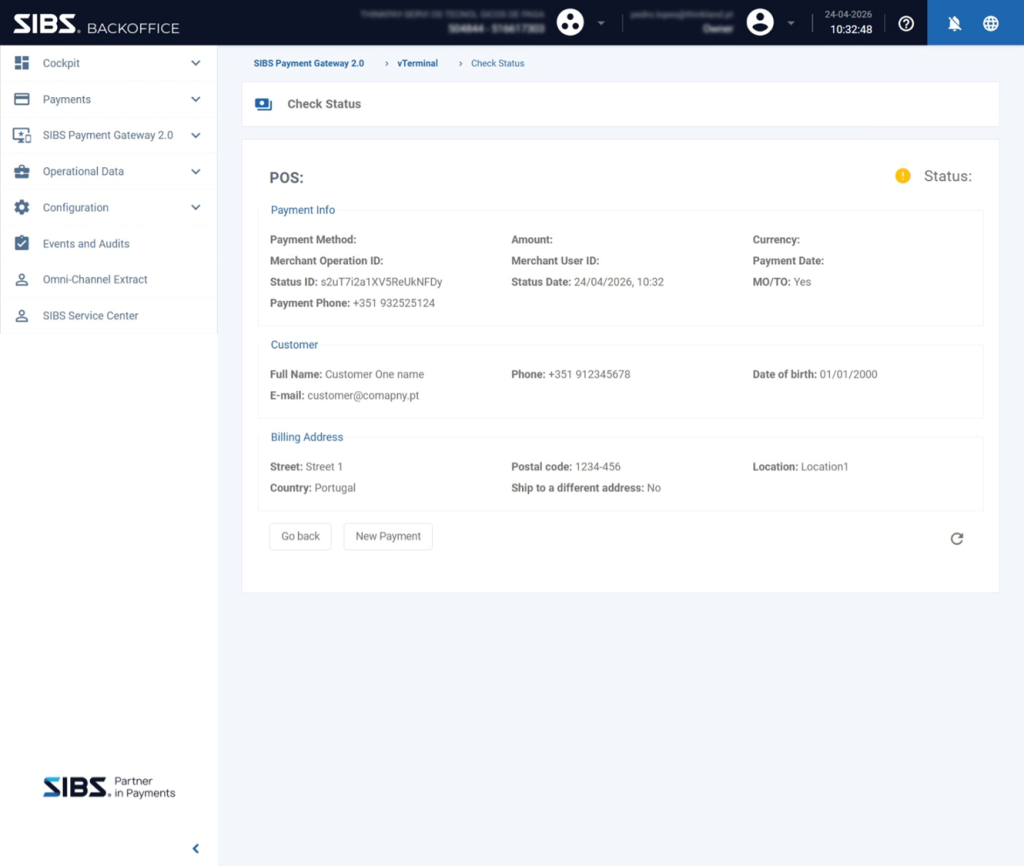
Step 10 – Final Result
The final status screen displays operational details such as:
- Payment Method
- Amount
- Currency
- Merchant Operation ID (
merchantTransactionId) - Transaction identifiers
- Customer information
- Billing information
Possible final outcomes include:
Success
The customer approved the authorization request successfully.
The customer authorization is now successfully established and may be used for future merchant-initiated payment collections depending on the merchant configuration.
Declined
The customer rejected the authorization request.
The authorization is not created.
Pending
Customer approval is still pending.
The operator may continue monitoring the status.
Expired
The customer did not approve the authorization request within the allowed authorization window. The request expires automatically and the authorization is not created.
Summary
The MB WAY Authorized Payment flow in Virtual Terminal allows operators to manually create customer authorizations directly from Backoffice.
This process requires:
- Correct operation selection
- Accurate customer information
- Successful customer approval
- Final status validation
A successful authorization creates the customer authorization required for future merchant-initiated MB WAY payment operations.
This operation only creates the customer authorization required for future payments. Actual future collections occur separately through the appropriate operational or API-driven payment flows.