

Overview
The Virtual Terminal operation form is the central interface used to manually initiate payment operations within the SIBS Backoffice.
It provides a structured and guided data entry model, ensuring that all required information for a given payment flow is captured with consistency and validation. The form is dynamically adjusted based on the selected payment method and operation type, exposing only the fields that are relevant for the specific scenario.
Across all supported flows, the form is organized into logical blocks:
- Payment Method selection
- Payment Information
- Customer data (optional)
- Billing information (optional)
While the structure remains consistent, the field set and validation rules vary depending on whether the user is performing:
- An MB WAY payment (Purchase)
- An MB WAY Authorization (Mandate Creation)
- A Multibanco Reference Generation
This chapter details:
- The common fields shared across all operations
- The specific fields and behaviors per payment method
- A consolidated reference table summarizing all required and optional inputs
The following vTerminal subchapters provide step-by-step operational procedures for MB WAY payments, MB WAY Authorized Payments (Mandate Creation), and Multibanco Reference generation using these forms.
Understanding these forms is essential to correctly execute operations in the Virtual Terminal, as incorrect or incomplete data directly impacts transaction processing and transaction reconciliation.
Common Fields (All Payment Methods)
The following fields are present across all payment methods and operations.
Payment Method Block
- Payment Method
Defines the payment channel used for the transaction (e.g., MB WAY or Multibanco Reference).
This selection dynamically controls the remaining form fields.
Payment Information Block
- Operation
Defines the type of transaction (e.g., Purchase, Authorization, Generate Multibanco Reference). - Amount
Monetary value of the transaction. - Currency
Currency of the transaction (typically EUR). - Merchant Operation ID (
merchantTransactionId)
Merchant-defined identifier used for internal reconciliation and transaction traceability. - Merchant User ID
Optional identifier representing the end customer or an internal user reference defined by the merchant.
Customer Block (Optional)
- Full Name
- Date of Birth
- Country Code
- Mobile
These fields enrich the transaction context and may support operational or reconciliation processes.
Billing Address Block (Optional)
- Street
- Postal Code
- Location
- Country
- Ship to a different address
These fields are optional and primarily used for customer data enrichment.
MB WAY (Purchase and Mandate Creation)
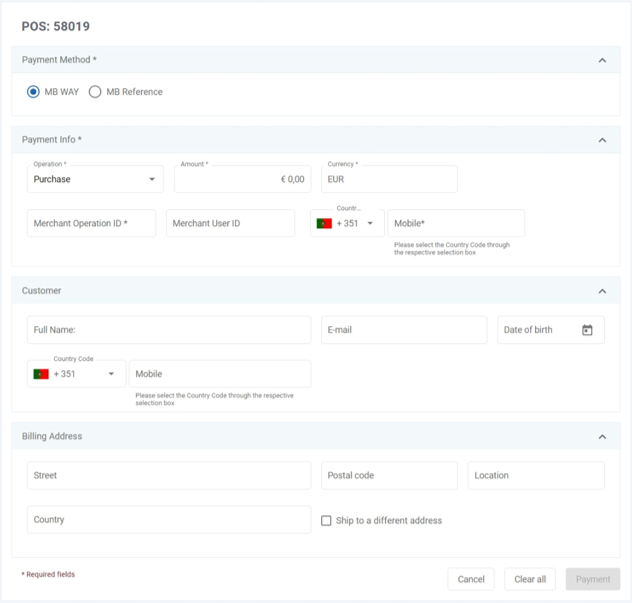
For MB WAY operations (Purchase and Mandate Creation), the following additional fields are required:
- Country Code
Country prefix associated with the mobile number. - Mobile
Mobile number of the customer receiving the MB WAY payment request.
Behavior (MBWAY Purchase)
- A payment request is sent to the customer’s MB WAY application.
- The transaction is completed upon user approval on the mobile device.
Behavior (MBWAY Mandate Creation)
- Instead of immediate payment, this operation creates a mandate (authorised payment).
- This mandate can later be used for Merchant Initiated Transactions (MIT).
- No immediate payment collection occurs during mandate creation.
Multibanco Reference – Generation
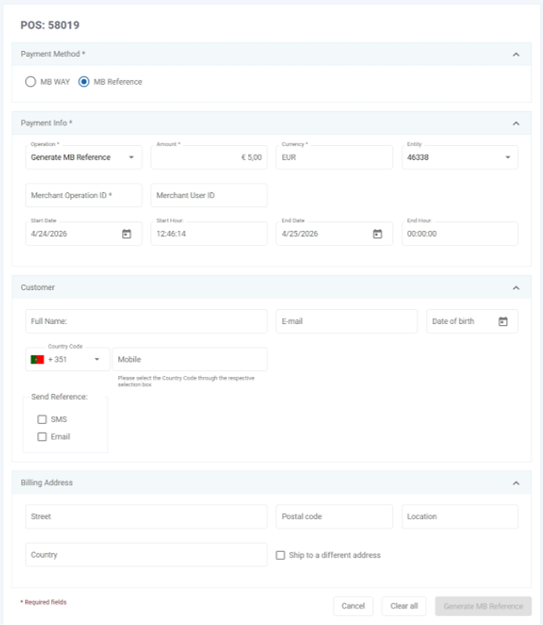
For Multibanco Reference generation, the form adapts to include:
- Entity
Entity associated with the generated reference. - Start Date / Start Hour
Beginning of the reference validity period. - End Date / End Hour
End of the reference validity period. - Send Reference (optional)
Delivery mechanism for the reference (e.g., SMS or Email).
Behavior
- A payment reference is generated.
- The customer completes the payment asynchronously using the generated Multibanco Reference through the available Multibanco payment channels.
- The amount defined during reference generation represents the expected payment value, but the actual payment is only completed when the customer performs the payment using the generated reference.
Field Behavior and Conditional Visibility
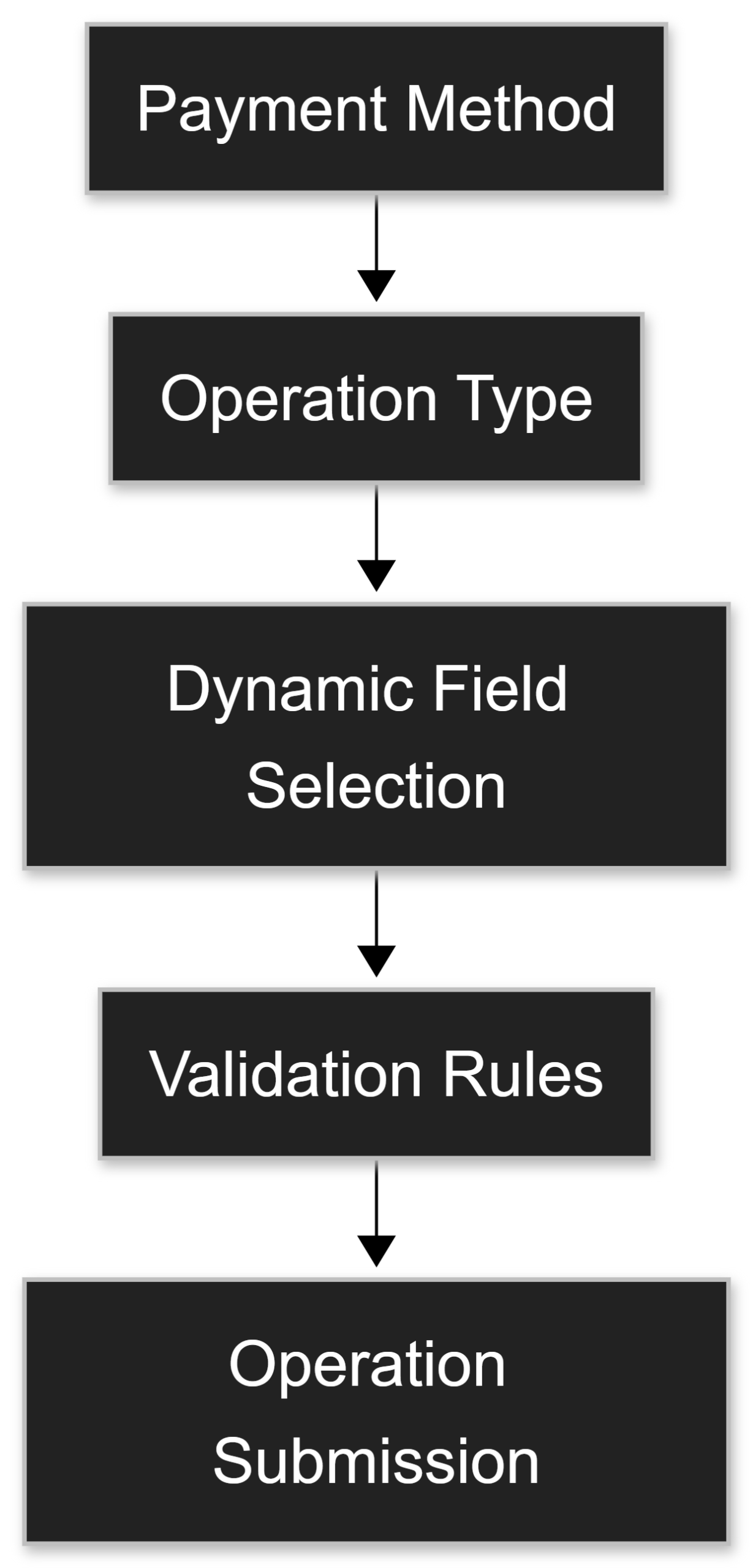
The Virtual Terminal dynamically adjusts the form based on:
- Selected payment method
- Selected operation type
This dynamic behavior ensures that:
- Only context-relevant fields are displayed
- Mandatory fields are enforced according to the operation
- Validation rules are applied consistently per payment method
This reduces configuration errors and ensures that submitted operations comply with the expected processing requirements of each payment flow.
Summary Table
The following table consolidates all fields across the supported operations.
| Block | Field | Description | Mandatory / Optional |
|---|---|---|---|
| Payment Method | Payment Method | Selection of payment method (MB WAY or Multibanco Reference). | Mandatory |
| Payment Information | Operation | Defines the type of operation to be performed (Purchase, Authorization, Generate Multibanco Reference), which controls the behavior of the transaction. | Mandatory |
| Payment Information | Amount | Transaction amount. | Mandatory |
| Payment Information | Currency | Transaction currency (EUR). | Mandatory |
| Payment Information | Entity | Entity associated with the Multibanco reference generation. | Mandatory for Multibanco Reference |
| Payment Information | Merchant Operation ID (merchantTransactionId) | Merchant internal operation identifier. | Mandatory |
| Payment Information | Merchant User ID | Merchant-defined identifier representing the end customer or an internal user reference. | Optional |
| Payment Information | Country Code | Country code associated with the mobile number used in MB WAY operations. | Mandatory for MB WAY |
| Payment Information | Mobile | Mobile number associated with the MB WAY account receiving the request. | Mandatory for MB WAY |
| Payment Information | Start Date | Reference validity start date. | Mandatory for Multibanco Reference |
| Payment Information | Start Hour | Reference validity start hour. | Mandatory for Multibanco Reference |
| Payment Information | End Date | Reference validity end date. | Mandatory for Multibanco Reference |
| Payment Information | End Hour | Reference validity end hour. | Mandatory for Multibanco Reference |
| Customer | Full Name | Customer full name. | Optional |
| Customer | Customer email. | Optional | |
| Customer | Date of Birth | Customer date of birth. | Optional |
| Customer | Country Code | Country code associated with the customer’s mobile contact information. | Optional |
| Customer | Mobile | Customer mobile number. | Optional |
| Customer | Send Reference | Delivery channel for reference (SMS/Email). | Optional (Multibanco Reference) |
| Billing Address | Street | Billing street. | Optional |
| Billing Address | Postal Code | Billing postal code. | Optional |
| Billing Address | Location | Billing location. | Optional |
| Billing Address | Country | Billing country. | Optional |
| Billing Address | Ship to a different address | Indicates that a different shipping address is used. | Optional |
Summary
The vTerminal form provides a consistent and controlled interface for manual payment operations, dynamically adapting to each payment method and operation type.
Understanding:
- Which fields are mandatory
- Which fields are context-dependent
- How each payment method affects form structure and behavior
is essential to ensure correct operation execution, avoid validation errors, and guarantee proper transaction processing and reconciliation.