

Overview
After a vTerminal operation is submitted, the platform generates an operational result that allows the operator to understand whether the transaction was successfully initiated, completed, rejected, or remains pending.
The exact result depends on:
- Selected payment method
- Selected operation type
- Customer interaction (when applicable)
- Transaction processing status
- External confirmation mechanisms such as asynchronous notifications or later status updates
Different payment methods may produce different post-submission behaviors, including:
- Immediate payment initiation and processing
- Payment reference generation
- Customer approval flows
- Delayed transaction finalization
This chapter explains how operators should interpret transaction results after submitting a vTerminal operation and how these transactions become part of the broader SIBS Backoffice operational ecosystem.
Immediate Post-Submission Behavior
After an operation is submitted, one of the following behaviors may occur:
- The operator may remain on the current screen
- The operator may be redirected to the transaction status screen
- The operator may need to re-authenticate
- The platform may return to the Virtual Terminal form
These immediate behaviors do not necessarily represent the final transaction outcome.
Operators should always validate the final transaction state before considering the operation completed.
Result Information Available to the Operator
Depending on the operation type, the platform may display operational information such as:
- Payment Method
- Operation Type
- Amount
- Currency
- Merchant Operation ID (
merchantTransactionId) - Transaction identifiers
- Customer information
- Billing information
Additional payment-specific information may also be displayed depending on the transaction type.
Reference Operations
For reference-based transactions, additional information may include:
- Entity
- Reference
- Validity period
Authorization Operations
For authorization-based transactions, additional information may include:
- Authorization approval status
- Authorization creation result
Final Transaction States
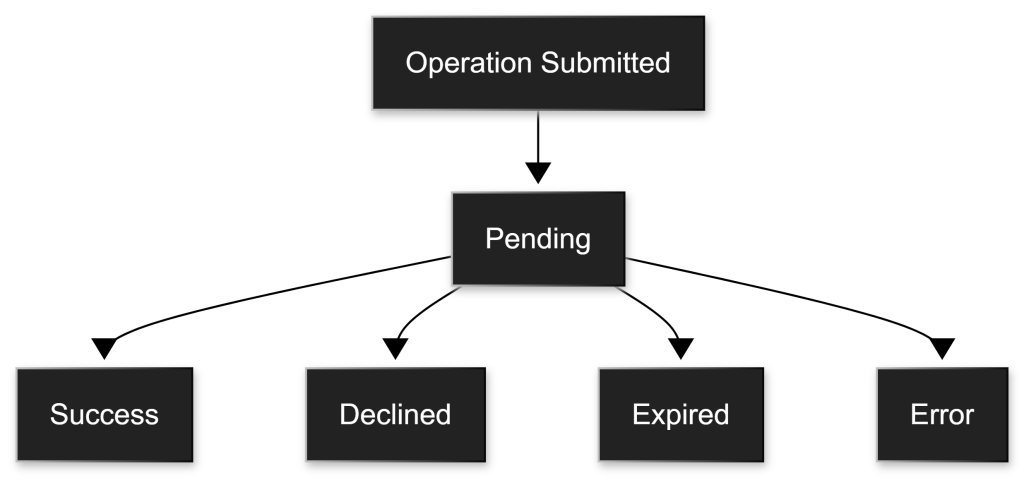
The transaction may eventually reach one of the following final states.
Success
The operation completed successfully.
Examples include:
- Payment approved
- Reference successfully generated
- Authorization successfully created
The transaction may proceed to the next operational stage depending on the payment model.
Pending
The transaction has not yet reached a final state.
This commonly occurs when:
- Customer approval is pending
- External payment completion is pending
- Processing is still ongoing
Operators may continue monitoring the transaction until a final state is reached.
Declined
The transaction was rejected.
This may occur due to:
- Customer rejection
- Validation issues
- Processing failures
The transaction does not reach a successful completion state.
Expired
The transaction expired before completion.
Examples include:
- Customer did not approve within the allowed timeframe
- Reference validity period expired
A new transaction may be required.
Error
Technical or operational issues prevented the transaction from reaching a successful completion state.
Examples may include:
- Invalid configuration
- Invalid customer information
- Processing failures
Operators should review transaction details before retrying.
Transaction Management Through Backoffice
After a transaction is initiated through vTerminal, it becomes part of the broader SIBS transaction ecosystem.
The transaction can be monitored and managed through the same Backoffice tools used for transactions created through:
- API integrations
- Hosted payment forms
- Plugin integrations
- Other SPG operational channels
Operators may use Backoffice tools such as:
- Transaction dashboards
- Payment lists
- Search tools
- Transaction detail pages
- Operational monitoring views
For detailed information about Backoffice dashboards, transaction searches, and operational monitoring interfaces, refer to G.1 – Backoffice Overview and Transaction Management.
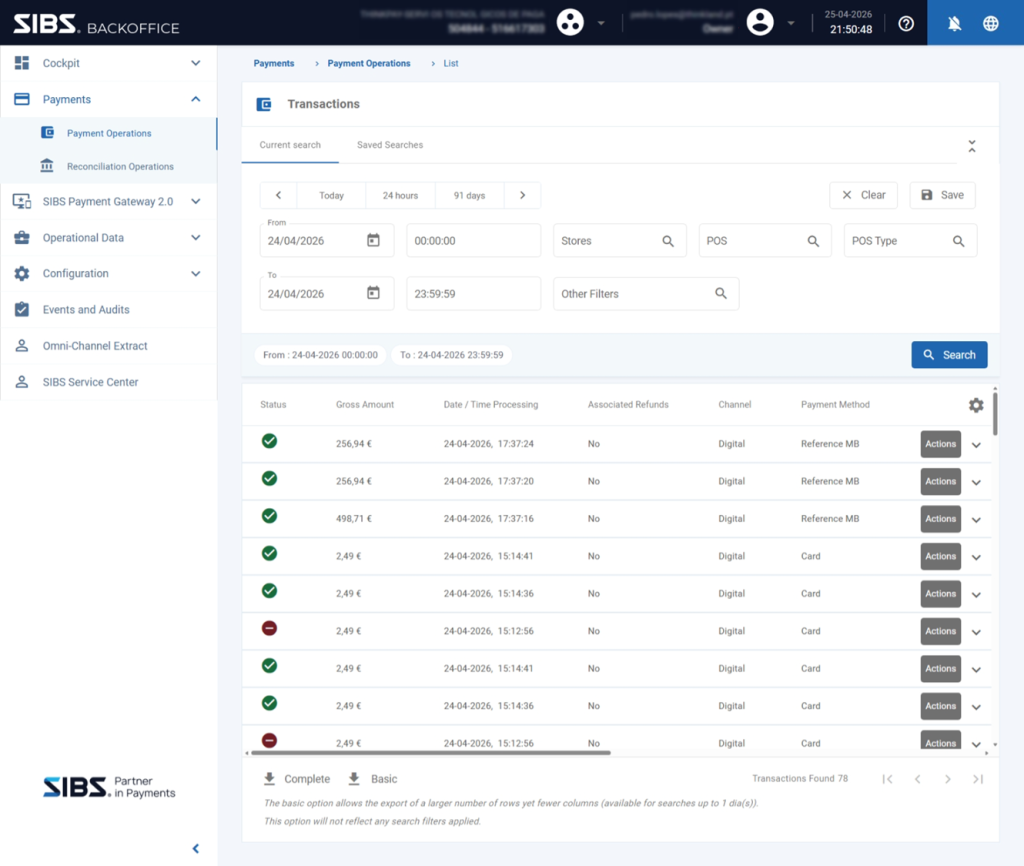
This provides centralized visibility across all transaction origins.
The transaction origin does not limit how the transaction can later be monitored or managed.
Operator Validation Responsibilities
Operators should always validate:
- Final transaction status
- Transaction identifiers
- Customer details
- Payment details
- Payment-specific outputs
before considering an operation completed.
Operators should never assume success immediately after submission.
For broader transaction lifecycle semantics, status interpretation, transaction validation principles, and reconciliation models, refer to:
Transaction Traceability
The following fields are particularly important for operational tracking:
- Merchant Operation ID (
merchantTransactionId) - Transaction identifiers
- Customer information
- Payment method information
These fields support:
- Reconciliation
- Internal investigations
- Operational support workflows
Relationship with vTerminal Operational Flows
The detailed operational flows remain documented in:
This chapter focuses exclusively on interpreting transaction results after those operations are executed.
Summary
Submitting a vTerminal operation is only the beginning of the transaction lifecycle.
Operators must validate final transaction outcomes and understand that all transactions become part of the broader SIBS operational ecosystem.
After initiation, transactions can be monitored, searched, and managed through the same Backoffice tools used across all SIBS integration models.